Tools / Power Tools
DeWalt 18V Ratchet User Manual (DCF512, DCF513)
Quick guide for the DeWalt 18V Ratchet (DCF512, DCF513). Includes setup, operation, safety, maintenance, and troubleshooting.
Table of contents
Manual images
Click an image to enlargeQuick guide from the manual
This manual provides essential information for operating the DeWalt 18V Ratchet (DCF512, DCF513). Always read the full safety instructions before use. Key operations include battery installation, variable speed control, and forward/reverse selection. If the tool stalls, release the trigger immediately to prevent damage.
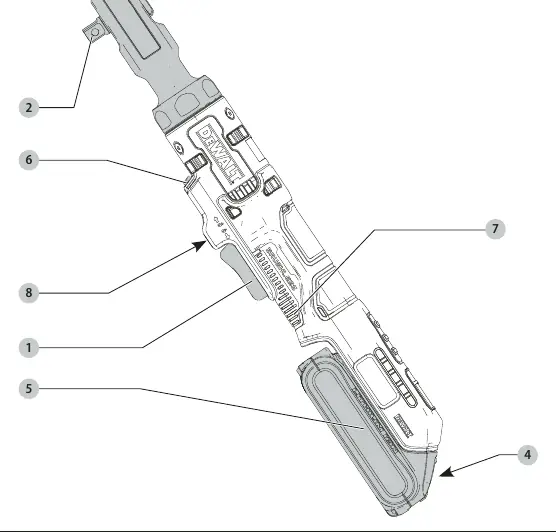
Description
The DeWalt 18V Ratchet is a professional-grade power tool designed for light-duty fastening applications. It is not a torque wrench; use a calibrated torque measurement device if specific torque settings are required.
Operation
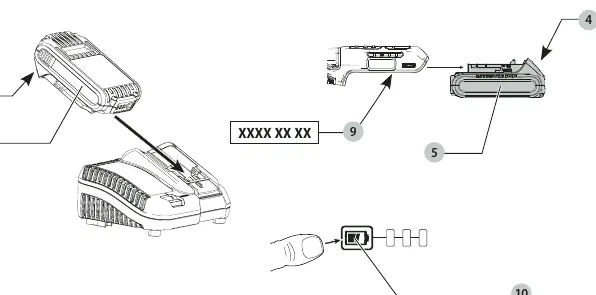
Battery Installation and Removal
To install the battery, align it with the rails in the tool handle and slide it in until it is firmly seated. To remove, press the battery release button and pull the battery out of the handle.
Using the Tool
- Variable Speed Trigger: Pull the trigger to start the tool. The speed increases as you press the trigger further. Release the trigger to stop.
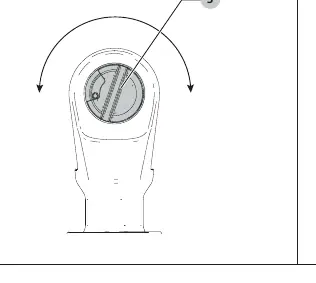
- Forward/Reverse Dial: Use the dial on the head of the tool to select the rotation direction.
- Lock-off Button: Slide the lock-off button to the locked position to prevent the trigger from being pulled.
- Worklight: The worklight activates when the trigger is pressed and stays on for up to 20 seconds after release.
Maintenance
The tool requires minimal maintenance. Keep the tool clean and free of dust. Blow dirt and dust out of the main housing with dry air regularly. The tool does not require additional lubrication.
Safety
Always wear eye and ear protection. Keep the work area clean and well-lit. Do not operate in explosive atmospheres. Hold the tool by insulated gripping surfaces when performing operations where the fastener may contact hidden wiring.
Manufacturer information
DEWALT
Practical help
Common problems
Ratchet stalls during operation
The tool is overloaded or used improperly. Release the variable speed trigger immediately. Do not cycle the trigger to restart the tool, as this can cause damage.
Battery not charging
Ensure the battery is fully seated in the charger. If the charger light does not turn on, the battery or charger may be faulty; take it to an authorized service center.
Before use
- Ensure the battery is fully charged
- Inspect the anvil for damage
- Check for proper accessory fit
- Ensure the lock-off button is in the correct position
Specs in practice
- No load speed
- 0-250 RPM
Images and diagrams
- Fig A: Tool overview (trigger, anvil, forward/reverse, battery, worklight, lock-off)
- Fig B: Battery charging and fuel gauge
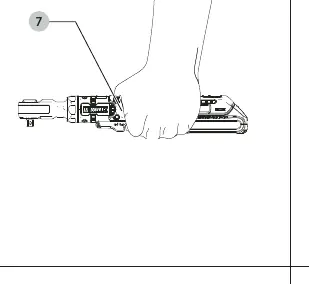
- Fig C: Proper hand position
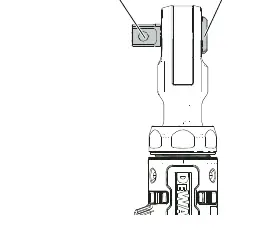
- Fig D: Anvil operation
- Fig E: Forward/reverse dial
Model compatibility
- Compatible with DeWalt 18V battery packs (DCB181, DCB182, DCB183, DCB184, DCB185, DCB187, DCB189, DCBP034)

Manual page author
Emily Carter
User documentation editor
Prepares concise manual descriptions and highlights the most useful setup, operation, and maintenance information for readers.