Tools / Power Tools
User Manual for DeWALT DCF787, DCF840, DCF845, DCF850, DCF809 20V Max Impact Driver
Comprehensive user guide for the DeWALT 20V Max 1/4" Impact Driver series. Includes instructions for battery installation, operation, Precision Drive modes, maintenance, and safety guidelines.
Table of contents
Manual images
Click an image to enlargeQuick guide from the manual
This manual covers the operation and safety of the DeWALT 20V Max 1/4" Impact Driver series (DCF787, DCF840, DCF845, DCF850, DCF809). Always ensure the battery is fully charged before use and wear appropriate safety equipment, including eye and hearing protection. The tool features a variable speed trigger and a forward/reverse control button that also acts as a lock-off switch.
Product Overview
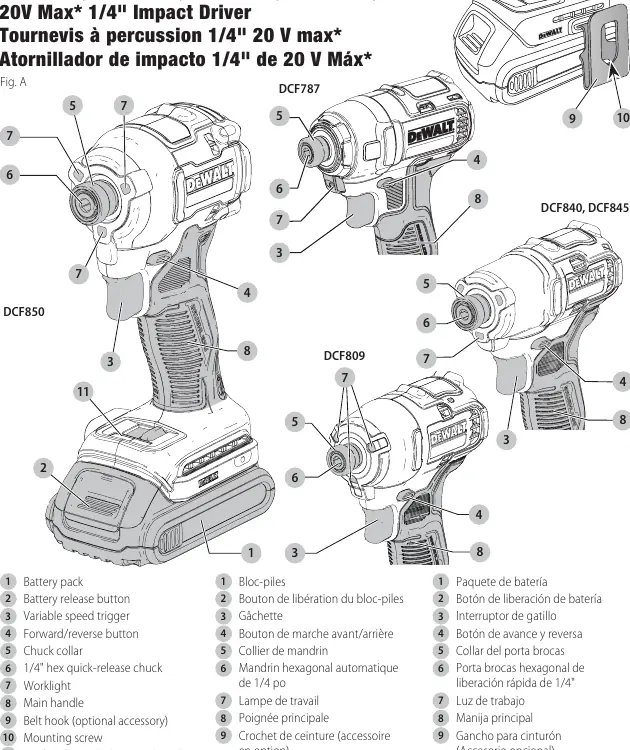
The impact driver consists of a battery pack, variable speed trigger, forward/reverse button, 1/4" hex quick-release chuck, worklights, and a main handle. Specific models (DCF845, DCF850) include a mode selector for Precision Drive.
Assembly and Adjustments
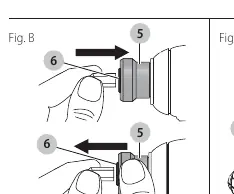
- Quick-Release Chuck: To install an accessory, fully insert it into the chuck until it locks. To remove, pull the chuck collar away from the front of the tool. Use only impact-rated accessories.
- Belt Hook: Can be attached to either side of the tool using the provided screw. Do not use the belt hook for tethering the tool at heights.
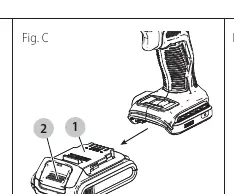
- Battery Installation: Align the battery pack with the rails inside the handle and slide it in until firmly seated. Press the release button to remove.
Operation
The tool is operated by pulling the variable speed trigger; the further it is depressed, the higher the speed. The forward/reverse button determines rotation direction and locks the tool in the center position. Precision Drive (DCF845, DCF850 only): This mode provides greater control for light applications (e.g., cabinet hinges) by hesitating as the screw reaches the workpiece before applying slow, controlled impact.
Maintenance and Cleaning
Regularly blow dirt and dust out of all air vents with clean, dry air at least once a week. Never use solvents or harsh chemicals to clean non-metallic parts; use only a cloth dampened with water and mild soap. Repairs should only be performed by a factory or authorized service center.
Specifications
The tool operates on 20V Max battery systems. RPM ranges vary by model:
- DCF787: 0–2800 RPM
- DCF840: 0–3200 RPM
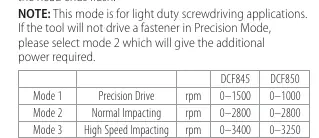
- DCF845: 0–1500 RPM (Mode 1), 0–2800 RPM (Mode 2), 0–3400 RPM (Mode 3)
- DCF850: 0–1000 RPM (Mode 1), 0–2800 RPM (Mode 2), 0–3250 RPM (Mode 3)
- DCF809: 0–2800 RPM
Manufacturer information
DEWALT
Practical help
Common problems
Tool does not start
Ensure the battery is fully charged and properly seated. Check that the forward/reverse button is not in the center (lock-off) position.
Reduced fastening torque
Check for low battery voltage, incorrect accessory size, or rust/debris on bolt threads. Ensure the material and fastening time are appropriate.
Accessory falls out
Ensure the accessory is fully inserted into the quick-release chuck and the collar is engaged. Use only impact-rated accessories.
Before use
- Ensure battery pack is fully charged.
- Wear ANSI Z87.1 approved eye protection.
- Wear hearing protection.
- Inspect accessories for cracks or damage.
- Check that the forward/reverse switch is in the desired position.
- Ensure work area is well-lit and clear of debris.
Specs in practice
- Precision Drive
- A specialized mode for light-duty screwdriving to prevent damage to fasteners or materials.
Images and diagrams
- Fig A: Identifies the trigger, chuck, battery, and mode selector locations.
- Fig B: Shows how to operate the quick-release chuck collar.
- Fig C: Illustrates battery pack installation and removal.
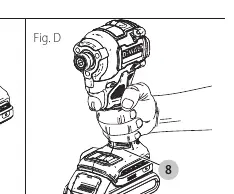
- Fig D: Demonstrates the proper hand position for safe operation.
Model compatibility
- Use only DeWALT impact-ready accessories.
- Use only DeWALT batteries and chargers.
- Precision Drive mode is exclusive to DCF845 and DCF850 models.

Manual page author
Emily Carter
User documentation editor
Prepares concise manual descriptions and highlights the most useful setup, operation, and maintenance information for readers.