Tools / Power Tools
User Manual for DEWALT 18V Cordless Impact Wrench DCF921, DCF922, DCF923
Quick guide for the DEWALT 18V Cordless Impact Wrench (DCF921, DCF922, DCF923). Includes setup, operation, battery charging, and safety instructions.
Table of contents
Manual images
Click an image to enlargeQuick guide from the manual
This manual covers the DEWALT 18V Cordless Impact Wrench models DCF921, DCF922, and DCF923. It provides essential safety, operation, and maintenance information for professional use.
Description
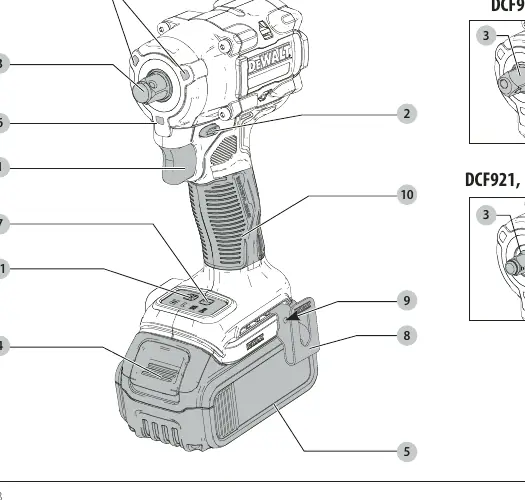
The tool features a trigger switch, forward/reverse button, anvil, battery release button, worklights, mode selector, belt hook, and main handle.
Battery and Charging
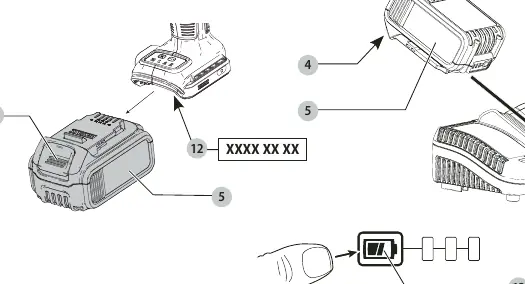
Ensure the battery is fully charged before first use. Insert the battery into the charger until it clicks. The red light indicates charging, and a solid red light indicates a full charge. The tool features an electronic protection system to protect the battery against overloading, overheating, or deep discharge.
Operation
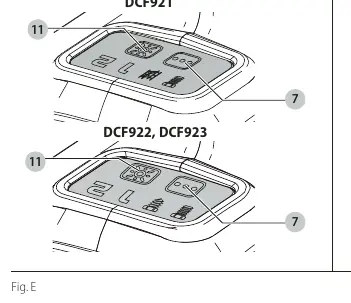
Mode Selector: Use the mode selector to choose between different operating modes (e.g., Precision Wrench, Timber Screw, Scaffolding Mode) to optimize tool performance for specific tasks.
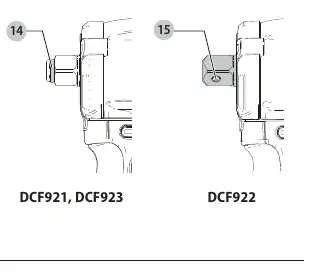
Anvil Types: The tool features different anvil types (detent pin or hog ring) depending on the model. Ensure the correct accessory is used and securely attached.
Maintenance
Keep the tool clean and free of dust. No additional lubrication is required. The charger and battery pack are not serviceable.
Safety
Always wear eye and ear protection. Do not use the tool in wet conditions or near flammable liquids. Hold the tool by insulated gripping surfaces when performing operations where the fastener may contact hidden wiring.
Manufacturer information
DEWALT
Practical help
Common problems
Tool does not start
Check battery charge and ensure it is fully seated in the tool handle.
Battery not charging
Check charger connection and ensure the battery is compatible and not damaged.
Before use
- Ensure battery is fully charged
- Check for damage to tool or accessories
- Select correct mode for the task
- Ensure proper hand position
Specs in practice
- Max tightening torque
- 406 Nm
- Max breakaway torque
- 610 Nm
Images and diagrams
- Fig A: Tool components overview
- Fig B: Battery installation and charging
- Fig C: Mode selector
- Fig D: Anvil types (detent pin vs hog ring)
Model compatibility
- Compatible with DEWALT 18V batteries (DCB181, DCB182, DCB183, DCB184, DCB185, DCB187, DCB189, DCB546, DCB547, DCB548)

Manual page author
Michael Turner
Technical manual editor
Reviews PDF manuals for structure, safety notes, and practical product details so readers can find the right information quickly.