Tools / Drills
User Manual for Dexter 12V Cordless Tile Vibrator and Vacuum Lifter 12VVIB2-200.1
Quick guide for the Dexter 12V Cordless Tile Vibrator and Vacuum Lifter 12VVIB2-200.1. Includes setup, operation, safety warnings, and troubleshooting.
Table of contents
Manual images
Jump to the sectionQuick guide from the manual
This manual provides instructions for the Dexter 12V Cordless Tile Vibrator and Vacuum Lifter (12VVIB2-200.1). This tool is designed for lifting, moving, and placing tiles, marble, and stone slabs, as well as providing uniform vibration to ensure proper adhesion. Always inspect the rubber seal pad before use and ensure the surface is clean and dry.
Intended Use
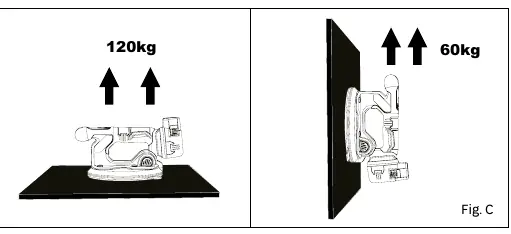
The tool is designed for two primary functions: Vacuum lifting (up to 120kg horizontally, 60kg vertically) and Tile vibration (providing uniform hammering force to reduce air pockets under tiles).
Safety Warnings
- Always wear safety glasses, hearing protection, gloves, and a dust mask.
- Do not use on flexible materials (thin plastic films) or glass thinner than 3mm (1/8").
- Do not use on foliated rocks like slate, as layers may separate.
- Do not leave the tool unattended while attached to a material.
- Do not use with a crane or similar equipment.
- Store the tool in its case when not in use to protect the rubber seal.
Operation
Battery Insertion
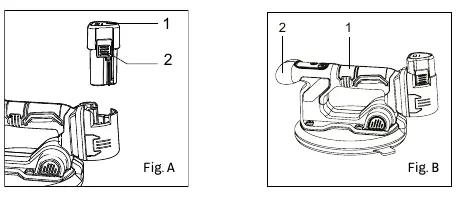
Align the battery pack with the rails inside the tool housing and slide it in until it is firmly seated.
Vacuum Lifting
- Position the tool with the rubber seal pad flush against the surface.
- Press the ON/OFF button for 3 seconds to turn on the screen.
- Press the pump control button once to create a vacuum seal.
- Once the vacuum reaches 100% (after about 5 seconds), you can lift the object.
- To release, press the pump control button twice quickly.
Tile Vibration
- Follow the vacuum lifting steps to position the tile.
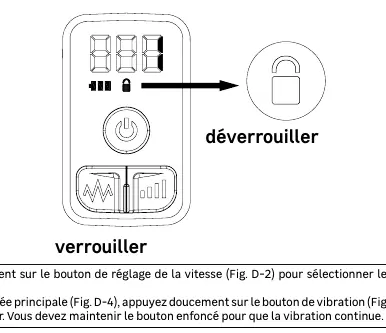
- Press the speed-adjustment button for 2 seconds to unlock the vibration function.
- Select the desired vibration level (1-5) using the speed-adjustment button.
- Hold the main handle and press the vibration button to start.
Maintenance and Cleaning
- Disconnect the battery before any maintenance.
- Keep the tool and ventilation slots clean.
- Use only a damp cloth with mild soap for cleaning; do not use harsh chemicals or solvents.
- Inspect air filters regularly and clean or replace if obstructed.
Troubleshooting
The device includes error codes (E01-E15) for various issues. Common solutions include restarting the unit, checking battery charge, or contacting a service center if the motor or controller fails.
Manufacturer information
Dexter
Practical help
Common problems
Impossible to get good vacuum pressure
Check for air leaks in the rubber seal, clean air vents, or replace the wool filter.
Vibration function failure
Check if the vibration motor is working or if there is an open circuit in the motor wire.
Screen light off
Restart the device, charge the battery, or check for battery issues.
Before use
- Ensure the battery is fully charged.
- Check the rubber seal pad for damage or wear.
- Clean the surface to be lifted of dust and debris.
- Ensure the air filters are not obstructed.
Specs in practice
- Horizontal lifting capacity
- 120 kg
- Vertical lifting capacity
- 60 kg
Images and diagrams
- Fig. A: Battery insertion/removal.
- Fig. B: Correct hand positioning.
- Fig. C: Horizontal vs Vertical lifting capacity.
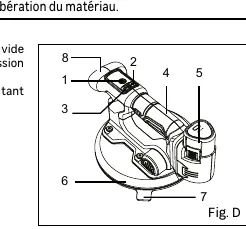
- Fig. D: Device components (pump button, vibration button, etc.).
Model compatibility
- Do not use on slate or other foliated rocks.
- Do not use on glass thinner than 3mm (1/8").
- Do not use on flexible materials like thin plastic films.

Manual page author
Emily Carter
User documentation editor
Prepares concise manual descriptions and highlights the most useful setup, operation, and maintenance information for readers.