Tools / Drills
Dexter 12SD2-25RC.1A / 20SD2-35RC.2A / 20SD2-35RC.2B Cordless Drill User Manual
Comprehensive user manual for Dexter cordless drills (models 12SD2-25RC.1A, 20SD2-35RC.2A, 20SD2-35RC.2B). Includes safety instructions, operation, maintenance, and troubleshooting.
Table of contents
Manual images
Jump to the sectionQuick guide from the manual
This manual provides essential information for operating your Dexter cordless drill. Always prioritize safety and ensure the battery is charged before use. The drill is designed for driving screws and drilling in wood and metal.
Safety Instructions
Always wear appropriate protective gear, including safety glasses, ear protection, gloves, and a dust mask. Ensure the work area is well-ventilated and free from hidden electrical, gas, or water lines. Keep children and bystanders away from the work area.
Operation
Drill Bit Installation: To open the chuck, hold the collar and turn the sleeve counter-clockwise. Insert the bit, then turn the sleeve clockwise to tighten. Forward/Reverse: Use the switch to select the rotation direction. Ensure the switch is not in the center position to operate. Variable Speed: Control the speed by applying pressure to the trigger. Use the dial on the trigger to limit the maximum speed.
Drilling Techniques
For large holes, start with a smaller bit and work up to the required size. Use a "wood-pecker" action for deep holes to clear debris. When drilling metal, use HSS bits and a suitable lubricant. Always secure workpieces with clamps or a vice.
Maintenance
Keep the tool clean and dry. Regularly inspect mounting screws and ensure they are tight. Keep ventilation slots clean. If carbon brushes need replacement, have this done by a qualified professional. Do not use water or chemical cleaners.
Troubleshooting
If the product does not start, check the power connection or battery charge. If the machine stops after running slowly, clean the air vents or charge the battery. Unusual vibrations may indicate the bit is not properly installed.
Technical Data
The drill is available in 12V and 18V (Max 20V) versions. It features variable speed (0-400/0-1500/min) and is compatible with Sterwins, Lexman, and Dexter UP20 batteries and chargers.
Manufacturer information
Dexter
Practical help
Common problems
Product does not start
Check power connection, ensure battery is charged, or have it checked by a specialist.
Machine stops after running slowly
Clean air vents or charge the battery.
Unusual vibration during use
Check if the drill bit is correctly and securely installed.
Sparks visible through air vents
This is normal and does not indicate a problem.
Unsatisfactory drilling result
Replace the drill bit or ensure it is suitable for the material.
Before use
- Ensure the battery is fully charged.
- Check that the drill bit is sharp and correctly installed.
- Verify the rotation direction (forward/reverse).
- Ensure the workpiece is securely clamped.
- Wear appropriate personal protective equipment (glasses, ear protection, mask).
Specs in practice
- Drilling Capacity
- Max diameter in wood (25mm-35mm) and metal (8mm-10mm) depending on the model.
Images and diagrams
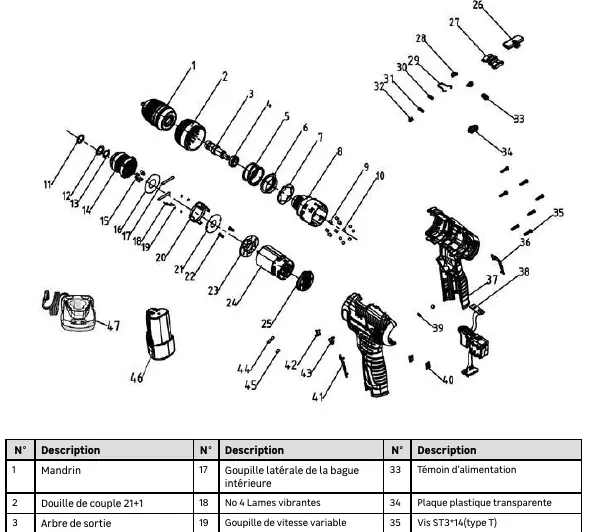
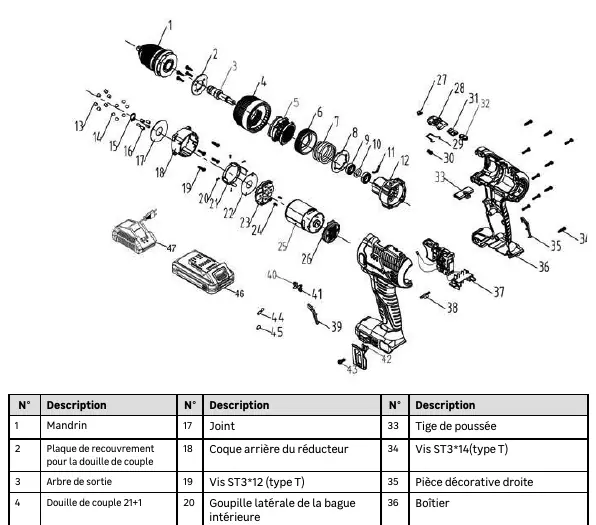
- The manual includes exploded view diagrams for models 12SD2-25RC.1A and 20SD2-35RC.2A/2B, identifying parts like the chuck, motor, battery, and switch assembly.
Model compatibility
- Compatible with all Sterwins UP20, Lexman UP20, and Dexter UP20 batteries and chargers.

Manual page author
Emily Carter
User documentation editor
Prepares concise manual descriptions and highlights the most useful setup, operation, and maintenance information for readers.