Home / Seasonal Decorations
User Guide for Disney Encanto Singing Isabela Madrigal Fashion Doll
Quick guide for the Disney Encanto Singing Isabela Madrigal Fashion Doll (22400-A1). Includes battery installation, operation modes, and safety instructions.
Quick answers from the manual
Quick answer
- The doll requires 3 x AG13 (LR44) 1.5V batteries. Use the switch on the back to toggle between Try-Me, Play Mode, and Language Selection. p. 2
Key actions
- Install batteries p. 2
First start
- Remove packaging, install 3x AG13 batteries, and set switch to Play Mode. p. 1, 2
Show 4 more answers Show less
Problems and fixes
Toy stops working
Remove batteries, wait a few minutes, then replace with fresh batteries.
p. 2Maintenance and reset
- Remove batteries, wait a few minutes, then replace with fresh batteries. p. 2
Technical specifications
| Parameter | Value | Meaning | Pages |
|---|---|---|---|
| Battery Type | 3 x AG13 (LR44) 1.5V | Required for operation | p. 2 |
Where to find it in the PDF
- Safety and Battery Warnings p. 1, 2
- Operation and Battery Installation p. 2
Table of contents
Quick guide from the manual
This guide provides essential information for operating the Disney Encanto Singing Isabela Madrigal Fashion Doll. The doll requires 3 x AG13 (LR44) 1.5V batteries for operation. Ensure an adult installs the batteries and that the compartment is securely closed before giving the toy to a child.
Product description
The package includes the Singing Isabela Madrigal doll, one doll outfit, one pair of doll shoes, one doll hair clip, and one cactus accessory. Colors and decorations may vary.
Battery installation
Adult installation is required.
- Locate the battery compartment on the doll.
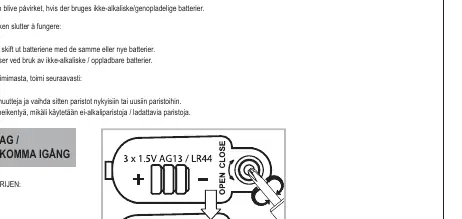
- Use a Phillips head screwdriver (not included) to remove the screw and the battery cover.
- Install 3 x AG13 (LR44) 1.5V batteries, ensuring correct polarity (+ and -).
- Replace the battery cover and tighten the screw.
Operation modes
The doll features a switch on the back to select between different modes:
- Play Mode: Move the switch to the 'Play' position. To select a language, move the switch to 'Language Selection Mode' and press the chest button to hear the song in different languages. Switch back to 'Play Mode' when your preferred language is heard.
- Try-Me Mode: Used for demonstration purposes.
Troubleshooting
If the toy stops working, follow these steps:
- Remove the batteries from the toy.
- Let the toy sit for several minutes.
- Replace the batteries with fresh ones.
Note: Toy performance may be affected when using non-alkaline or rechargeable batteries.
Safety information
- Choking Hazard: Contains small parts. Not for children under 3 years.
- Battery Safety: Contains button/coin cell batteries. Swallowing can cause internal chemical burns in as little as two hours and lead to death. Keep new and used batteries away from children. Dispose of used batteries immediately.
- Do not mix old and new batteries or different brands.
- Do not dispose of batteries in fire.
Practical help
Common problems
Toy stops working
Remove batteries, wait a few minutes, and replace with fresh batteries.
Before use
- Remove all packaging before giving the toy to a child
- Ensure an adult installs the batteries
- Check that the battery compartment screw is tightened
- Use only the specified battery type (3 x AG13/LR44)
Show more Show less
Specs in practice
- Battery Type
- Requires 3 x AG13 (LR44) 1.5V batteries
Images and diagrams
- The battery compartment is located on the back of the doll
- The mode switch allows selection between Play Mode, Try-Me, and Language Selection
Model compatibility
- Performance may be affected if using non-alkaline or rechargeable batteries

Manual page author
Emily Carter
User documentation editor