Home / Seasonal Decorations
User Manual for Disney 10000mAh Portable Power Bank
Quick guide for the Disney 10000mAh Portable Power Bank. Learn how to charge your devices, understand LED indicators, and follow safety guidelines for optimal use.
Quick answers from the manual
Quick answer
- This manual provides instructions for operating, charging, and safely using the Disney 10000mAh Portable Power Bank, including LED indicator meanings and output specifications. p. 1
Key actions
- Charge the power bank p. 1
- Charge a device p. 1
- Check battery level p. 1
First start
- Fully charge the power bank before first use. p. 1
Show 3 more answers Show less
Problems and fixes
Device overheats, has been dropped, damaged, or dropped in liquids
Do not use the power bank.
p. 1Technical specifications
| Parameter | Value | Meaning | Pages |
|---|---|---|---|
| Capacity | 10,000 mAh | Rated battery capacity | p. 1 |
| Input | 5V/2A | Micro USB & Type C input | p. 1 |
| Output (Single Port) | 5V/2A | Output when using a single port | p. 1 |
| Output (Dual Port) | 5V/1A | Output per port when using two USB ports together | p. 1 |
| Operating Temperature | 32°F - 104°F | Safe operating temperature range | p. 1 |
Where to find it in the PDF
- English Manual p. 1
- Swedish Manual p. 2, 3, 4
- Greek Manual p. 5, 6, 7
- Dutch Manual p. 8, 9, 10
Table of contents
Quick Guide
This portable power bank is designed to charge your electronic devices on the go. Before using the device for the first time, it is highly recommended to fully charge the power bank. Always ensure you are using a 5V adapter for charging the power bank, as using fast chargers exceeding 5V may cause overheating, fire, or damage to the unit.
Device Overview
The power bank features the following components:
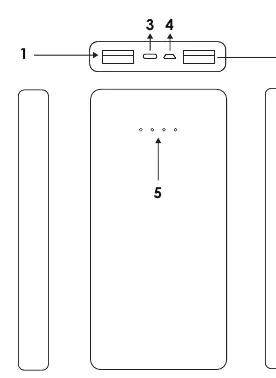
- USB Output 1 (5V/1A): Port for charging your device.
- USB Output 2 (5V/2A): Port for charging your device.
- Type C Input (5V/2A): Port for recharging the power bank.
- Micro USB Input (5V/2A): Port for recharging the power bank.
- LED Indicators: Displays the remaining battery percentage.
- Power Button: Used to turn the device ON/OFF.
Specifications
- Capacity: 10,000 mAh
- Input: Micro USB & Type C (5V/2A)
- Output: 2x USB A
- Charging Voltage: 5V
Charging and Usage
To charge the power bank, connect it to a power source using either the Micro USB or Type C cable. The LED lights will indicate the charging progress:
- 1 Light: 25%
- 2 Lights: 50%
- 3 Lights: 75%
- 4 Lights: 100%
When the power bank is fully charged, the LED lights will stop flashing. To charge your smartphone or other device, connect it to one of the USB output ports using a compatible cable. If you use a single port, the output is 5V/2A. If you use both USB output ports simultaneously, each port provides 5V/1A.
Safety Information
To ensure safe operation and longevity of your power bank, please adhere to the following guidelines:
- Do not expose the power bank to high temperatures, extreme cold, high humidity, or liquids.
- Do not use the power bank if it has been dropped, damaged, or exposed to liquids.
- Do not attempt to open or repair the unit yourself; consult a certified professional.
- Keep the device out of reach of children.
- Do not use the power bank in temperatures below 0°C (32°F) or above 40°C (104°F).
- Unplug the device when not in use for long periods or during lightning storms.
- Do not clean the unit with harmful chemicals or detergents.
Practical help
Common problems
Device not charging
Ensure you are using a 5V adapter. Do not use fast chargers over 5V as they may cause heat and fire.
Power bank overheating
Immediately discontinue use and contact the manufacturer.
LED indicators not showing charge
Ensure the cable is properly connected to the input port and the power source is active.
Before use
- Fully charge the power bank before first use.
- Check that your electronic device is compatible with 5V charging.
- Ensure you have a compatible Micro USB or Type C cable.
- Verify the ambient temperature is between 0°C and 40°C.
Show more Show less
Specs in practice
- Output 5V/2A (Single Port)
- Provides faster charging for a single connected device.
- Output 5V/1A (Dual Port)
- When two devices are charged simultaneously, each port provides 1A.
Images and diagrams
- 1 & 2: USB Output ports for charging your devices.
- 3: Type C input port for charging the power bank.
- 4: Micro USB input port for charging the power bank.
- 5: LED indicators showing remaining battery capacity.
- 6: Power button to turn the device on/off.
Model compatibility
- Only use with 5V adapters.
- Compatible with Audio/Video equipment and smartphones.

Manual page author
Emily Carter
User documentation editor