Home Appliances / Refrigerators
Dometic 10-Series Refrigerator Maintenance Guide
Official maintenance instructions for Dometic 10-Series refrigerators, covering decorative plate replacement and door lock adjustment procedures.
Table of contents
Manual images
Jump to the sectionOverview of 10-Series Maintenance
The Dometic 10-Series refrigerator range is designed for versatility and ease of maintenance. This guide provides essential instructions for users who need to customize the appearance of their unit by changing the decorative plate or adjusting the door locking mechanism. These procedures are applicable to a wide range of models within the 10-Series, including RCD, RMD, RMDT, RC, RCL, RML, RM, RCS, and RMS variants.
Changing the Decorative Plate
The decorative plate allows users to match the refrigerator front to their interior design. Before beginning, ensure the plate thickness is compatible with the door frame. The recommended thickness for the decorative plate is between 1.2 mm and 1.5 mm. If the plate is thicker, specifically between 1.6 mm and 3 mm, ensure that the combined thickness of the plate and any backing material does not exceed 3 mm to ensure a proper fit within the door channel.
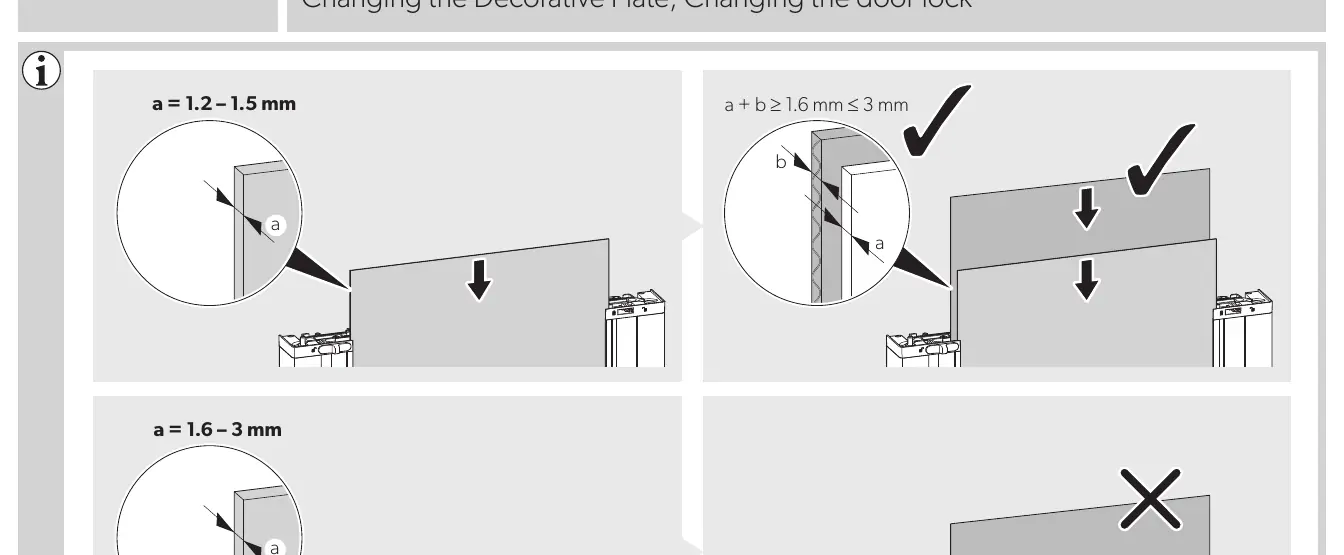
To replace the plate, follow these steps:
- Carefully remove the existing decorative trim or side profiles as indicated by the model-specific diagrams.
- Slide the old decorative plate out of the door frame.
- Insert the new decorative plate into the guide channels, ensuring it is fully seated.
- Reattach the trim profiles securely to lock the plate in place.
Always verify that the plate is flush and does not interfere with the door seal or the locking mechanism.
Adjusting the Door Lock
The door lock mechanism on 10-Series refrigerators can be adjusted or reversed depending on the installation requirements. This is particularly useful for changing the door swing direction or ensuring the door closes securely during travel.

Key steps for lock maintenance include:
- Locate the locking components on the door edge.
- Use the appropriate tools to release the locking handle or latch assembly.
- If reversing the lock, rotate the mechanism 180 degrees as shown in the technical diagrams to align with the new latch position.
- Ensure all screws are tightened correctly after adjustment to prevent the door from opening during vehicle movement.
Regular maintenance of these components ensures the longevity of your appliance and maintains the integrity of the cooling environment. If you encounter resistance during the removal of panels or the adjustment of the lock, do not force the components. Re-check the alignment and ensure all retaining clips are properly disengaged.
Manufacturer information
Dometic
Practical help
Common problems
Decorative plate does not slide in easily
Check that the plate thickness is within the 1.2-3 mm range and that no debris is in the guide channel.
Door lock feels loose after adjustment
Ensure the mechanism was rotated exactly 180 degrees and all mounting screws are fully tightened.
Before use
- Verify the model number matches the instructions provided.
- Measure the thickness of the new decorative plate (1.2-3 mm).
- Ensure the refrigerator is powered off if performing electrical-adjacent work.
- Have a flat-head screwdriver or appropriate tool ready for trim removal.
Specs in practice
- Decorative plate thickness
- The allowed thickness for the front panel insert is 1.2 mm to 3 mm.
Images and diagrams
- Page 1 diagrams show the correct insertion method for decorative plates based on thickness.
- Page 2 diagrams illustrate the 180-degree rotation required for reversing the door lock mechanism.
Model compatibility
- Applicable to RCD, RMD, RMDT, RC, RCL, RML, RM, RCS, and RMS 10-Series models.
- Specific steps vary slightly by model; refer to the specific diagram for your unit.

Manual page author
David Miller
Documentation analyst
Organizes user manual content into clear summaries, with attention to model details, product context, and everyday usability.