Electronics / Monitors
Draper 10.8V & 12V Soldering Iron
Comprehensive user guide for the Draper 10.8V and 12V cordless soldering irons, covering safety, operation, maintenance, and battery usage.
Table of contents
Product Overview
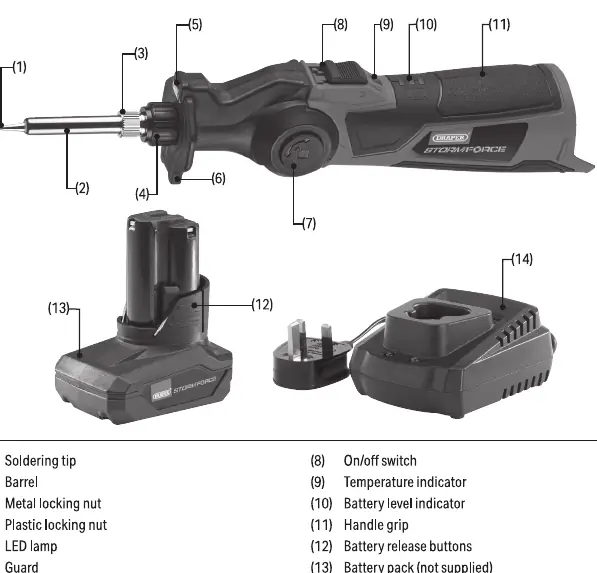
The Draper 10.8V and 12V cordless soldering irons are professional-grade tools designed for heating solder to attach or tin electrical components, cables, and conductors. These tools offer portability and flexibility, featuring an adjustable head that can be rotated up to 90 degrees for better access in confined spaces. The unit includes an integrated LED lamp that illuminates the work area automatically when the tool is powered on.
Safety Information
Safety is paramount when using high-temperature tools. Always wear protective eye, face, and hand coverings. The soldering tip becomes extremely hot during operation; never touch the metal parts or direct the tip towards others. Ensure the work environment is well-ventilated to remove any soldering fumes. Never leave the tool unattended while powered on, and always allow it to cool for at least 20 minutes after use before storage or maintenance. Do not use the tool in wet conditions or near flammable materials.
Operation
To operate the tool, insert a compatible Draper battery pack into the base until it clicks. Ensure the switch is in the off position before installation. Use the rotation button to adjust the head angle as needed. When switched on, the temperature indicator will show a solid red light while heating up, turning solid green when the tip reaches the appropriate temperature for use. A flashing red light indicates the tip is cooling down. The battery level indicators provide an approximation of the remaining charge, with three lights indicating a fully charged battery.
Maintenance and Storage
Regular maintenance ensures the longevity of your soldering iron. Always remove the battery pack before performing any maintenance or cleaning. Keep the handle and grips clean, dry, and free from grease. If the soldering tip needs replacement, ensure the tool is completely cool, remove the battery, and unscrew the metal locking nut to swap the tip. Store the tool in a clean, dry location, away from children. If storing for extended periods, periodically charge the battery to maintain its health. Never dispose of the tool with domestic waste; follow local regulations for electronic waste disposal.
Manufacturer information
Draper Tools
Practical help
Common problems
Tool does not power on
Check if the battery is charged and properly inserted. Ensure the switch is in the off position before installing the battery, then switch it on.
Soldering tip not heating
Verify battery charge level. If the battery is low, the tool may power down automatically to protect the battery.
Before use
- Read all safety instructions in the manual.
- Inspect the tool for signs of damage or battery leakage.
- Ensure the work area is well-lit and ventilated.
- Wear appropriate eye, face, and hand protection.
- Check that the soldering tip is securely attached.
- Ensure the battery is charged and compatible.
- Verify the switch is in the off position before inserting the battery.
Specs in practice
- Max. tip temperature
- The maximum heat the soldering tip can reach, which is 400°C for both models.
- Ambient operating temperature
- The range of environmental temperatures in which the tool can safely operate (-18 to 50°C).
- Rated voltage
- The electrical potential required for the tool (10.8V DC or 12V DC depending on the model).
Images and diagrams
- The product overview diagram identifies the soldering tip, barrel, locking nuts, LED lamp, rotation button, and battery interface.
- Operating diagrams illustrate the battery installation process and the 90-degree head rotation mechanism.
- Temperature indicator modes are explained: solid red (heating), solid green (ready), flashing red (cooling).
Model compatibility
- Use ONLY Draper Tools 12V range battery packs and chargers.
- Do not use non-rechargeable batteries.
- Only use spare parts supplied by Draper Tools.

Manual page author
Emily Carter
User documentation editor
Prepares concise manual descriptions and highlights the most useful setup, operation, and maintenance information for readers.