Tools / Drills
Draper 12V Drill Driver Instruction Manual
Quick guide for the Draper 12V Drill Driver (70258). Includes battery charging, bit installation, torque settings, and troubleshooting steps.
Table of contents
Quick guide from the manual
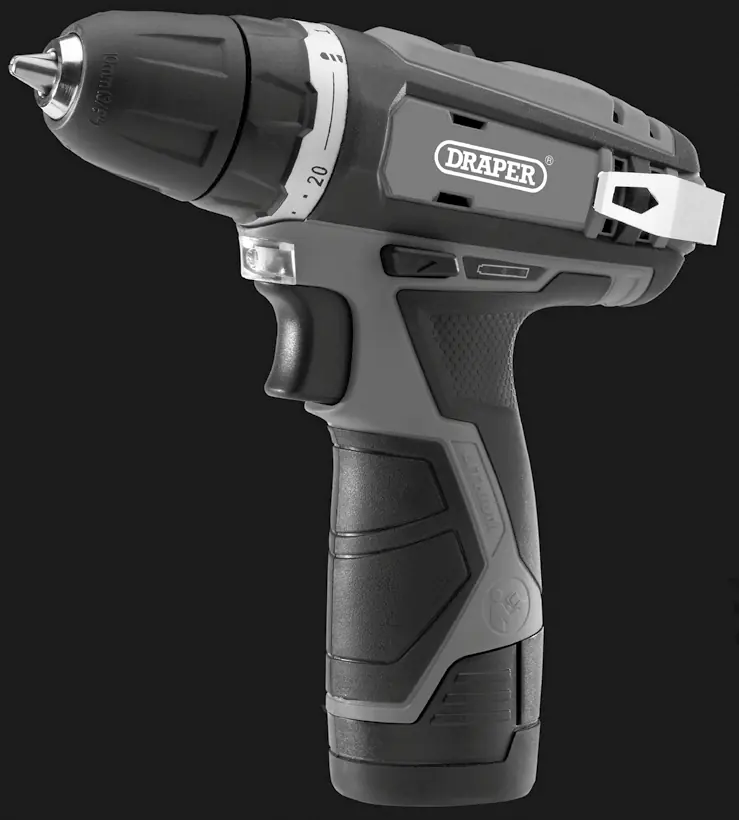
This document provides essential operating instructions for the Draper 12V Drill Driver (Stock No: 70258). It is intended for domestic and light commercial use. Always ensure the battery is charged correctly and the tool is inspected for damage before use. The drill features a keyless chuck, variable speed trigger, and adjustable torque settings.
Battery charging
The battery pack and charger are sold separately. To charge:
- Ensure the power source voltage matches the charger rating.
- Insert the battery pack into the charger compartment.
- The red LED indicates fast charging; the green LED indicates stand-by or full charge.
- Do not charge in temperatures below 4.5°C or above 40.5°C.
- If the battery is too hot or cold, the charger will blink until the battery reaches the correct temperature.
Basic drill driver operations
Installing and removing bits: The drill uses a 10mm keyless chuck. Insert the bit into the chuck and tighten firmly by hand.
Forward/Reverse selector: Use the switch to change rotation direction. Always stop the drill completely before changing direction. Set to the neutral middle position to lock the trigger.
Torque selection: Turn the torque collar to adjust settings (1-20). Lower settings are for small screws; higher settings provide more power.
2-Speed gearbox: Use low gear for high-torque screwdriving and high gear for faster drilling.
Maintenance
Keep the tool clean and ensure air vents are free from dust. Regularly inspect the chuck for debris. If the tool fails to operate, check the battery charge status and the forward/reverse selector position. For further assistance, contact Draper Tools at 023 8049 4344 or email [email protected].
Manufacturer information
Draper Tools
Practical help
Common problems
Drill does not operate
Check battery charge, ensure forward/reverse selector is not in neutral, or replace faulty battery.
Motor runs slowly or loses power
Re-charge the battery pack or replace it if damaged.
Chuck does not close or grip
Clean inside the chuck to remove swarf or debris.
Battery not charging
Check for a blown fuse in the charger plug or replace the charger.
Before use
- Check that the battery is fully charged.
- Ensure the drill bit is securely tightened in the keyless chuck.
- Verify the forward/reverse selector is set to the desired direction.
- Check the work area for hidden electrical cables or pipes.
- Wear appropriate safety goggles and a dust mask.
Specs in practice
- Max Torque (30Nm)
- The maximum rotational force the drill can apply.
- Torque Settings (20+1)
- Allows precise control for driving screws to a consistent depth.
- Chuck Capacity (10mm)
- The maximum diameter of the drill bit shank the chuck can hold.
Images and diagrams
- 1: Variable speed trigger switch
- 2: LED worklight
- 3: 10mm keyless chuck
- 4: Torque collar
- 5: 2-speed gearbox
Model compatibility
- Compatible with Draper 12V interchangeable battery system.
- Charger requires 230V 50Hz mains supply.
- Not intended for heavy-duty industrial use.

Manual page author
Michael Turner
Technical manual editor
Reviews PDF manuals for structure, safety notes, and practical product details so readers can find the right information quickly.