Health / Mobility Aids
User Guide for Drive Bariatric Folding Walkers 10220-2WW and 10220HD
Quick guide for Drive Bariatric Folding Walkers 10220-2WW and 10220HD. Includes specifications, weight limits, and key features for these heavy-duty mobility aids.
Table of contents
Quick Guide
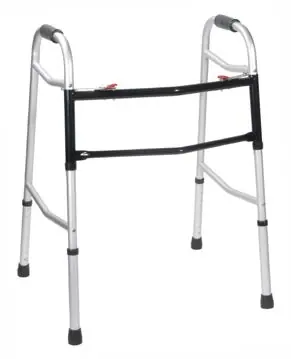
This document provides specifications and features for the Drive Bariatric Folding Walkers, models 10220-2WW and 10220HD. These walkers are designed for bariatric use, featuring steel legs, side braces, and a two-button folding mechanism for easy storage and transport.
Product Overview
The walkers are equipped with easy-to-operate push-button mechanisms that can be activated by fingers, palms, or the side of the hand. Each side operates independently, allowing the user to navigate narrow spaces while maintaining stability. The frames are designed to provide additional strength while keeping the overall weight minimal.
Specifications
Model 10220-2WW (Adult)
- Weight Limit: 500 lbs
- Overall Width: 27 inches
- Depth (Opened at Base): 23 inches
- Height: 32 - 39 inches
- Weight: 11 lbs
- Hand Grip: Vinyl-contoured
Model 10220HD (Heavy-Duty, Adult)
- Weight Limit: 700 lbs
- Overall Width: 24.5 inches
- Depth (Opened at Base): 21.75 inches
- Height: 32.5 - 39.5 inches
- Weight: 9 lbs
- Hand Grip: Heavy-duty vinyl-contoured
Operation and Maintenance
The walker features a two-button folding mechanism. To fold or unfold, press the push-button mechanism on each side independently. Ensure the walker is fully opened and the buttons are securely locked in place before applying weight. The vinyl-contoured hand grips provide comfort during use.
Manufacturer information
Drive Medical
Practical help
Common problems
Unstable walker
Ensure both sides of the walker are fully opened and the push-button mechanisms are securely locked in place.
Difficulty folding
Press the push-button mechanism on each side independently to fold the frame.
Before use
- Verify the walker is fully opened and locked.
- Check that the push-button mechanisms are engaged.
- Ensure the user's weight does not exceed the specific model's weight limit (500 lbs for 10220-2WW or 700 lbs for 10220HD).
Specs in practice
- Weight Limit
- The maximum weight capacity the walker is designed to support safely.
- Overall Width
- The total width of the walker, important for navigating doorways.
Images and diagrams
- The walker features a two-button folding mechanism for easy storage and transport.
Model compatibility
- 10220-2WW supports up to 500 lbs.
- 10220HD supports up to 700 lbs.

Manual page author
Michael Turner
Technical manual editor
Reviews PDF manuals for structure, safety notes, and practical product details so readers can find the right information quickly.