Computers / Label Makers
Panasonic Microwave Oven NN-SD372S User Manual
Quick guide and user manual for the Panasonic NN-SD372S microwave oven. Includes setup, safety instructions, cooking features, maintenance, and troubleshooting.
Table of contents
Manual images
Click an image to enlargeQuick Guide from the Manual
This microwave oven is designed for household use only. Before using, ensure the oven is placed on a flat, stable surface with at least 3 inches of space on both sides and 1 inch on top for proper ventilation. Always use the Glass Tray and Roller Ring during operation.
Safety Information
- Grounding: This appliance must be grounded. Use a properly installed and grounded 3-prong outlet. Do not use an adapter or remove the ground prong.
- Operation: Do not operate the oven empty or use metal containers, as this can cause arcing and fire. Do not block air vents.
- Food Safety: Do not cook whole eggs in the shell. Pierce foods with nonporous skins (like potatoes or sausages) before cooking. Use pot holders when removing hot items.
- Child Safety: Use the Child Safety Lock feature to prevent unauthorized operation.
Control Panel and Operation
The control panel allows you to set power levels, cooking time, and various automatic features:
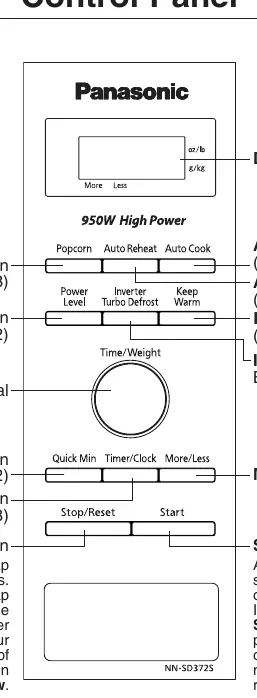
- Power Level: Press the Power Level button to select from P10 (High) to P1 (Low).
- Inverter Turbo Defrost: Defrost meat, poultry, and seafood by entering the weight.
- Auto Cook/Reheat: Use these features for pre-timed cooking of common items like oatmeal, beverages, frozen entrées, and vegetables.
- Quick Min: Adds cooking time in 1-minute increments.
- Keep Warm: Keeps food warm for up to 30 minutes after cooking.
Maintenance and Cleaning
Keep the oven clean to prevent excessive noise and damage:
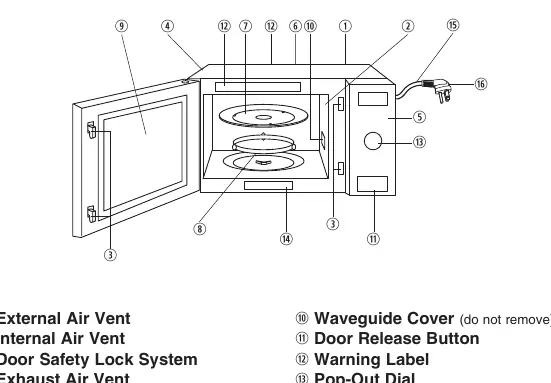
- Interior: Wipe with a damp cloth after use. Do not remove the waveguide cover.
- Glass Tray & Roller Ring: Wash in warm soapy water or a dishwasher. Ensure they are properly positioned before use.
- Exterior: Clean with a damp cloth. Do not allow water to seep into ventilation openings.
Troubleshooting
If you encounter issues, check the following:
- Oven won't turn on: Check if plugged in, check circuit breaker/fuse, or test the outlet with another appliance.
- Oven won't start: Ensure the door is closed securely and the Start button was pressed.
- Noise: Clean the roller ring and oven floor.
- Child Lock: If "Child" appears on the display, press Stop/Reset 3 times to deactivate.
Manufacturer information
DYMO
Practical help
Common problems
Oven will not turn on
Check if the oven is plugged in securely. Check the main circuit breaker or fuse. Test the outlet with another appliance.
Oven will not start cooking
Ensure the door is closed completely. Press the Start button after programming. Cancel any previous programs by pressing Stop/Reset.
Glass tray wobbles or makes noise
Ensure the tray is positioned correctly on the roller ring. Clean the roller ring and oven floor.
"Child" appears in the display
The Child Lock is activated. Deactivate it by pressing the Stop/Reset button 3 times.
Before use
- Unpack and remove all packing material.
- Examine the oven for any damage such as dents or broken door latches.
- Place on a flat, stable surface with 3 inches of space on sides and 1 inch on top.
- Ensure the outlet is properly grounded.
- Verify the Glass Tray and Roller Ring are correctly installed.
Specs in practice
- Power Source
- 120 V, 60 Hz
- Cooking Power
- 950 W
- Operating Frequency
- 2,450 MHz
Images and diagrams
- The Oven Components Diagram identifies the air vents, door safety lock, control panel, glass tray, roller ring, and waveguide cover.
- The Control Panel diagram illustrates the location of buttons for Power Level, Inverter Turbo Defrost, Auto Cook, Auto Reheat, Keep Warm, Popcorn, Quick Min, and Start/Stop.
Model compatibility
- Use only microwave-safe cookware.
- Do not use metal containers or metal twist-ties.
- Do not use recycled paper products unless labeled safe for microwave use.

Manual page author
Michael Turner
Technical manual editor
Reviews PDF manuals for structure, safety notes, and practical product details so readers can find the right information quickly.