Industrial / Electrical
ELKO 10AX Smart Relay Puck User Guide
Comprehensive user guide for the ELKO 10AX Smart Relay Puck, covering installation, pairing with the ELKO SmartHub, configuration, and automation setup.
Table of contents
Product Overview
The ELKO 10AX Smart Relay Puck is a versatile micro module switch designed to integrate conventional mechanical push-button switches into a smart home ecosystem. By transforming standard switches into connected devices, it allows for remote control via the ELKO Smart app, as well as the creation of schedules, moments, and complex automations. It is compatible with various load types, including ohmic, inductive, and capacitive loads.
Safety and Installation
Important: Electrical installation must be performed exclusively by skilled professionals who possess profound knowledge of installation networks, safety standards, and local wiring regulations. Failure to adhere to these safety guidelines can result in death, serious injury, or equipment damage. The device must not be used to control equipment that requires a permanent power supply. Always ensure that the terminal connection area is isolated from metallic parts and that outputs are not shorted to neutral.
Commissioning and Pairing
To begin using the device, it must be paired with an ELKO SmartHub. This can be done manually using an install code (recommended) or via the auto-scan feature in the ELKO Smart app. During pairing, the device is put into discovery mode by pressing the setup/reset button or the connected push-button three times in quick succession. A blinking orange LED indicates that the device is ready for pairing, while a solid green LED confirms a successful connection.
Configuration and Usage
Once paired, the device can be fully managed through the ELKO Smart app. Users can rename the device, change its icon, or assign it to a specific room. The app provides functionality for manual switching, setting time-based schedules, and grouping actions into moments. Advanced automation features allow the relay to trigger based on conditions such as weather changes, time schedules, or the status of other connected devices, such as window/door sensors.
Maintenance and Troubleshooting
If the device needs to be removed or reset, it can be done through the app or manually by pressing the setup/reset button three times followed by a long press of 10 seconds. A red blinking LED indicates the reset process. If the device fails to pair after removal, ensure it has been properly reset to factory defaults. The device is designed for indoor use and requires a neutral conductor for operation.
Manufacturer information
ELKO AS
Practical help
Common problems
Device is not ready to pair after removal from the app.
The device was not reset correctly. Perform a manual factory reset by pressing the setup/reset button 3 times (10s.
Before use
- Ensure installation is performed by a skilled professional.
- Verify the load type is compatible (ohmic, inductive, or capacitive).
- Confirm a neutral conductor is available at the installation site.
- Ensure the ELKO SmartHub is powered and connected.
- Download and install the ELKO Smart app.
- Check that the device is within range of the SmartHub.
- Use insulated tools compliant with EN 60900 for any manual button operation.
Specs in practice
- Nominal voltage
- AC 220-240 V, 50/60 Hz.
- Nominal current
- 10 AX, suitable for various lighting and small appliance loads.
- Communication protocol
- Zigbee 3.0 certified for reliable smart home connectivity.
- Operating temperature
- 0 °C to 35 °C.
- Extension connection
- Supports up to 10 mechanical push-buttons.
Images and diagrams
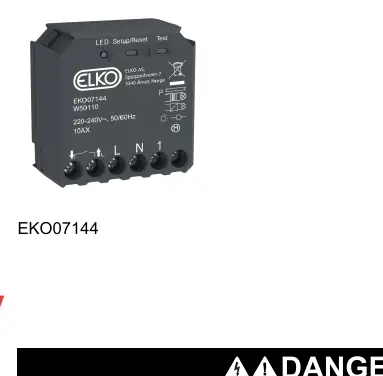
- The device features a dedicated Setup/Reset button and a Test button for manual operation.
- Wiring terminals include L (Live), N (Neutral), and output 1.
- The status LED provides visual feedback: orange for pairing mode, red for reset, and green for successful connection.
- The device is compact (43 x 43 x 22 mm) for installation inside standard wall boxes.
Model compatibility
- Compatible with incandescent, halogen, LED, and fluorescent lamps.
- Supports motor loads up to 1000 VA.
- Requires a neutral conductor for all installations.
- Not suitable for devices requiring a permanent power supply.

Manual page author
Emily Carter
User documentation editor
Prepares concise manual descriptions and highlights the most useful setup, operation, and maintenance information for readers.