Smart Home / Smart Relays
User Manual for ELKO SmartRelay Puck 10AX
Quick guide for the ELKO SmartRelay Puck 10AX. Learn about installation, wiring, control options, and technical specifications for this Zigbee-enabled smart relay.
Table of contents
Manual images
Click an image to enlargeQuick guide from the manual
The ELKO SmartRelay Puck 10AX is a Zigbee-enabled relay designed to switch ohmic, inductive, or capacitive loads. It requires a neutral wire for installation and can be controlled via the Wiser Home app (requires Wiser Hub), Quick Home Connect (Zigbee), or directly via mechanical push-buttons. Note: Do not control devices that require a permanent power supply.
Control Options
The device offers three primary control methods:
- Home Control: Requires a Wiser Hub to control the puck via the Wiser Home app.
- Quick Home Connect: A wireless connectivity solution for Zigbee devices without needing a hub or smartphone app.
- Direct Operation: The puck can be controlled directly on-site using any number of connected mechanical push-buttons.
Installation
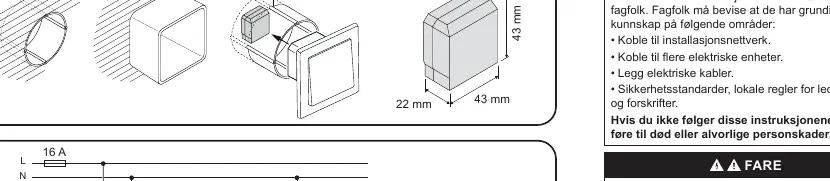
If installing the puck behind a mechanical push-button, ensure the wall box is deep enough to accommodate both the puck and the switch mechanism. The device requires a neutral conductor for operation.
Electrical Connections
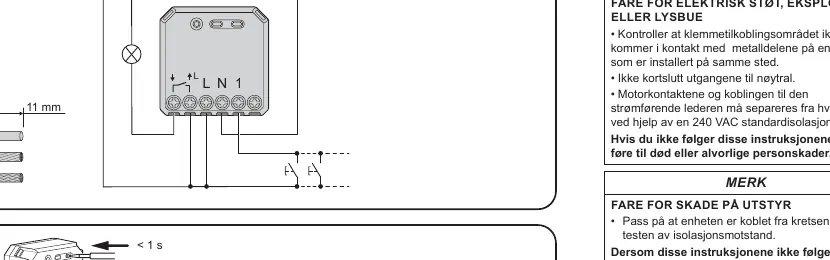
Danger: Risk of electric shock, explosion, or arc flash. Installation must be performed by a qualified professional. Ensure the terminal connection area does not come into contact with metallic parts of other devices installed in the same location. Do not short the outputs to neutral. The motor contacts and live conductor connection must be separated by 240 VAC basic insulation.
Testing
After installation, test the puck operation. Ensure you follow regulations for working on live parts and use insulated tools that meet EN 60900 requirements when actuating device buttons.
Technical Data
- Nominal Voltage: AC 220-240 V, 50/60 Hz
- Nominal Current: 10 AX
- Switching Channel: 1, dry contact
- Standby Power: Max 0.3 W
- Dimensions: 43 x 43 x 22 mm
- Operating Temperature: 0 ºC to 35 ºC
- Communication: Zigbee 3.0
- IP Rating: IP20
Manufacturer information
ELKO AS
Practical help
Common problems
Device not responding or not connecting
Ensure the device is connected to a permanent power supply and that the neutral wire is correctly installed.
Installation space issues
If the puck does not fit behind the switch, ensure the wall box is deep enough (>26mm recommended).
Before use
- Verify that a neutral wire is available in the installation box.
- Ensure the load type is compatible (ohmic, inductive, or capacitive).
- Check that the wall box depth is sufficient.
- Disconnect power before starting installation.
- Ensure you have the necessary insulated tools.
Images and diagrams
- The wiring diagram shows the connection points for L (Live), N (Neutral), and 1 (Load).
- The diagram indicates that up to 10 mechanical push-buttons can be connected to the puck.
Model compatibility
- Requires a neutral conductor.
- Not suitable for devices requiring permanent power supply.
- Compatible with Wiser Home system.

Manual page author
David Miller
Documentation analyst
Organizes user manual content into clear summaries, with attention to model details, product context, and everyday usability.