Power / Batteries & Chargers
User Manual for ePropulsion Spirit Battery 12V Charger Ultra
Quick guide for the ePropulsion Spirit Battery 12V Charger Ultra (Model DC124870). Learn how to connect, charge, understand LED indicators, and maintain your device safely.
Table of contents
Quick Guide
The ePropulsion Spirit Battery 12V Charger Ultra is designed specifically for charging the Spirit Battery Ultra. This device allows you to charge your battery using a 10-30V vehicle power source, such as a car cigarette lighter or a vehicle battery. Please read the manual carefully before use to ensure safe operation.
Specifications
- Input power: 70 W
- Input voltage: 10 - 30 VDC
- Max input current: 7 A
- Rated output: 56V 1.25A
- Operating temperature: -20 to 40 °C (-4 to 104 °F)
- Storage temperature: -30 to 70 °C (-22 to 158 °F)
- Weight: 450g
- Dimensions: 132 x 59 x 31 mm
- Cable Length: 1000mm (Input and Output)
Operations
Follow these steps to charge your battery:
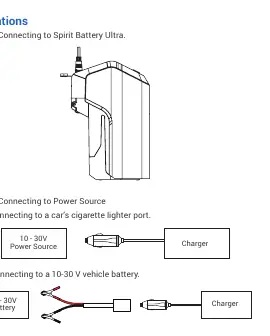
- Connect to Spirit Battery Ultra: Plug the output cable of the charger into the Spirit Battery Ultra.
- Connect to Power Source: Choose one of the following methods:
- Car cigarette lighter port: Connect the input cable to the vehicle's cigarette lighter port.
- Vehicle battery: Connect the input cable directly to a 10-30V vehicle battery.
LED Indicators
The charger features a bicolored LED to indicate the charging status:
- Red: In process of charging.
- Green: No load output or Full Charge.
Safety Notes
- Do not puncture, throw, drop, bend, or modify the charger.
- Use the controller in a well-ventilated, dry, and particle-free environment.
- Avoid direct sun exposure.
- Do not cover the case, as it is essential for heat dissipation.
- Opening the housing without manufacturer consent voids the warranty.
Warranty
The product is guaranteed against manufacturing defects for two years from the date of delivery. To validate the warranty, you must present the legal serial number, the Warranty Card, and proof of purchase from an authorized dealer. The warranty does not cover damage caused by accident, misuse, unauthorized repair, improper care, or storage.
Contact Information
For support, contact Guangdong ePropulsion Technology Limited at [email protected] or visit www.epropulsion.com.
Official resources from the manual
Practical help
Common problems
LED is Green
This indicates the battery is fully charged or there is no load connected.
LED is Red
The charger is currently in the process of charging the battery.
Before use
- Ensure the environment is dry, well-ventilated, and particle-free.
- Verify the power source is between 10-30V.
- Check that the charger case is not covered to allow for heat dissipation.
- Ensure the charger is not exposed to direct sunlight.
Specs in practice
- Input voltage: 10-30 VDC
- The charger is compatible with standard vehicle power sources like cigarette lighters or 12V/24V batteries.
- Rated output: 56V 1.25A
- The specific voltage and current required to charge the Spirit Battery Ultra.
- Operating temperature: -20 to 40 °C
- The ambient temperature range in which the charger can safely operate.
Images and diagrams
- Step 1: Connect the charger output cable to the Spirit Battery Ultra.
- Step 2a: Connect the input cable to a car cigarette lighter port.
- Step 2b: Connect the input cable directly to a 10-30V vehicle battery.
Model compatibility
- This charger is specially designed for the Spirit Battery Ultra.

Manual page author
David Miller
Documentation analyst
Organizes user manual content into clear summaries, with attention to model details, product context, and everyday usability.