Power / Batteries & Chargers
ESR 3-in-1 Charging Station User Guide
Quick guide for the ESR 3-in-1 Charging Station. Learn how to assemble the base, install the watch charger, adjust the phone support, and safely charge your devices.
Table of contents
Manual images
Click an image to enlargeQuick guide from the manual
This guide provides essential instructions for assembling and using your ESR 3-in-1 Charging Station. Ensure you use a compatible power adapter (5V/3A-5V/4A) to avoid charging issues. Do not use 5V/1A adapters as they are insufficient for this device.
Parts list
- Base
- Watch Charger
- Phone Support
- Wall Charger (Adapter)
- Screw Knob
- Cable
Assembly and installation
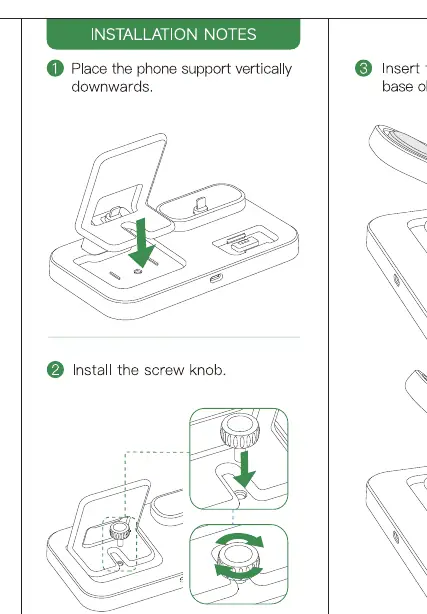
- Place the phone support vertically downwards into the base.
- Install the screw knob to secure the support.
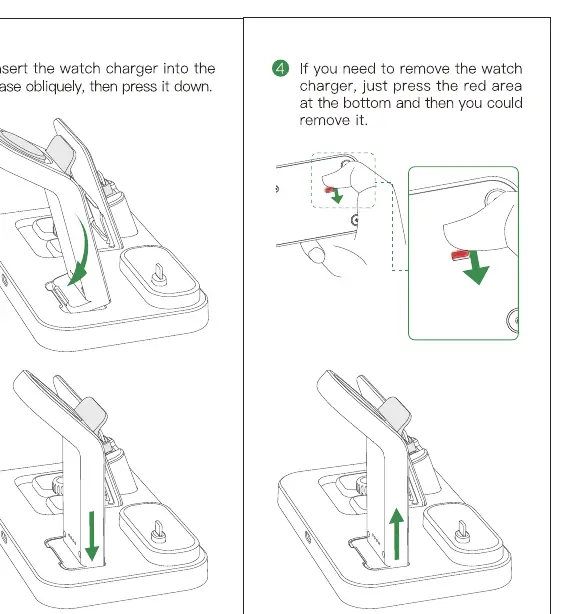
- Insert the watch charger into the base and press down until it clicks.
- To remove the watch charger, press the red area at the bottom of the charger and pull it out.
Device charging instructions
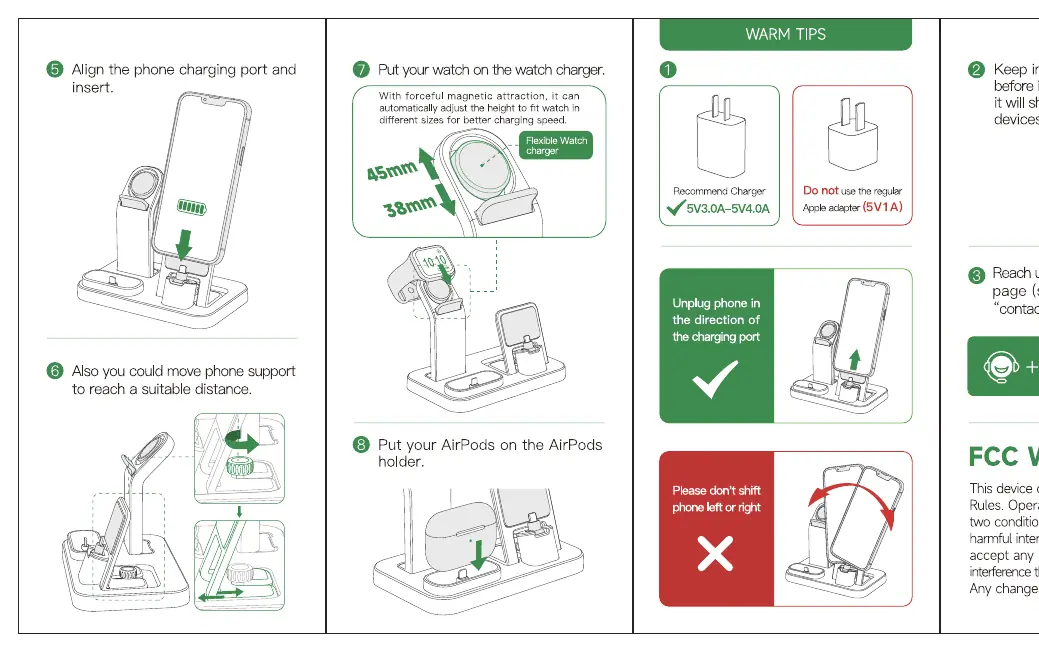
- Phone: Align the phone charging port with the connector and insert. You can adjust the phone support height to reach a suitable distance. Do not shift the phone left or right while charging.
- Watch: Place your watch on the watch charger. The magnetic attraction will secure it. It is compatible with different sizes (e.g., 38mm/45mm).
- Earphones: Place your AirPods or compatible earphones on the designated AirPods holder.
Important usage tips
- Power Adapter: Always use the recommended 5V/3A-5V/4A adapter. Using a 5V/1A adapter will not provide enough power.
- Device Maintenance: Keep your devices charged; do not let them run out of power completely, as this can shorten the battery life.
- Removal: When removing your phone, unplug it in the direction of the charging port to avoid damage.
Technical specifications
- Adapter Input: AC 100-240V~50/60Hz 0.13-0.3A
- Station Input: DC 5V/3.0A
- Phone Output: DC 5V/2.0A (Max)
- Watch Output: DC 5V/0.5A (Max)
- Earphone Output: DC 5V/0.5A (Max)
Manufacturer information
ESR
Practical help
Common problems
Phone not charging or charging slowly
Ensure you are using a 5V/3A-5V/4A adapter. Do not use a 5V/1A adapter.
Watch charger difficult to remove
Press the red area at the bottom of the watch charger to release it.
Phone alignment issues
Do not shift the phone left or right; align it directly with the charging port.
Before use
- Verify you have the base, watch charger, phone support, wall adapter, screw knob, and cable.
- Ensure your power adapter meets the 5V/3A-5V/4A requirement.
- Assemble the phone support and watch charger onto the base before connecting power.
Specs in practice
- Adapter Input
- AC 100-240V, 50/60Hz, 0.13-0.3A
- Station Input
- DC 5V/3.0A
- Phone Output
- DC 5V/2.0A (Max)
- Watch/Earphone Output
- DC 5V/0.5A (Max)
Images and diagrams
- The installation notes show how to insert the phone support and screw knob.
- The watch charger section illustrates how to insert and remove the charger using the release button.
- The usage section demonstrates proper alignment for the phone, watch, and earphones.
Model compatibility
- Watch charger supports different sizes (e.g., 38mm and 45mm) via magnetic attraction.

Manual page author
Emily Carter
User documentation editor
Prepares concise manual descriptions and highlights the most useful setup, operation, and maintenance information for readers.