Home Appliances / Vacuum Cleaners
Quick Start Guide for Eufy 11S RoboVac
Get started with your Eufy 11S RoboVac. This guide covers initial setup, charging base placement, app connectivity, and essential usage tips to ensure optimal cleaning performance and safety.
Table of contents
Quick Start Guide
This guide provides the essential steps to set up and operate your Eufy 11S RoboVac. Please follow these instructions to ensure proper functionality and safety.
Initial Setup
Before using the RoboVac for the first time, perform the following steps:
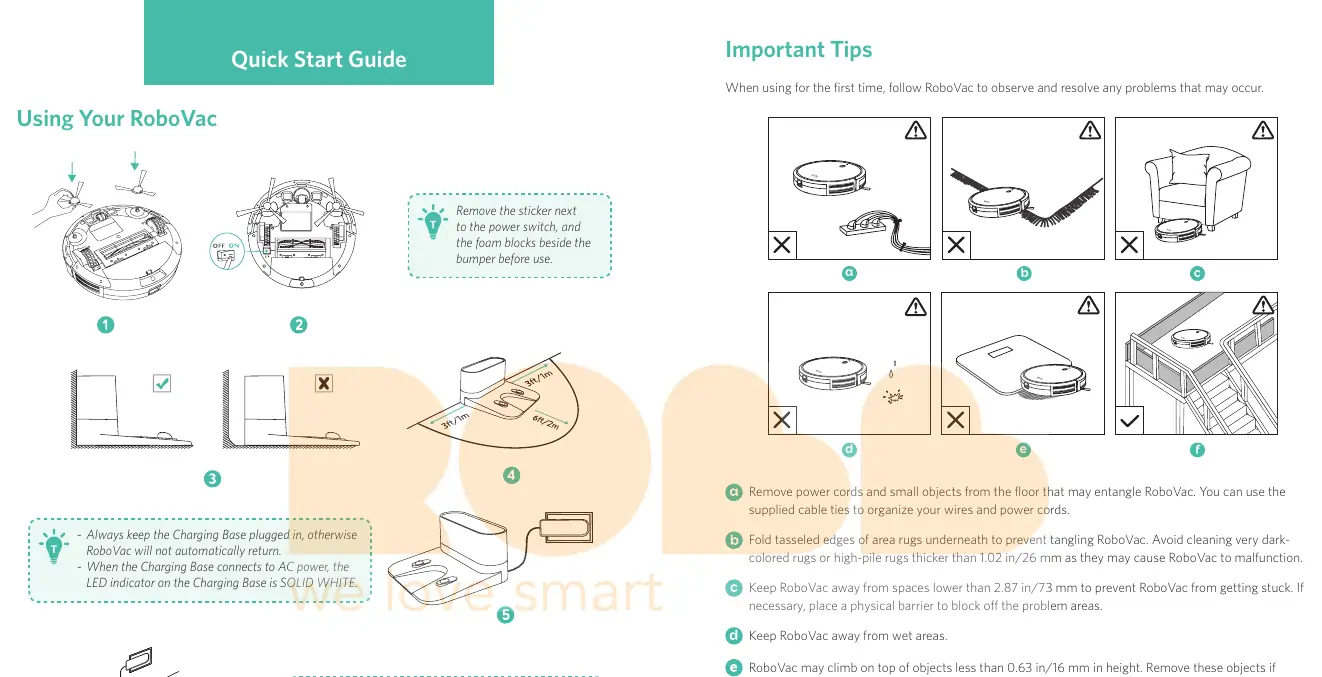
- Remove the protective sticker located next to the power switch.
- Remove the foam blocks positioned beside the bumper.
- Ensure the charging base is placed on a flat surface.
Charging and Power
Proper charging is essential for the RoboVac to function correctly:
- Charging Base Placement: Always keep the Charging Base plugged into an AC power outlet. If it is unplugged, the RoboVac will not be able to return to the base automatically.
- LED Indicators: When the base is connected to power, the LED indicator will be solid white.
- Charging Status: While charging, the LED indicator on the RoboVac will breathe orange. Once fully charged, it will turn solid blue.
App Connection
To control your RoboVac via smartphone, download the EufyHome app and follow the in-app instructions to complete the Wi-Fi connection process.
Important Usage Tips
To prevent malfunctions and ensure safety, observe the following guidelines:
- Clear the Floor: Remove power cords and small objects that could entangle the vacuum. Use the provided cable ties to organize wires.
- Rug Care: Fold tasseled edges of area rugs underneath. Avoid cleaning very dark-colored rugs or high-pile rugs thicker than 1.02 in (26 mm).
- Clearance: Keep the RoboVac away from spaces lower than 2.87 in (73 mm) to prevent it from getting stuck. Use physical barriers if necessary.
- Obstacles: The RoboVac can climb over objects up to 0.63 in (16 mm) in height. Remove these objects if possible.
- Sensors: Anti-drop sensors prevent the vacuum from falling down stairs. Note that these may be less effective on reflective or very dark-colored floors.
- Hazardous Areas: Keep the RoboVac away from wet areas and use physical barriers in front of fireplaces or areas that may cause damage.
Manufacturer information
eufy
Practical help
Common problems
RoboVac gets stuck under furniture
Ensure the clearance is at least 2.87 in (73 mm). If the area is lower, use a physical barrier to block it off.
RoboVac fails to return to the charging base
Ensure the Charging Base remains plugged into an AC power outlet at all times.
Anti-drop sensors are not working effectively
The sensors may struggle on reflective or very dark-colored floors. Place physical barriers to block off areas where the vacuum might fall.
Before use
- Remove the sticker next to the power switch
- Remove the foam blocks beside the bumper
- Place the charging base on a flat surface
- Plug the charging base into an AC outlet
- Fully charge the RoboVac before the first use
Specs in practice
- Minimum Clearance
- The RoboVac requires at least 2.87 in (73 mm) of height to avoid getting stuck.
- Climbing Height
- The device can climb over objects up to 0.63 in (16 mm) high.
- Rug Thickness Limit
- Avoid cleaning rugs thicker than 1.02 in (26 mm) as they may cause malfunctions.
Images and diagrams
- The guide illustrates the correct placement of the charging base, requiring 3ft/1m of clearance on the sides and 6ft/2m in front.
- Visuals demonstrate the removal of protective foam and stickers from the unit.
Model compatibility
- Requires the EufyHome app for Wi-Fi connectivity and advanced control.
- Not suitable for very dark-colored or high-pile rugs exceeding 26 mm.

Manual page author
David Miller
Documentation analyst
Organizes user manual content into clear summaries, with attention to model details, product context, and everyday usability.