Home Appliances / Small Kitchen Appliances
User Manual for Gemini GSP-L5500PK / GSP-5500 PA Speaker
Quick guide for the Gemini GSP-L5500PK and GSP-5500 PA speakers. Learn about setup, control panel functions, EQ settings, TWS pairing, and technical specifications.
Table of contents
Quick guide from the manual
The Gemini GSP-L5500PK and GSP-5500 are 15-inch 2-way active Bluetooth PA speakers. The GSP-L5500PK model includes additional LED party lighting and a speaker stand. Both models feature a 2200W peak power output, multiple playback options (USB, Bluetooth, AUX), and TWS linking for stereo sound.
What's Included
- GSP Series Loudspeaker
- Wired Microphone
- Speaker Stand (included with GSP-L5500PK only)
- Power Cable
- User Manual
Safety Precautions
- Do not open the device; there are no user-serviceable parts inside.
- Avoid overloading wall outlets.
- Unplug the apparatus during lightning storms.
- Keep the unit away from open flame sources and liquids.
- Ensure proper ventilation; keep at least 10cm of space around the unit.
Product Overview
The rear control panel allows for full management of the speaker:
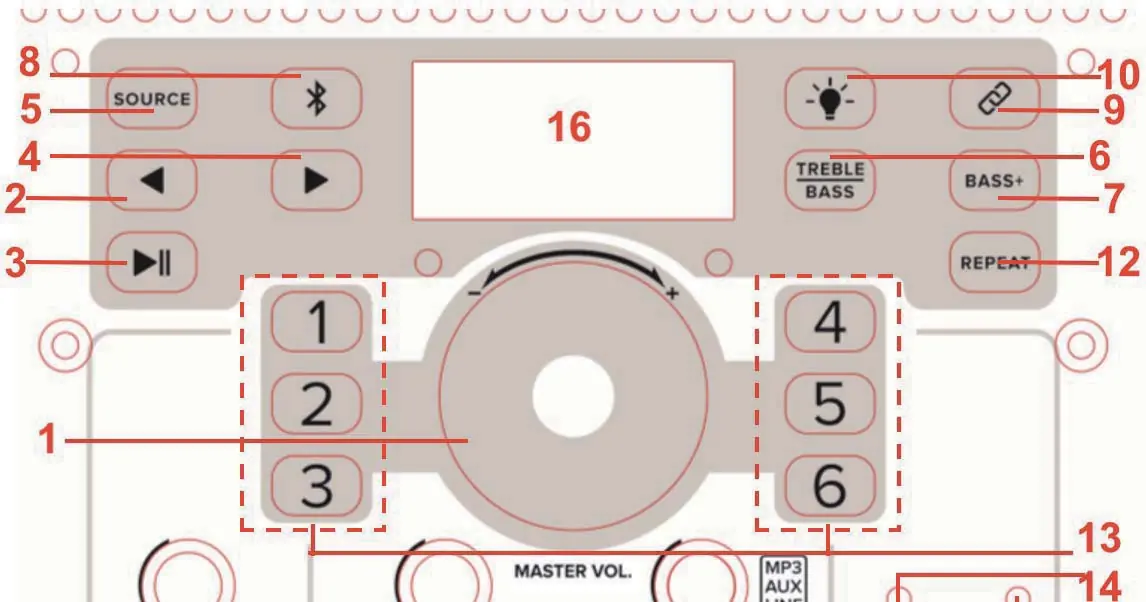
- Master Volume: Controls overall volume. Press and hold for 6 seconds to restore factory settings.
- Source: Switches between Bluetooth, USB, and AUX modes.
- TWS Link: Enables wireless pairing with a second GSP speaker.
- EQ Presets: Select from 6 modes (Normal, Club, Jazz, Classical, Rock, Speech).
- Inputs: Includes XLR and 1/4" microphone inputs, plus AUX and Line inputs.
- Outputs: Balanced XLR Line Out for connecting to recording devices or additional speakers.
Operation
Bluetooth Pairing: Press the SOURCE button to enter Bluetooth mode. Search for "GSP Series" on your device and connect.
TWS Linking: Power on both speakers. Press the TWS LINK button on both units. The screen will show "Link" blinking until the connection is established.
EQ Adjustments: Use the dedicated EQ buttons or the Master Volume knob (depending on the specific model version) to cycle through presets or adjust Bass/Treble.
Specifications
- Power: 2200 Watts Peak
- Drivers: 15" Woofer, 1.35" Tweeter
- Frequency Response: 20Hz - 20kHz
- Max SPL: 126dB @ 1 Meter
- Inputs: 2x 1/4" Mic, 2x XLR Mic, 1x 1/8" Aux, 1x RCA Line, 1x XLR Line
- Outputs: XLR Mix Output
Support
For assistance, contact Gemini via email at [email protected], call 1-844-GEMINI9, or visit geminisound.com.
Official resources from the manual
Practical help
Common problems
Distortion or clipping sound
Reduce the volume levels using the Master Volume or Gain knobs until the CLIP LED stops illuminating.
Bluetooth connection issues
Ensure the speaker is in Bluetooth mode by pressing the SOURCE button, then re-scan for 'GSP Series' on your playback device.
TWS linking fails
Ensure both speakers are powered on and press the TWS LINK button on both units simultaneously. Wait for the 'Link' indicator to stop blinking.
Before use
- Verify all accessories are present (Speaker, Mic, Power Cable, Stand for PK model).
- Ensure the power source matches the unit requirements.
- Check that all volume knobs are turned down before powering on to prevent sudden loud noise.
- Inspect cables for damage before connecting.
- Ensure the speaker is placed on a stable surface or the included stand.
Specs in practice
- 2200W Peak Power
- The maximum power output capacity the amplifier can handle for short bursts.
- 15-Inch Woofer
- A large driver dedicated to reproducing low-frequency sounds (bass).
- TWS (True Wireless Stereo)
- A feature that allows two speakers to pair wirelessly to create a stereo sound system.
Images and diagrams
- The control panel features a central Master Volume knob, individual Gain controls for microphones and line inputs, and playback control buttons for USB/Bluetooth.
- Numbered indicators on the panel correspond to specific functions like Source selection, TWS linking, and EQ presets.
Model compatibility
- The GSP-L5500PK model includes LED party lighting and a speaker stand.
- The GSP-5500 model does not include the speaker stand or LED lighting features.

Manual page author
Michael Turner
Technical manual editor
Reviews PDF manuals for structure, safety notes, and practical product details so readers can find the right information quickly.