Electronics / Paper Shredders
User Manual for Fellowes AutoMax 100M Paper Shredder
Quick guide for the Fellowes AutoMax 100M paper shredder. Includes setup instructions, auto and manual feed operation, maintenance tips, and troubleshooting.
Table of contents
Manual images
Click an image to enlargeQuick Guide
The Fellowes AutoMax 100M is a micro-cut paper shredder designed for personal or office use. It features an automatic feed tray for up to 100 sheets and a manual feed slot for up to 10 sheets. Always ensure the shredder is plugged into a grounded outlet and keep it away from children and pets.
Product Overview
The shredder includes the following key components:
- Auto Feed Tray: Holds up to 100 sheets for automatic shredding.
- Manual Feed Slot: For shredding individual sheets or credit cards.
- Control Panel: Includes buttons for Reverse, Start, and LED indicators for Bin Full, Overheat, and Remove Paper.
- Pull-Out Bin: Removable waste bin for easy emptying.
Basic Setup
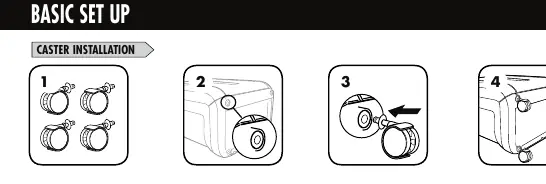
Before using the shredder, install the casters provided with the unit. Snap the casters into the base of the shredder to ensure mobility.
Operating Instructions
Manual Feed
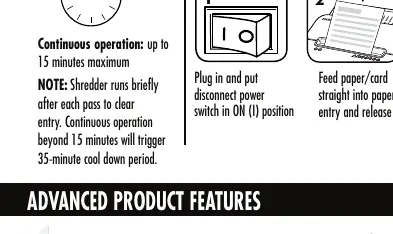
- Plug in the shredder and set the disconnect power switch to the ON (I) position.
- Feed paper or credit cards straight into the manual feed slot and release.
Auto Feed
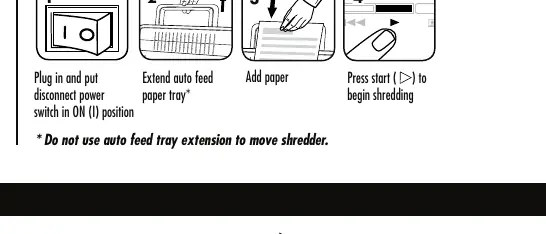
- Plug in the shredder and set the disconnect power switch to the ON (I) position.
- Extend the auto feed paper tray.
- Add paper to the tray.
- Press the Start button to begin shredding.
Advanced Features
- SilentShred Technology: Allows for quiet operation.
- Sleep Mode: The shredder automatically shuts down after 2 minutes of inactivity. To wake it, press the Start button or insert paper.
- Auto Reverse: Automatically stops and reverses the motor if a paper jam occurs.
Maintenance
Oiling the Shredder
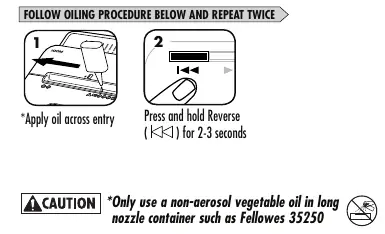
To maintain peak performance, oil the shredder every time you empty the waste bin. Apply non-aerosol vegetable oil (such as Fellowes 35250) across the paper entry, then press and hold the Reverse button for 2-3 seconds. Repeat this procedure twice.
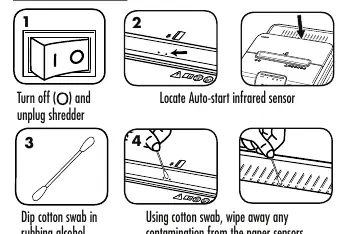
Cleaning Auto-Start Infrared Sensors
If the motor runs without paper, the sensors may be blocked by paper dust. To clean:
- Turn off and unplug the shredder.
- Locate the infrared sensors in the center of the paper entry.
- Dip a cotton swab in rubbing alcohol.
- Use the swab to wipe away any contamination from the sensors.
Troubleshooting
- Overheat Indicator: The shredder has exceeded its maximum operating temperature. Wait 35 minutes for it to cool down.
- Bin Full: Empty the waste bin. Use Fellowes waste bag 36053.
- Bin Open: The shredder will not operate if the bin is open. Ensure it is closed properly.
- Remove Paper: If illuminated, press the Reverse button to back out the paper and reduce the quantity before re-feeding.
Safety Instructions
- Keep away from children and pets.
- Do not use aerosol products, petroleum-based lubricants, or canned air on or near the shredder.
- Always set the power switch to OFF or unplug when not in use.
- Do not disassemble the shredder or place it near heat sources or water.
Manufacturer information
Fellowes
Practical help
Common problems
Shredder motor runs without paper
The infrared sensors are likely blocked by paper dust. Clean the sensors using a cotton swab dipped in rubbing alcohol.
Overheat indicator is illuminated
The shredder has exceeded its maximum operating temperature. Allow it to cool down for 35 minutes.
Paper jam
Press the Reverse button to back out the paper, then reduce the quantity of paper and re-feed.
Shredder will not run
Check if the bin is open (close it) or if the power switch is in the OFF position.
Before use
- Install the casters on the base of the unit.
- Ensure the shredder is plugged into a properly grounded outlet.
- Verify the power switch is in the ON (I) position.
- Keep hands and loose items away from the paper entry.
- Do not use aerosol lubricants or canned air.
Specs in practice
- Auto Feed Capacity
- Up to 100 sheets (8.5 x 11 in, 20lb paper).
- Manual Feed Capacity
- Up to 10 sheets.
- Continuous Operation
- Up to 15 minutes maximum before requiring a 35-minute cool down.
Images and diagrams
- Caster installation: Snap the four casters into the bottom of the shredder base.
- Oiling: Apply oil across the entry and run in reverse for 2-3 seconds; repeat twice.
- Sensor cleaning: Use a cotton swab with rubbing alcohol to wipe the sensors located in the center of the paper entry.
Model compatibility
- Do not shred adhesive labels, CD/DVDs, continuous form paper, transparencies, newspaper, or cardboard.
- Only use non-aerosol vegetable oil for maintenance.

Manual page author
Michael Turner
Technical manual editor
Reviews PDF manuals for structure, safety notes, and practical product details so readers can find the right information quickly.