Power / EV Chargers
Feyree Lion EV-Ultra Portable EV Charger User Guide
Quick guide for the Feyree Lion EV-Ultra portable EV charger. Learn how to operate the touchscreen, use the Smart Life app, adjust charging settings, and troubleshoot common errors.
Table of contents
Manual images
Click an image to enlargeQuick Start and Safety
Before using the Feyree Lion EV-Ultra, ensure the electrical outlet is installed by a qualified electrician and complies with local codes. The device must be grounded. Do not use the charger if the enclosure, cable, or connector is damaged, cracked, or shows signs of wear. The operating ambient temperature range is -30°C to +55°C. Do not use the charger in severe rain or near flammable materials.
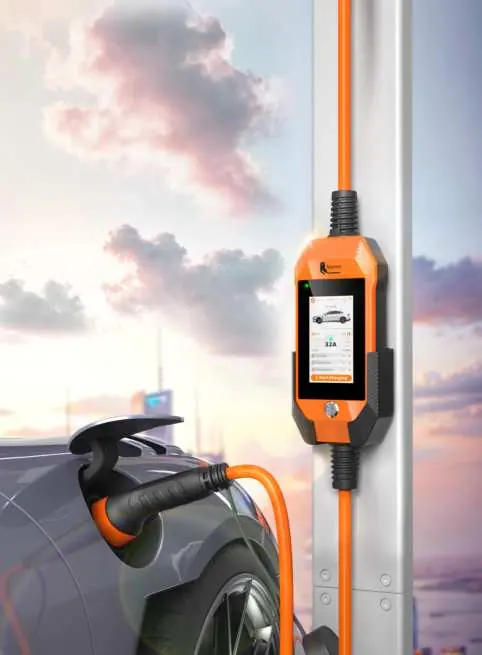
Device Overview and Specifications
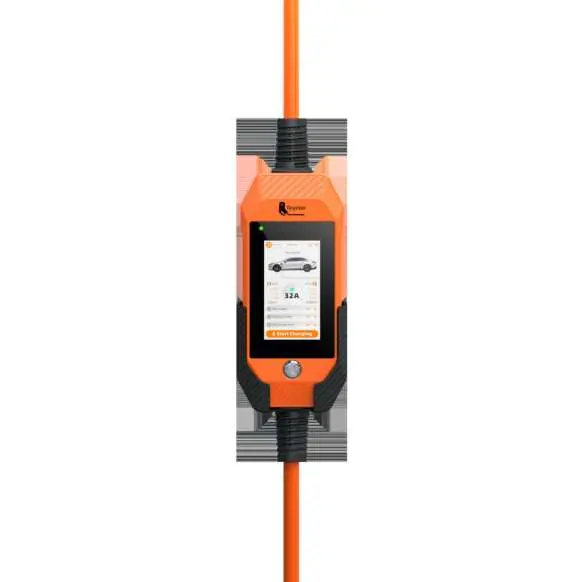
The charging box features a touchscreen display for monitoring and control. Key specifications include:
- Power Ratings: Available in 3.5kW, 7kW, and 11kW variants depending on the model.
- Protection: IP66 rating for charger plug and box. Leakage protection (Type B AC 30mA + DC 6mA).
- Operating Voltage: 85V-264V (varies by model).
- Cable: Various specifications based on power rating (e.g., 3G 2.5mm² to 5G 2.5mm²).
Touchscreen Operation
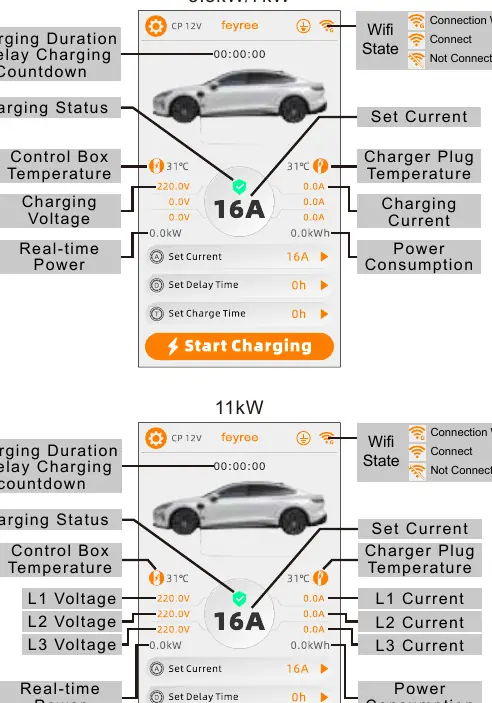
The control box includes a touchscreen and a physical button. The screen enters saver mode after 5 minutes of inactivity; touch it to wake the device. Use the touchscreen to:
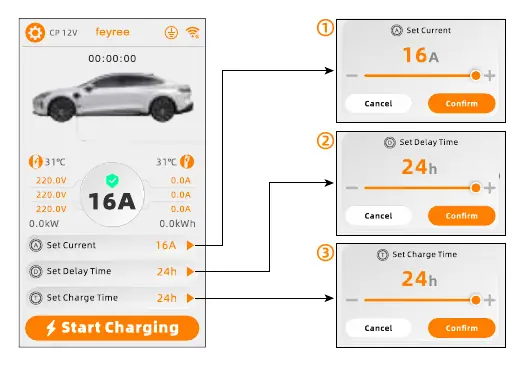
- Set Current: Adjust charging current (e.g., 8A-16A or 8A-32A depending on the model) when the plug is not inserted in the car.
- Set Delay Time: Schedule charging start time (0 to 24 hours).
- Set Charge Time: Limit the duration of the charging session (0 to 24 hours).
- Monitor Status: View real-time power, voltage, current, and temperature.
App Setup and Usage
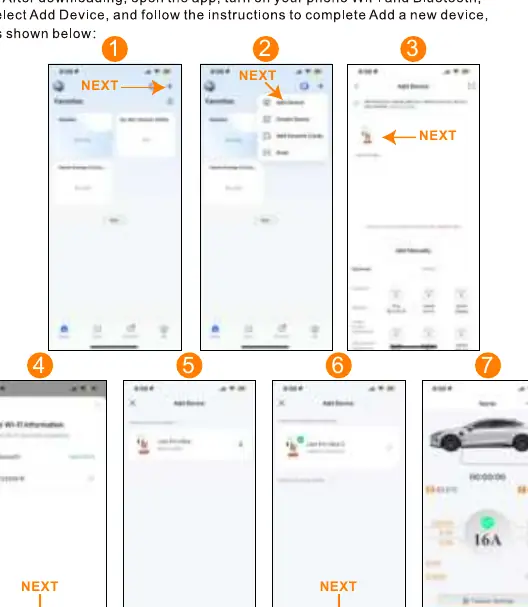
The device supports remote control via the Smart Life or Tuya Smart app. Ensure your phone's WiFi and Bluetooth are enabled during setup. Follow the in-app instructions to add the device. The app allows you to view charging logs, set charging plans, and monitor real-time data.
Charging Procedures
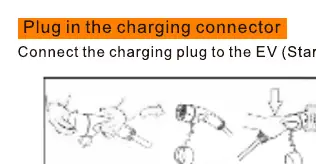
To start charging, connect the charging plug to the EV. To stop charging, you can use one of the following methods:
- Plan A: The charger stops automatically when the car is fully charged.
- Plan B: Turn off the power switch at the source.
- Plan C: Use the stop button or switch inside the vehicle.
- Plan D: Click "Stop charging" in the app.
- Plan E: Press the button on the charger box.
Warning: Do not unplug the charger while charging is in progress.
Troubleshooting
If a fault occurs, the screen will display an error code. Common issues include:
- OverVoltage/UnderVoltage: Check input voltage with an electrician.
- OverCurrent: Check for foreign objects in the plug or vehicle abnormalities.
- Over TEMP: Ensure the charger is not near heat sources and ambient temperature is below 50°C.
- PE Fault: Check for proper grounding and wiring.
- Err:cp: Check the charging plug connection.
Maintenance and Warranty
The device is not user-serviceable. Do not attempt to open or modify the charger. Feyree offers a two-year warranty. For repairs or technical support, contact [email protected]. The warranty does not cover damage from misuse, unauthorized disassembly, or use of non-original products.
Manufacturer information
Shenzhen Feyree Technology Co., Ltd.
Practical help
Common problems
OverVoltage / UnderVoltage
Have an electrician measure the input voltage. If the issue persists, contact your local power supply department.
OverCurrent
Cut off power immediately. Check the charging plug for foreign objects and inspect the vehicle's on-board charger.
Over TEMP
Ensure the charger is not near other heat-generating equipment and that the ambient temperature is below 50°C.
PE Fault
Cut off power immediately. Verify that the charging station is properly grounded and wiring is correct.
Err:cp
Check if the charging plug is correctly inserted and the connection is secure.
Before use
- Verify the electrical outlet is installed by a qualified electrician.
- Ensure the power supply is grounded.
- Check that the charging connector, cable, and control box are free of scratches, rust, or damage.
- Ensure the socket is clean, dry, and free of debris.
- Confirm the power plug and socket are compatible.
Specs in practice
- Type B Leakage Protection
- Provides protection against both AC and DC leakage currents (30mA AC + 6mA DC).
- Operating Temperature
- The device is rated to operate between -30°C and +55°C.
Images and diagrams
- The touchscreen displays real-time voltage, current, power consumption, and temperature for each phase.
- The app setup requires downloading 'Smart Life' or 'Tuya Smart' and enabling Bluetooth/WiFi on your phone.
- Charging steps involve connecting the plug to the vehicle and using the app or physical button to start/stop.
Model compatibility
- Ensure the power supply system (Single Phase vs Three Phase) matches your specific charger model.
- The device is designed exclusively for electric vehicle charging.

Manual page author
Michael Turner
Technical manual editor
Reviews PDF manuals for structure, safety notes, and practical product details so readers can find the right information quickly.