Tools / Power Tools
FLEX DW 45 18.0-EC Cordless Drywall Screwdriver User Manual
Quick guide for the FLEX DW 45 18.0-EC cordless drywall screwdriver. Includes setup, battery operation, screw magazine installation, depth adjustment, and maintenance instructions.
Table of contents
Manual images
Click an image to enlargeQuick guide from the manual
This guide provides essential information for operating the FLEX DW 45 18.0-EC cordless drywall screwdriver. Always read the full manual for complete safety instructions and technical details.
Overview
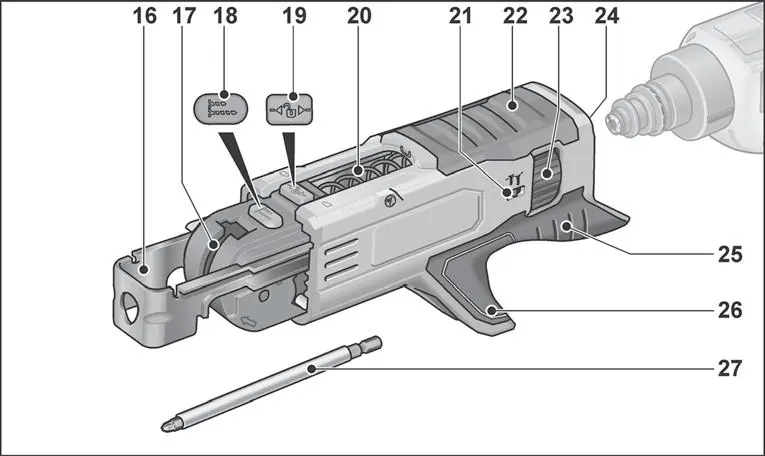
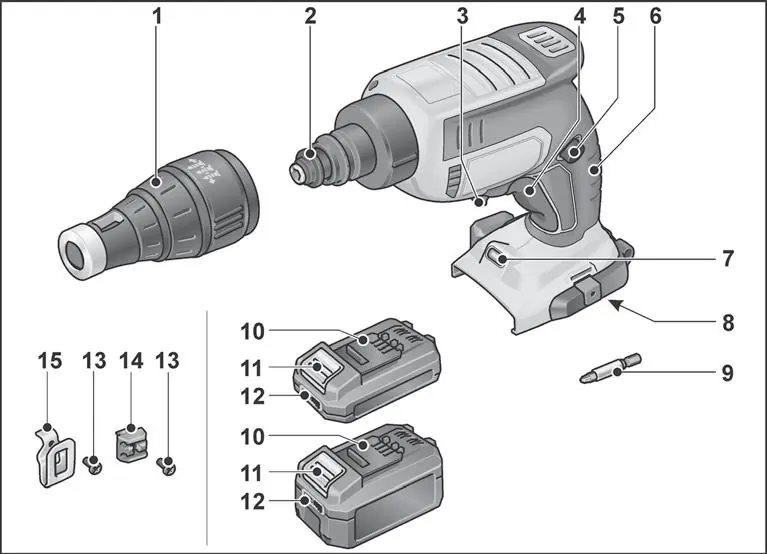
The tool features a stop sleeve, clutch, rotation direction lever, and an ON/OFF switch with accelerator function. The screw magazine (M-DW) allows for quick insertion of screws.
Instructions for use
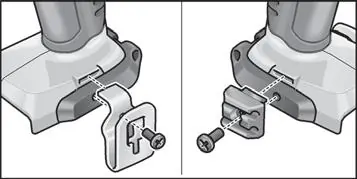
Before switching on: Unpack the tool and accessories, checking for completeness and transport damage. Attach the belt clip and bit holder using the provided screw.
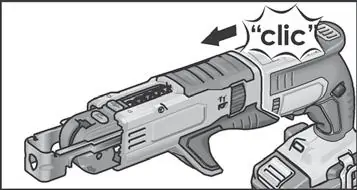
Battery operation: Press the charged battery into the tool until it clicks. To remove, press the release button and pull out the battery. Check the charge level by pressing the button on the battery; if an LED flashes, the battery needs recharging.
Inserting tools: Always remove the battery before working on the tool. Move the rotation direction lever to the middle position. Push the coupling towards the rear, insert the bit into the holder, and release the coupling.
Operating instructions
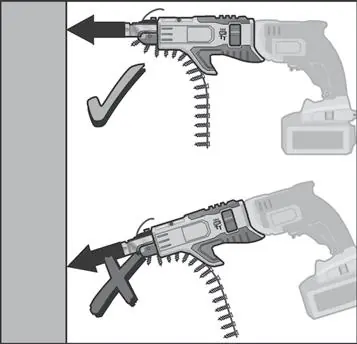
Screwing in screws: Insert the appropriate bit, set the screw-in depth, and set the rotation direction to clockwise. Grip the tool by the handle, place the screw on the bit, and press the screw tip against the workpiece until the stop sleeve is positioned. Switch on the tool; the drive will disengage when the set depth is reached.
Loosening screws: Set the rotation direction to anti-clockwise, place the bit on the screw, and switch on the tool.
Screw magazine: Insert the screw belt from underneath. Adjust the screw length manually using the setting button and adjust the screw-in depth using the dial.
Maintenance and care
Always remove the battery before maintenance. Regularly clean the tool and ventilation slots with dry compressed air. Repairs must be carried out by an authorized customer service center.
Manufacturer information
FLEX
Practical help
Common problems
Battery does not charge or indicator does not light up
Check if the battery is faulty or if the charger is functioning correctly.
Screw depth is incorrect
Adjust the depth stop or the screw magazine depth dial.
Tool stops during operation
Check if the battery is depleted or if the tool has overheated.
Before use
- Check that the battery is fully charged.
- Ensure the correct screwdriver bit is installed.
- Verify the screw magazine is properly attached if using it.
- Set the rotation direction to the desired position.
- Adjust the screw-in depth.
Specs in practice
- No load speed
- 0-4500 min-1, indicates the maximum speed of the tool without resistance.
Images and diagrams
- Overview of the tool components (1-15)
- Overview of the screw magazine components (16-27)
Model compatibility
- Screw magazine M-DW is designed for quick insertion of drilling screws, chipboard screws, and wood construction screws.
- Only use with DW 45 18.0-EC.

Manual page author
Emily Carter
User documentation editor
Prepares concise manual descriptions and highlights the most useful setup, operation, and maintenance information for readers.