Tools / Power Tools
User Manual for FLEX PE 150 18.0-EC Polisher
Quick guide for the FLEX PE 150 18.0-EC polisher. Includes setup, battery operation, tool attachment, speed selection, and maintenance instructions.
Table of contents
Quick guide from the manual
This guide provides essential information for operating the FLEX PE 150 18.0-EC polisher. Always refer to the full manual for complete safety and operational details.
Safety
Before using the power tool, read the operating instructions and the enclosed "General safety instructions". Use the polisher only for its intended purpose and in perfect working order.
Overview
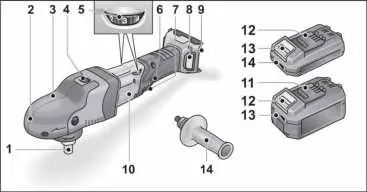
The polisher features a spindle, gear head with handle cover, spindle lock, speed preselection dial, locking button, switch, filter cover, battery slot, and handle.
Setup
- Auxiliary Handle: Can be attached for better handling. Remove the handle cover fastening screw from the side where the handle will be attached.
- Battery: Insert the charged battery until it clicks into place. Press the release button to remove it.
- Tool Holder: Press and hold the spindle lock. Screw the tool holder (Velcro plate) clockwise onto the spindle and tighten by hand.
Operation
- Switching On/Off: Press and hold the switch for brief operation. For continuous operation, press the switch and hold the locking button, then release the switch.
- Speed Selection: Move the dial to the required value. Gently press the switch to accelerate to the preselected speed.
Maintenance
Clean the power tool and grille in front of the vent slots regularly. Blow out the housing interior and motor with dry compressed air. Clean the filter cover regularly.
Troubleshooting
If the charger display flashes, there is a fault in the battery or charger. If the display flashes slowly (orange), the battery is too hot or too cold. If it flashes rapidly (red), the battery is faulty.
Manufacturer information
FLEX
Practical help
Common problems
Device switches off during continuous operation
Overload or overheating. Switch the power tool off and back on again.
Charger display flashes
Fault in battery or charger. If orange, battery is too hot/cold. If red, battery is faulty.
Before use
- Unpack the polisher and check for missing or damaged parts.
- Charge batteries fully before initial operation.
- Attach the auxiliary handle if needed.
- Secure the tool holder (Velcro plate) to the spindle.
- Check for imbalances and vibrations before starting work.
Specs in practice
- Nominal voltage
- 18V
- No load speed
- 900-1450 rpm
Images and diagrams
- 2: Gear head with handle cover
- 11: Li-ion battery
Model compatibility
- Use original FLEX accessories for this model.
- Not using original FLEX accessories may lead to poor polishing results, increased vibrations, and wear.

Manual page author
Emily Carter
User documentation editor
Prepares concise manual descriptions and highlights the most useful setup, operation, and maintenance information for readers.