Tools / Polishing Tools
User Manual for FLEX PE 2 18-EC Cordless Polisher
Quick guide for the FLEX PE 2 18-EC cordless polisher. Includes setup, battery handling, tool mounting, speed settings, and maintenance instructions.
Table of contents
Manual images
Click an image to enlargeQuick guide from the manual
This guide provides essential information for operating the FLEX PE 2 18-EC cordless polisher. Always read the full safety instructions provided in the original manual before use.
Overview
The polisher features a spindle (1), gear head with handle cover (2), spindle lock (3), speed preselection dial (5), switch (6), and locking button (7). The battery (11) is inserted into the slot (9) and features a state of charge indicator (13).
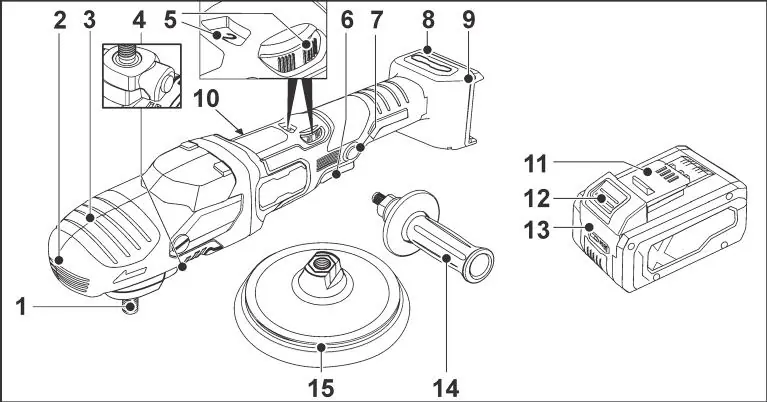
Intended Use
This polisher is designed for commercial use in industry and trade. It is intended for polishing work with polishing sponges, lambskins, woolskins, felt plates, and buffing discs. Use only polishing tools permitted to run at a speed of at least 1800 /min.
Operating Instructions
Battery Handling
Batteries are not fully charged on delivery. Charge fully before initial operation. To insert, press the battery into the slot until it clicks. To remove, press the release button and pull out. Press the button on the battery to check the state of charge via the LEDs.
Auxiliary Handle
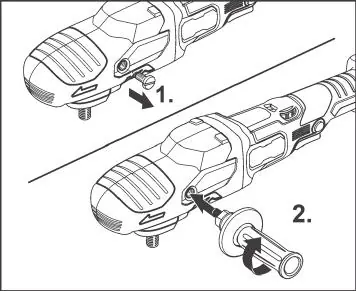
For better handling, the auxiliary handle can be attached. Remove the handle cover fastening screw from the side where the handle is to be attached, then mount the handle.
Tool Holder and Tools
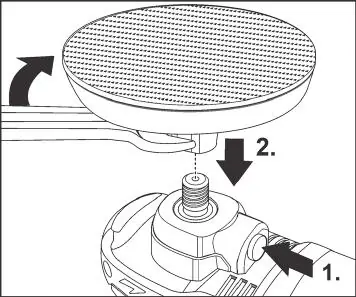
To attach the tool holder (Velcro plate): Remove the battery, press and hold the spindle lock, screw the holder clockwise onto the spindle, and tighten by hand. Secure the tool centrally on the holder. Use only original FLEX accessories to prevent poor results, vibrations, or damage.
Switching On and Off
For brief operation, press and hold the switch. For continuous operation, press and hold the switch, then press the locking button and release the switch. To switch off, briefly press and release the switch.
Speed Preselection
Set the dial to the required speed value. Gently press the switch to accelerate the tool to the preselected speed.
Maintenance and Care
Remove the battery before any work on the tool. Regularly clean the tool and the grille in front of the vent slots. Blow out the housing interior and motor with dry compressed air. Regularly clean the filter cover.
Safety and Disposal
Always wear personal protective equipment, including eye protection. Do not operate near flammable materials. In case of overload or overheating, the tool will switch off; switch off and back on to continue. Dispose of the tool and batteries according to local regulations; do not throw into household waste.
Manufacturer information
FLEX
Practical help
Common problems
Device switches off during continuous operation.
Overload or overheating. Switch the tool off and back on again to continue.
Battery LEDs do not light up after pressing the button.
The battery is faulty and must be replaced.
Battery LED flashes.
The battery must be recharged.
Before use
- Unpack and check for missing or damaged parts.
- Charge the battery fully before the first operation.
- Ensure the auxiliary handle is securely mounted if needed.
- Ensure the tool is centered on the tool holder.
- Run the tool for 30 seconds without load to check for imbalances or vibrations.
Specs in practice
- Nominal voltage
- 18V
- Max. tool diameter
- 160 mm
Images and diagrams
- 3: Spindle lock
- 7: Locking button
- 11: Li-ion battery
- 15: Velcro plate
Model compatibility
- Use only original FLEX accessories.
- Use only FLEX batteries and chargers.

Manual page author
David Miller
Documentation analyst
Organizes user manual content into clear summaries, with attention to model details, product context, and everyday usability.