Tools / Polishing Tools
User Manual for FLEX XFE 2 15 18-EC and XCE 2 8 18-EC Orbital Polishers
Quick guide for the FLEX XFE 2 15 18-EC and XCE 2 8 18-EC orbital polishers. Includes setup, operation, maintenance, and safety instructions.
Table of contents
Manual images
Click an image to enlargeQuick guide from the manual
This manual covers the operation and maintenance of the FLEX XFE 2 15 18-EC and XCE 2 8 18-EC orbital polishers. Always read the safety instructions before use.
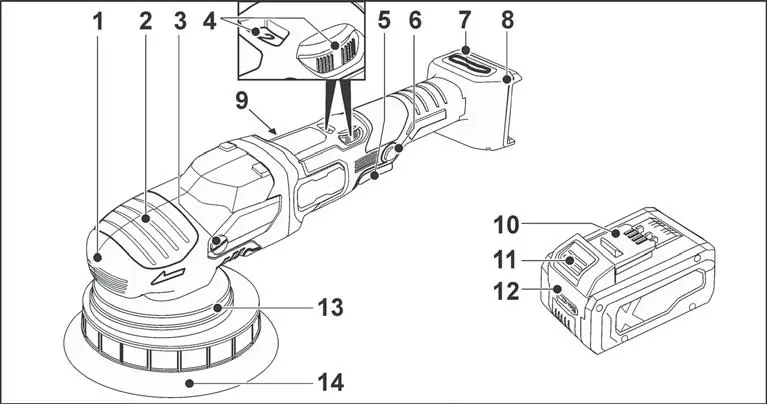
Intended use
These hand-operated orbital polishers are designed for industrial applications and all types of polishing work on vehicles, furniture, and metal surfaces using a polishing sponge.
Operation
Battery: Insert the charged battery until it clicks. To remove, press the release button and pull out. Check the charge state by pressing the button on the battery.
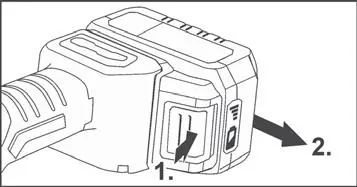
Tool attachment: Firmly press the polishing tool, centered, onto the Velcro pad. Run the polisher for 30 seconds without load to check for imbalances.
Speed selection: Use the dial to set the required speed. Gently press the switch to accelerate to the preselected speed.
Maintenance and care
Cleaning: Regularly clean the power tool and the grille in front of the vent slots. Blow out the housing interior and motor with dry compressed air. Clean the filter cover regularly.
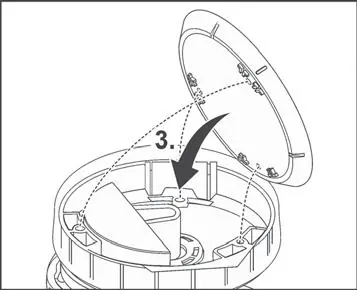
Replacing the Velcro pad: Remove the battery and polishing tool. Place the machine on its back. Release and remove the screws with the Torx wrench. Remove the worn Velcro pad, clean the interior, align the holes, and fit the new pad. Tighten screws to 2.5-3.0 Nm.
Safety
Always wear personal protective equipment, including eye protection. Do not use damaged accessories. Keep bystanders at a safe distance.
Manufacturer information
FLEX
Practical help
Common problems
Device switches off during continuous operation.
Overload or overheating. Switch off and on again.
Increased vibrations after tool change.
Weight difference between tools. Adjust speed using the dial until vibrations decrease.
Before use
- Unpack and check for completeness/damage.
- Charge battery fully before first use.
- Ensure polishing tool is centered on the Velcro pad.
- Check for imbalances and vibrations by running for 30 seconds.
Specs in practice
- No load speed
- The speed range of the tool when not under load.
Images and diagrams
- Overview of components (switch, speed dial, battery slot).
- Battery insertion and removal procedure.
- Velcro pad replacement steps.
Model compatibility
- Use only original FLEX accessories.
- Compatible with AP 18/2.5, AP 18/5.0, AP 18/8.0 batteries.
- Compatible with CA 12/18 and CA 18.0-LD chargers.

Manual page author
Emily Carter
User documentation editor
Prepares concise manual descriptions and highlights the most useful setup, operation, and maintenance information for readers.