Tools / Saws
User Manual for FLEX RS 16 12-EC and RS 25 18-EC Cordless Reciprocating Saw
Quick guide for the FLEX RS 16 12-EC and RS 25 18-EC cordless one-handed reciprocating saws. Includes instructions for blade installation, cutting techniques, maintenance, and safety.
Table of contents
Manual images
Click an image to enlargeQuick guide from the manual
This manual provides essential operating and safety instructions for the FLEX RS 16 12-EC and RS 25 18-EC cordless one-handed reciprocating saws. Always read the safety instructions before use.
Product Overview
The tool features the following components:
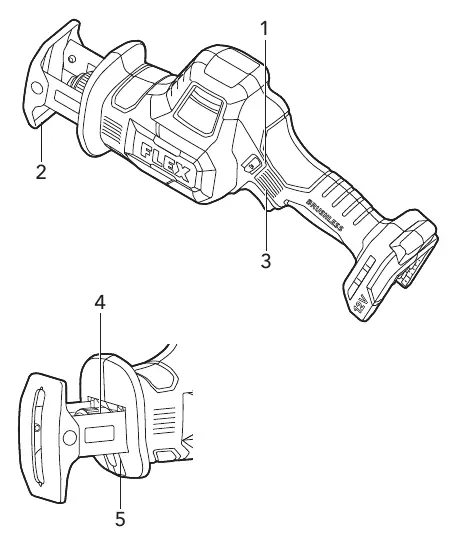
- 1: Lock-off button
- 2: Pivoting shoe
- 3: Variable-speed trigger switch
- 4: Tool-less blade clamp sleeve
- 5: LED
Operation
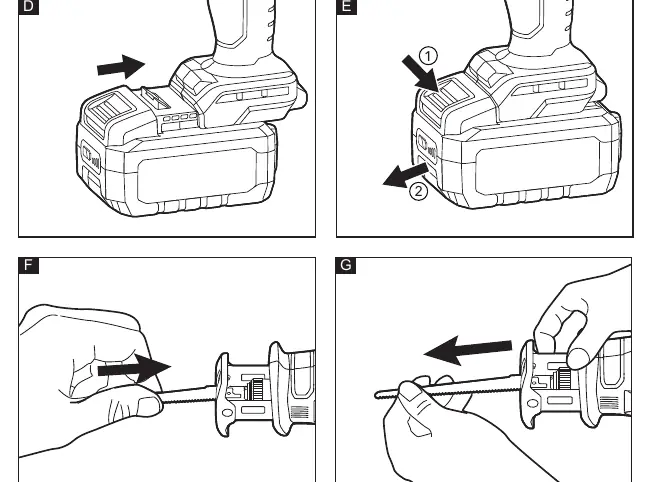
Inserting/Replacing the Battery
Press the charged battery into the tool until it clicks into place. To remove, press the release button and pull out the battery.
Installing and Removing the Saw Blade
Always lock the tool and remove the battery before making adjustments. Ensure the tool-less blade clamp sleeve is ready to accept a blade. Align the blade shank with the clamp opening and insert it until it locks automatically. To remove, rotate the clamp sleeve to eject the blade.
Blade Selection
Select the correct blade for the material. Use blades with fewer teeth (e.g., 7 TPI) for wood and more teeth for metal or plastic. We recommend 6 TPI for wood and 14 TPI for metal.
Pivoting Shoe Adjustment
The shoe pivots to provide maximum control when aligned against the surface being cut. Lock the tool, remove the battery, and pivot the shoe to the desired angle.
LED Indicator
The LED turns on automatically when the trigger is squeezed. Rapid flashing indicates overload or overheating; slow flashing indicates low battery capacity.
Cutting Techniques
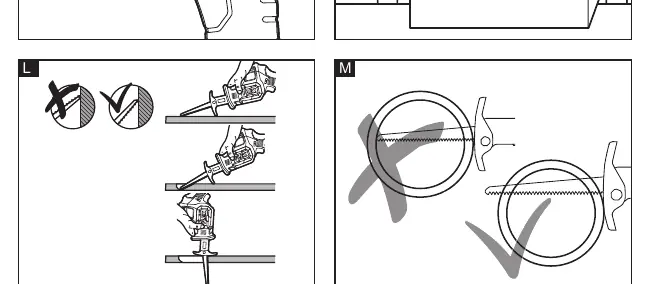
General Cutting
Ensure the workpiece is firmly clamped. Mark the cut line clearly. Start the saw and reach the desired speed before applying the blade to the workpiece. Use steady pressure; do not force the tool.
Plunge Cutting
Ideal for surfaces that cannot be cut from an edge. Rest the edge of the pivoting shoe on the workpiece. Start the tool, allow it to reach speed, and use the shoe edge as a pivot to lower the blade into the workpiece.
Metal Cutting
Never use wood-cutting blades for metal. Use cutting oil for soft metals and steel to keep the blade cool and increase efficiency.
Maintenance and Care
Remove the battery before any work on the tool. Regularly clean the tool and the grille in front of the vent slots. Blow out the housing interior and motor with dry compressed air.
Manufacturer information
FLEX
Practical help
Common problems
LED flashes rapidly
Tool or battery is overloaded or too hot. Let the tool rest or cool under airflow.
LED flashes slowly
Battery capacity is low. Recharge the battery pack.
Blade clamp retracts into housing
Reattach the battery and turn the tool on by pressing the trigger to move the clamp to an accessible position.
Before use
- Check for missing or damaged parts.
- Ensure the battery is fully charged.
- Select the correct blade for the material (e.g., 6 TPI for wood, 14 TPI for metal).
- Ensure the workpiece is securely clamped.
- Check for clearance behind the workpiece.
Specs in practice
- No-load speed
- 0-3000 r.p.m.
- Sawing capacity in wood
- 90mm (RS 16) / 210mm (RS 25).
Images and diagrams
- Figure A: Product overview (1: Lock-off, 2: Shoe, 3: Trigger, 4: Blade clamp, 5: LED).
- Figure L: Plunge cutting technique using the shoe as a pivot.
- Figure M: Correct pipe cutting (blade must extend beyond the workpiece throughout the stroke).
Model compatibility
- Use only correct saw blades.
- Never use wood-cutting blades for metal.

Manual page author
Michael Turner
Technical manual editor
Reviews PDF manuals for structure, safety notes, and practical product details so readers can find the right information quickly.