Tools / Saws
User Manual for FLEX JS 18.0-EC and JSB 18.0-EC Cordless Jigsaw
Quick guide for the FLEX JS 18.0-EC and JSB 18.0-EC cordless jigsaw. Includes setup, blade installation, speed and orbital settings, cutting tips, and maintenance.
Table of contents
Manual images
Click an image to enlargeQuick guide from the manual
This manual provides essential instructions for the safe and efficient operation of the FLEX JS 18.0-EC and JSB 18.0-EC cordless jigsaws. Before using the tool, ensure the battery is fully charged and the switch is in the OFF position. Always wear appropriate safety gear, including goggles and a dust mask.
Product Overview
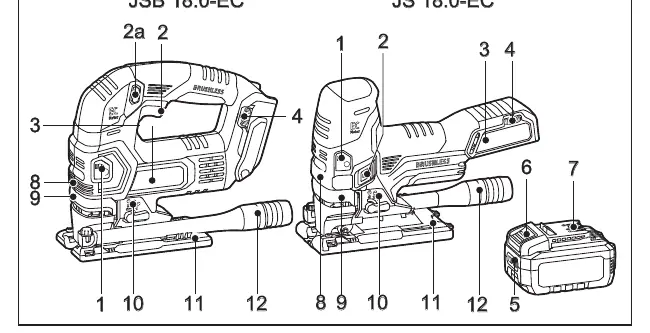
The jigsaw features a brushless motor, tool-less blade change, adjustable speed control, and orbital action settings. Refer to the diagram on page 3 for component identification, including the LED light, speed control dial, and orbital control lever.
Operation
Battery Installation
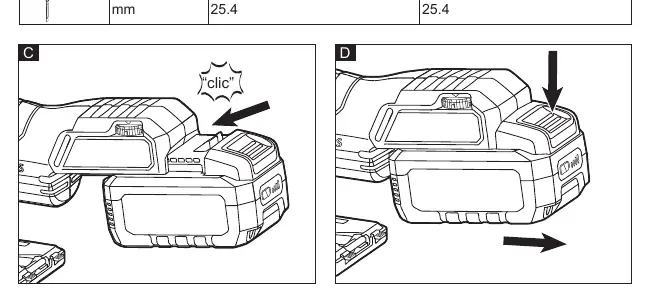
Insert the charged battery into the tool until it clicks into place. To remove, press the release button and pull the battery out.
Installing and Removing the Saw Blade
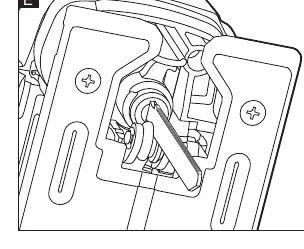
To install: Insert the blade (teeth facing the cutting direction) into the tool-less blade handle slot as far as it will go. Pull down on the blade to verify it is locked. Ensure the back of the blade rests in the guide roller groove.
To remove: Rotate the tool-less blade handle and pull out the blade. Always wear protective gloves when handling the blade, as it may be sharp or hot.
Adjusting the Foot Bevel Angle
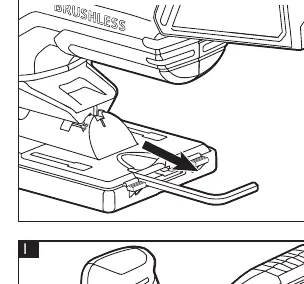
Remove the hexagon wrench from the foot. Loosen the hex screw, move the foot forward, and tilt it to the desired angle (0° or 45°). The foot has indents for easy angle setting.
Settings and Modes
Speed Adjusting Dial
Adjust the speed using the dial (1-5). Position 'A' automatically reduces no-load speed to minimize vibration. Refer to the table in the manual for recommended settings based on the material (e.g., Wood, Steel, Aluminum, Plastic).
Orbital-Action Settings
Adjust the orbital action using the control lever (0-3) to adapt to the material and cutting speed. Position 0 is for straight-line cutting, while higher positions provide more aggressive orbital action for faster cuts in wood.
Cutting Tips
- Straight Cuts: Use a straightedge clamped parallel to the cut line.
- Plunge Cutting: Useful for openings in soft materials. Tilt the saw forward on the foot, start the motor, and gradually lower the blade into the material. Do not plunge cut into metal.
- Metal Cutting: Use appropriate blades for metal. Move slowly, use lower speeds, and lubricate the blade with cutting wax or oil if available.
Maintenance
Regularly clean the tool and the grille in front of the vent slots. Periodically blow out the housing interior and motor with dry compressed air. For spare parts and accessories, visit www.flex-tools.com.
Official resources from the manual
Manufacturer information
FLEX
Practical help
Common problems
Blade jumps or bounces
Use a blade with finer teeth.
Blade seems clogged when cutting soft metal
Use a blade with coarser teeth.
Saw does not cut accurately
Ensure the blade is not twisted or bent, and do not force the saw.
Before use
- Check for missing or damaged parts
- Charge the battery fully
- Ensure the switch is in the OFF position
- Wear safety goggles and dust mask
Images and diagrams
- A: Overview of components
- B: Technical specifications table
- C/D: Battery insertion/removal
- E/F: Blade installation/removal
- G/H: Foot angle adjustment
Model compatibility
- Compatible with most T-shank blades

Manual page author
David Miller
Documentation analyst
Organizes user manual content into clear summaries, with attention to model details, product context, and everyday usability.