Tools / Electronic Test Equipment
User Manual for Fluke 1550C/1555 Insulation Tester
Quick guide and user manual for the Fluke 1550C/1555 Insulation Tester. Learn how to perform insulation tests, manage test data, use the guard terminal, and maintain your device.
Table of contents
Quick Guide from the Manual
The Fluke 1550C and 1555 are high-voltage insulation testers designed to validate circuits such as switchgear, motors, and cables. Key features include programmable test voltages, resistance measurement up to 2 TΩ, Polarization Index (PI), Dielectric Absorption Ratio (DAR), and PC connectivity via IR port.
Getting Started
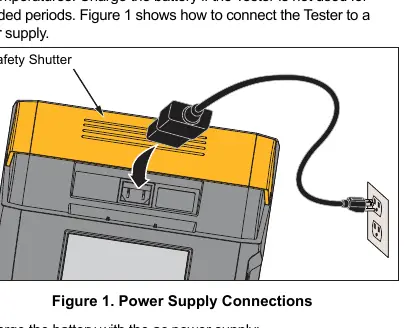
Before using the tester, inspect the pack list to ensure all items are present, including the AC power cord, test cables with alligator clips, and the infrared adapter. The tester uses a rechargeable 12 V lead-acid battery. To charge, connect the AC power cord to the IEC socket on the tester. Do not store the battery in a low-charged state.
Measurements
Safety Warning: Always remove power from the circuit under test and discharge circuit capacitance before testing. Confirm no hazardous voltage is present before and after testing.
- Connecting: Move the safety shutter to access input terminals. Connect the common test lead before the live test lead.
- Guard Terminal: Use the Guard (G) terminal for three-wire measurements to eliminate surface leakage current when measuring very high resistances.
- Insulation Test: Set the desired test voltage (250 V to 10,000 V), toggle Ramp mode if needed, and set a time limit (1 to 99 minutes). Press and hold the TEST button for 1 second to start.
- Advanced Tests: The tester automatically calculates PI and DAR when the test duration is sufficient.
Data Management
The tester can store up to 99 sets of test data. After a test is complete, you can save the results with a custom 4-character tag. Stored data can be viewed on the device or downloaded to a PC using the Fluke Connect Desktop software and the provided infrared cable.
Maintenance
Periodically wipe the case with a damp cloth and mild detergent. Do not use abrasives or solvents. There are no user-replaceable parts inside the product. Dispose of the product and batteries in a professional and environmentally appropriate manner.
Specifications
The tester is specified for 1 year after calibration at operating temperatures of 0 °C to 35 °C. It features a large LCD, auto shutoff after 30 minutes of inactivity, and supports Fluke Connect wireless systems.
Manufacturer information
Fluke Corporation
Practical help
Common problems
Tester beeps continuously and hazardous voltage is shown on the display.
Remove power from the circuit under test immediately and disconnect the test leads.
Unspecified reading >0 when leads are shorted.
This is normal for this input circuitry configuration and does not affect readings within the specified accuracy range.
Battery not holding charge or low battery.
Charge the battery for up to 12 hours. Do not store the battery in a low-charged state for extended periods.
Before use
- Inspect all items from the pack list.
- Ensure the battery is fully charged.
- Remove all power from the circuit under test.
- Discharge circuit capacitance.
- Confirm no hazardous voltage is present using the display indicators.
Specs in practice
- Test Voltage
- 250 V to 10,000 V (1555 only) for insulation testing.
- Resistance Range
- 200 kΩ to 2 TΩ.
- PI (Polarization Index)
- Ratio of resistance at 10 minutes to 1 minute.
- DAR (Dielectric Absorption Ratio)
- Ratio of resistance at 1 minute to 30 seconds.
Images and diagrams
- Figure 1: Shows how to connect the AC power cord to the tester for charging.
- Figure 3: Illustrates using the Guard terminal to eliminate surface leakage current.
- Table 5: Shows the correct placement of test leads into the input terminals.
Model compatibility
- 1550C is limited to 5000 V maximum.
- 1555 supports up to 10,000 V.
- PC software requires specific Windows drivers to be installed.

Manual page author
Michael Turner
Technical manual editor
Reviews PDF manuals for structure, safety notes, and practical product details so readers can find the right information quickly.