Electronics / Speakers & Soundbars
Focal Dôme User Manual
Comprehensive user guide for the Focal Dôme speaker system, covering installation, wall mounting, wiring for 2.0/2.1/5.1 configurations, subwoofer settings, and technical specifications.
Quick answers from the manual
Quick answer
- The Focal Dôme is a compact speaker system. This manual covers wall mounting, wiring for 2.0/2.1/5.1 configurations, and adjusting subwoofer settings like crossover and phase. p. 12, 13, 15, 17
Key actions
- Wall mounting: Drill holes using the template, attach the bracket, and click the speaker into place. p. 14
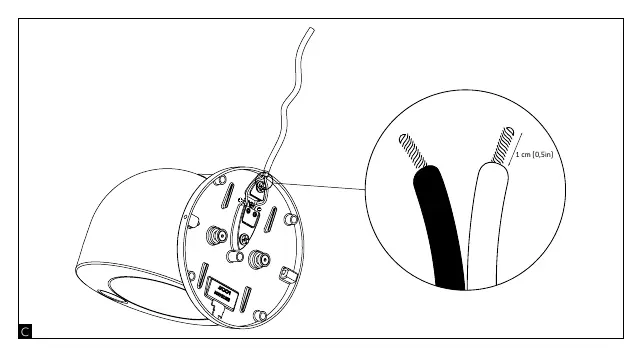
- Wiring: Strip 1cm of insulation, connect to the appropriate terminals (+/-). p. 13
Problems and fixes
No sound from subwoofer
Check power switch, input signal, and volume settings.
p. 17, 18Technical specifications
| Parameter | Value | Meaning | Pages |
|---|---|---|---|
| Dôme Sat Frequency Response | 80Hz - 28kHz | Frequency range of satellite speakers. | p. 20 |
| Dôme Sub Frequency Response | 39Hz - 170Hz | Frequency range of subwoofer. | p. 20 |
Where to find it in the PDF
- Safety Instructions p. 3, 4, 5, 6
- Installation and Wiring p. 13, 14, 15
- Subwoofer Settings p. 17, 18
- Specifications p. 20
Table of contents
Manual images
Click an image to enlargeQuick guide from the manual
The Focal Dôme system consists of compact satellite speakers and an active subwoofer. This manual provides essential instructions for safe installation, wiring, and configuration to ensure optimal performance. Always ensure the amplifier is turned off before making any connections.
Installation and Mounting
The Dôme speakers can be placed on a surface or mounted on a wall. To mount on a wall:
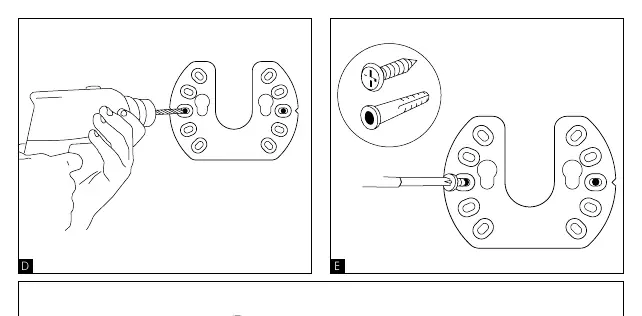
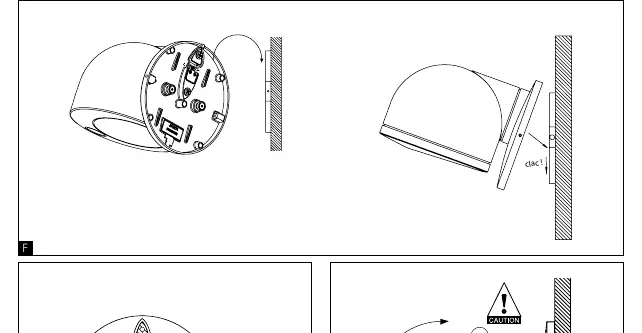
- Use the provided wall bracket as a template to mark the drilling points.
- Drill the holes and insert appropriate wall anchors.
- Secure the bracket to the wall using screws.
- Align the speaker with the bracket and click it into place.
- The speaker angle can be adjusted (0/90°) once mounted.
Wiring and Connections
Ensure all connections are made with the amplifier powered off. Strip approximately 1 cm (0.5 in) of insulation from the speaker cables.
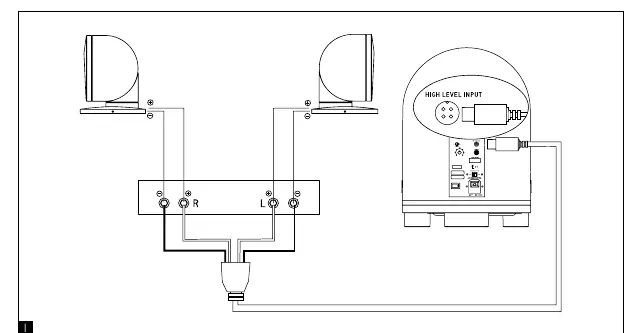
- 2.0/2.1 Setup: Connect the satellite speakers to the amplifier's left and right outputs. Connect the subwoofer to the amplifier's subwoofer output (LFE) or via high-level inputs if required.
- 5.1 Setup: Connect the front, center, and surround speakers to the corresponding amplifier outputs. Connect the subwoofer to the LFE output.
Subwoofer Controls
The subwoofer features several controls on the rear panel to fine-tune the sound:
- Volume: Adjusts the subwoofer output level.
- Autopower: Set to 'Auto' for the subwoofer to turn on automatically when a signal is detected and off after 5 minutes of inactivity. Set to 'On' for continuous operation.
- Phase Shift: Adjusts the phase (0° or 180°) to align the subwoofer's output with the satellite speakers.
- Adjustable Crossover: Sets the frequency (60Hz - 170Hz) at which the subwoofer takes over from the satellites. For Dôme satellites, set the crossover to the 'Dôme' position.
Safety and Maintenance
- Do not expose the equipment to water or moisture.
- Clean only with a dry cloth.
- Do not block ventilation openings.
- Ensure the power supply matches the voltage indicated on the product label.
- In case of prolonged absence, switch off the main power.
Manufacturer information
Focal
Practical help
Common problems
No sound from subwoofer
Check that the main power switch is ON, the power cable is connected, and the volume is turned up. Ensure an input signal is present.
Subwoofer does not turn on automatically
Ensure the 'Autopower' switch is set to 'Auto' and that the input signal level is sufficient to trigger the auto-on function.
Before use
- Ensure the amplifier is turned off before connecting speakers.
- Verify that the power supply voltage matches the product label.
- Check that all cable polarities (+/-) are correctly matched.
- Ensure the subwoofer is placed on a stable, flat surface.
- Strip 1 cm of insulation from speaker wires for secure connection.
Images and diagrams
- Wiring diagrams illustrate connections for 2.0/2.1 and 5.1 home theater configurations.
- Wall mounting diagrams show the step-by-step process for drilling and attaching the speaker bracket.
Model compatibility
- Recommended amplifier power: 25 - 100W.
- Dôme Sat impedance: 8 Ohms nominal, 4 Ohms minimum.

Manual page author
Emily Carter
User documentation editor
Prepares concise manual descriptions and highlights the most useful setup, operation, and maintenance information for readers.