Home Appliances / Personal Care
User Manual for FOREO LUNA 4 Facial Cleansing Device
Quick guide for the FOREO LUNA 4. Learn how to set up, use cleansing and firming massage modes, maintain your device, and troubleshoot common issues.
Quick answers from the manual
Quick answer
- The LUNA 4 is a 2-in-1 facial cleansing and firming device. To start, download the FOREO For You app, register your device, and connect via Bluetooth. Use the power button to toggle modes and the app for advanced settings. p. 3
Key actions
- Unlock/Register p. 3
- Cleansing Mode p. 5
- Firming Massage Mode p. 5
First start
- Download the FOREO For You app, log in, add device, and press the power button to connect. p. 3
Problems and fixes
Device not activating
Recharge using USB cable for up to 2 hours.
p. 6
Buttons unresponsive
Press and hold power button to restart.
p. 6Maintenance and reset
- Clean with water and soap, rinse with warm water. Avoid alcohol, petrol, or acetone. p. 5
Technical specifications
| Parameter | Value | Meaning | Pages |
|---|---|---|---|
| Battery | Li-ion 520mAh 3.7V | Rechargeable battery | p. 8 |
| Size | 102*82.5*39.2mm | Physical dimensions | p. 8 |
Where to find it in the PDF
- Getting Started p. 2, 3
- Troubleshooting p. 6
Table of contents
Manual images
Click an image to enlargeQuick Start Guide
To begin using your LUNA 4, follow these steps:
- Download the FOREO For You app on your mobile phone.
- Log in to your account or sign up for a new one.
- Add your device in the app.
- Press and hold the Power button on the device to connect it to the app.
- Fill in the purchase information to unlock and register your device.
Getting to Know LUNA 4
The LUNA 4 is a 2-in-1 facial cleansing and firming device. Key features include:
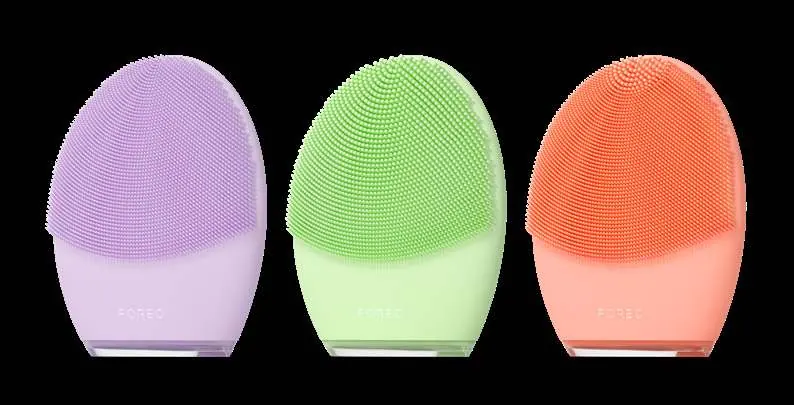
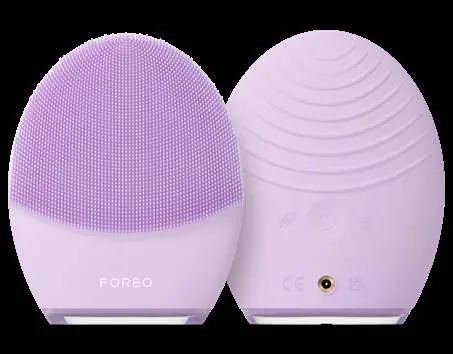
- T-Sonic Pulsations: Remove dirt, oil, and makeup residue in 1 minute.
- Firming Facial Massage: Targeted routines for a more youthful appearance.
- Ultra-Hygienic Silicone: BPA and phthalate-free, suitable for all skin types.
- Interface: Power button for on/off and mode switching, plus a charging port.
Using LUNA 4
Cleansing Mode
- Remove all makeup, dampen skin, and apply FOREO cleanser.
- Press the power button to activate Cleansing mode.
- Use the mode buttons to switch between Gentle and Deep Cleansing.
- Glide the device in circular motions over your face until the timer turns it off.
- Rinse and pat your face dry.
Firming Massage Mode
- Apply FOREO serum to clean, dry skin.
- Press the power button to turn on, then double-press to activate Firming Massage mode.
- Use the mode buttons to switch between saved massage routines.
- Glide the firming surface in outward motions following the shape of your face until the timer turns it off.
App Integration
The FOREO For You app allows you to:
- Control device settings and preferences.
- Access video-guided massage routines.
- Find your device if misplaced.
- Adjust cleansing duration (up to 240s) and T-Sonic intensity levels.
Maintenance and Cleaning
Always clean the device thoroughly after use:
- Wash the brush surface with water and soap, then rinse with warm water.
- Pat dry with a lint-free cloth or towel.
- For optimal results, use FOREO Silicone Cleaning Spray.
- Note: Never use cleaning products containing alcohol, petrol, or acetone, as they may damage the silicone. Avoid clay-based, silicone-based, or grainy cleansers.
Troubleshooting
- Device not activating: Battery is dead. Recharge using the USB cable for up to 2 hours.
- Buttons not responding: Microprocessor may be malfunctioning. Press and hold the power button to restart the device.
- Sync issues: Ensure the device is fully charged, Bluetooth is on, and the app is updated. Restart your phone if necessary.
Safety and Specifications
Safety Precautions:
- Consult a dermatologist if you have skin conditions or medical concerns.
- Discontinue use if you experience discomfort.
- Do not share the device for hygiene reasons.
- Do not use for more than 3 minutes at a time.
Specifications:
- Battery: Li-ion 520mAh 3.7V
- Size: 102 x 82.5 x 39.2 mm
- Weight: 126g
- Usage: Up to 300 uses per charge
Practical help
Common problems
Device not activating
Battery is dead. Recharge using the USB charging cable for up to 2 hours.
Buttons not responding
Microprocessor malfunction. Press and hold the power button to restart the device.
Won't sync to app
Ensure device is charged, Bluetooth is enabled, and the app is updated. Restart your phone.
Before use
- Download the FOREO For You app
- Register your device in the app
- Charge the device fully
- Remove all makeup before cleansing
- Apply FOREO cleanser or serum as directed
Images and diagrams
- The device features a power button, mode buttons, and a charging port on the back.
- The front features silicone touchpoints for cleansing.
Model compatibility
- Avoid clay-based, silicone-based, or grainy cleansers.
- Do not use cleaning products containing alcohol, petrol, or acetone.

Manual page author
David Miller
Documentation analyst
Organizes user manual content into clear summaries, with attention to model details, product context, and everyday usability.