Electronics / Cameras
FUJIFILM XF 100-400mm OIS WR Lens Owner’s Manual
Comprehensive owner's manual for the FUJIFILM XF 100-400mm F4.5-5.6 R LM OIS WR lens, covering safety, operation, maintenance, and technical specifications.
Table of contents
Product Overview
The FUJIFILM XF 100-400mm F4.5-5.6 R LM OIS WR is a high-performance telephoto zoom lens designed for X-mount cameras. It features advanced optical construction, including extra-low dispersion elements to ensure high image quality. The lens is equipped with a linear motor for fast and accurate autofocus, and optical image stabilization (OIS) to minimize blur.
Safety Precautions
Before using the lens, please read all safety instructions carefully. Do not immerse the lens in water or expose it to moisture, as this can cause fire or electric shock. Do not disassemble or modify the lens. If the lens casing breaks due to a fall or accident, do not touch the exposed internal parts; remove the camera battery immediately and contact your dealer. Keep the lens out of reach of children and avoid looking directly at the sun through the lens or camera viewfinder to prevent permanent eye damage.
Getting Started
Ensure your camera firmware is updated to the latest version to access all lens features. The lens comes with a front cap, rear cap, lens hood, wrapping cloth, and a tripod collar foot. To attach the lens, follow the instructions in your camera's manual. Note that this lens is not compatible with X-mount film cameras.
Operation
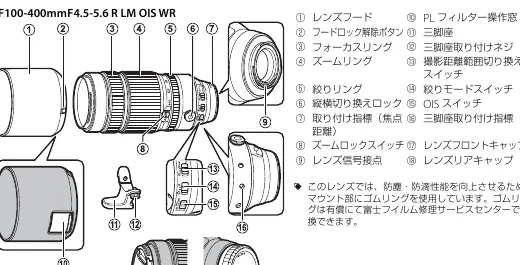
The lens features a zoom ring for focal length adjustment and an aperture ring for manual aperture control. For automatic aperture control, set the aperture mode switch to A. The OIS switch enables optical image stabilization. The focus range selector allows you to choose between the full range or a restricted range (5m to infinity) for faster autofocus. The tripod collar foot can be used to rotate the camera between landscape and portrait orientations without removing it from the tripod.
Maintenance
Keep the lens signal contacts clean. Use a blower to remove dust and lint from glass surfaces. To remove smudges or fingerprints, use a small amount of lens cleaner on a soft, clean cloth or lens-cleaning tissue, wiping in a circular motion from the center outwards. Never use organic solvents like paint thinner or benzene. Store the lens in a cool, dry place with both caps attached when not in use.
Manufacturer information
Fujifilm Corporation
Practical help
Common problems
Audible sound and slight vibration when camera is off or in playback mode.
This is normal behavior caused by the linear motor's magnets disengaging and does not affect performance.
Lens features not available.
Ensure your camera firmware is updated to the latest version.
Camera rotates unexpectedly on tripod.
Ensure the tripod collar lock screw is fully tightened.
Before use
- Update camera firmware to the latest version.
- Ensure lens signal contacts are clean.
- Check that the tripod collar lock screw is adjusted correctly.
- Verify the focus range selector is set to the desired range.
- Ensure the lens hood is properly attached.
Specs in practice
- Focal length
- 100-400mm (35mm format equivalent: 152-609mm).
- Max. aperture
- f/4.5-5.6.
- Min. aperture
- f/22.
Images and diagrams
- The lens features a zoom ring, focus ring, and aperture ring for manual control.
- The tripod collar allows for rotation between landscape and portrait orientations.
- The focus range selector toggles between FULL and 5m-infinity.
- The OIS switch controls optical image stabilization.
- The filter access port allows for adjustment of a polarizing filter.
Model compatibility
- Compatible with FUJIFILM X-mount digital cameras.
- Not compatible with X-mount film cameras.

Manual page author
Michael Turner
Technical manual editor
Reviews PDF manuals for structure, safety notes, and practical product details so readers can find the right information quickly.