Electronics / Cameras
FUJIFILM GFX 100S II Firmware Update v1.20
Official firmware update documentation for the Fujifilm GFX 100S II, detailing version 1.20 changes, including connectivity adjustments and smartphone pairing procedures.
Table of contents
Firmware Update Overview
This document outlines the changes, additions, and removals introduced in firmware version 1.20 for the Fujifilm GFX 100S II digital camera. Users are advised to visit the official Fujifilm support website for the most current manuals and firmware files.
Key Changes in Version 1.20
The update introduces several modifications to the camera's menu structure and connectivity features. Notable changes include the removal of specific wireless communication settings from the shooting, movie, and playback menus. Additionally, the instax print function has been removed from the playback menu, and the instax connection settings have been removed from the network/USB settings menu.
Please note that updating the firmware will reset the connection settings in the network/USB menu to default. Users will need to reconfigure these settings to match their external devices after the update process is complete.
Smartphone Pairing Procedure
The process for pairing the camera with a smartphone has been updated to improve user experience. To initiate the pairing process, follow these steps:
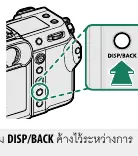
- Press the DISP/BACK button while the shooting information is displayed. Alternatively, you can press and hold the DISP/BACK button during playback to jump directly to the pairing menu.
- Navigate to the Bluetooth settings and select it using the MENU/OK button.
- Select the pairing option and confirm with MENU/OK.
- Open the dedicated app on your smartphone and follow the on-screen instructions to complete the pairing.
- Verify that the codes displayed on both the camera and the smartphone match to ensure a secure connection.
Once successfully paired, a white smartphone and Bluetooth icon will appear on the camera display. The devices will connect automatically when the app is opened. It is recommended to disable Bluetooth when not in use to conserve battery life.
Compatibility Notes
Following this update, the Fujifilm instax SHARE SP-1, SP-2, and SP-3 printers are no longer supported by the GFX 100S II. Users relying on these specific accessories should be aware of this change before proceeding with the firmware installation.
Manufacturer information
Fujifilm Corporation
Practical help
Common problems
Connection settings reset after update
The firmware update resets network/USB settings to default. You must reconfigure them manually for your external devices.
Instax printer not working
Fujifilm instax SHARE SP-1/SP-2/SP-3 printers are no longer supported in firmware v1.20.
Before use
- Ensure the camera battery is sufficiently charged.
- Visit the official Fujifilm support website to download the latest firmware.
- Back up any important camera settings before updating.
- Verify that the smartphone app is updated to the latest version.
Images and diagrams
- The DISP/BACK button is located on the rear of the camera body, used to access the pairing menu.
- The camera display shows a white smartphone and Bluetooth icon upon successful connection.
Model compatibility
- Instax SHARE SP-1, SP-2, and SP-3 printers are no longer supported.

Manual page author
David Miller
Documentation analyst
Organizes user manual content into clear summaries, with attention to model details, product context, and everyday usability.