Electronics / Cameras
Fujifilm GFX 100S II Firmware Update 1.20 Guide
Essential update information for the Fujifilm GFX 100S II camera, detailing changes in firmware version 1.20, including updated smartphone pairing procedures and removed legacy features.
Table of contents
Manual images
Jump to the sectionFirmware Update Overview
This document outlines the significant changes and feature updates introduced in firmware version 1.20 for the Fujifilm GFX 100S II digital camera. Users are advised that after performing a firmware update, certain settings, specifically the connection mode selection in the network/USB menu, may revert to default values. It is essential to reconfigure these settings according to the external devices you intend to connect to the camera.
Key Changes and Feature Removals
Firmware version 1.20 introduces several modifications to the camera's interface and connectivity options. Notable changes include:
- The removal of specific wireless communication functions from the shooting, movie, and playback menus.
- The removal of direct Instax printer printing options from the playback menu.
- The discontinuation of support for legacy Fujifilm Instax SHARE printers (SP-1, SP-2, and SP-3).
- Updates to the smartphone pairing procedure to improve connectivity reliability.
- Removal of wireless communication shortcuts from custom function button assignments.
Connecting to a Smartphone
The procedure for pairing the GFX 100S II with a smartphone via Bluetooth has been updated for better performance. To initiate the connection:
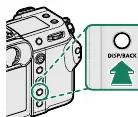
- Ensure the camera is displaying shooting information and press the DISP/BACK button.
- Navigate to the Bluetooth settings menu and select the pairing option.
- Launch the dedicated smartphone application and follow the on-screen instructions to complete the pairing process.
- Verify that the codes displayed on both the camera screen and the smartphone match to ensure a secure connection.
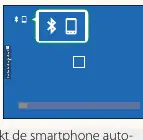
Once successfully paired, the smartphone will automatically reconnect to the camera whenever the application is launched. It is recommended to disable Bluetooth on the camera when not in use to conserve battery life. Always ensure your camera firmware is up to date by visiting the official Fujifilm support website to maintain compatibility with the latest mobile applications and accessories.
Manufacturer information
Fujifilm Corporation
Practical help
Common problems
Connection settings reset after firmware update
Manually reconfigure the connection mode in the network/USB settings menu.
Smartphone pairing failure
Ensure both the camera and smartphone display matching codes during the pairing process.
Battery draining quickly
Disable Bluetooth on the camera when not actively connected to a smartphone.
Before use
- Check current firmware version on the camera
- Visit the official Fujifilm support website for the latest firmware
- Ensure the camera battery is sufficiently charged
- Verify smartphone app compatibility
- Reconfigure network/USB settings after update
Images and diagrams
- The DISP/BACK button is used to initiate the smartphone pairing sequence.
- The Bluetooth menu allows for toggling the connection and starting the pairing process.
- The camera screen displays a white Bluetooth icon and a smartphone icon when a connection is active.
Model compatibility
- Instax SHARE printers SP-1, SP-2, and SP-3 are no longer supported.
- Requires updated smartphone application for full functionality.

Manual page author
David Miller
Documentation analyst
Organizes user manual content into clear summaries, with attention to model details, product context, and everyday usability.