Automotive / Navigation
Garmin TT 15X and TT 15 mini Dog Collar Device Quick Start Manual
Quick start guide for the Garmin TT 15X and TT 15 mini dog collar devices. Includes instructions for charging, pairing with handhelds, fitting the collar, and basic training setup.
Table of contents
Manual images
Click an image to enlargeQuick Start Guide
This manual provides essential setup and operating instructions for the Garmin TT 15X and TT 15 mini dog collar devices. Before using the device, ensure you have read the important safety information included in the product box.
Device Overview
The dog collar device consists of the following key components:
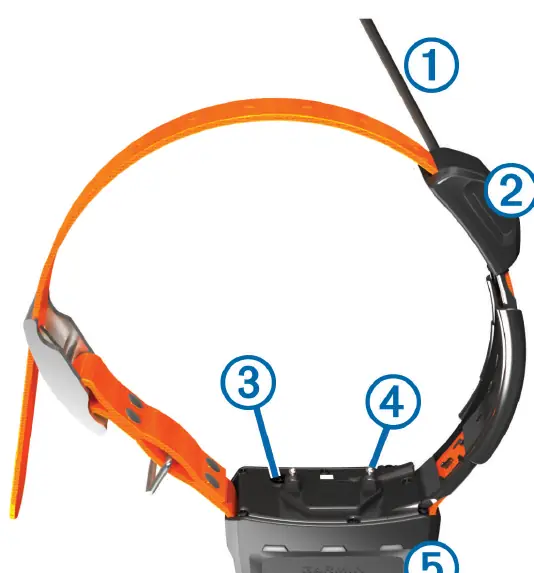
- VHF antenna: For radio communication.
- GPS antenna: For satellite tracking.
- Power button: Used to turn the device on and off and enter pairing mode.
- Contact points: Used for training stimulation.
- Status LED and flashing beacon LEDs: Indicates device status and helps locate the dog at night.
Charging the Device
NOTICE: To prevent corrosion, thoroughly dry the contacts on the collar and the surrounding area before connecting the charging clip.
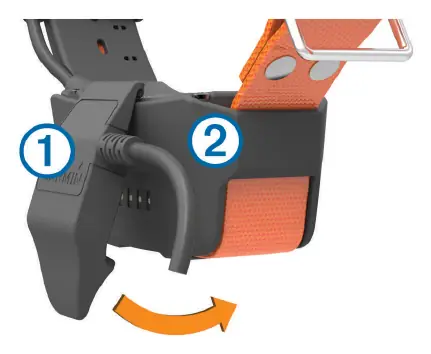
- Snap the charging clip onto the device.
- Plug the small end of the power cable into the mini-USB port on the charging clip cable.
- Plug the power cable into a power source. The status LED will be solid red while charging.
- Once the status LED turns solid green, remove the charging clip.
Charging a fully depleted battery takes approximately five hours.
Pairing with a Handheld Device
- If the collar is on, turn it off.
- Hold the power button on the collar until it emits two series of beeps (about 2 seconds), then release. The status LED will flash rapidly in green, indicating it is ready to pair.
- On your handheld device, select Dog List > Add Dog.
- Select Pair Collar and follow the on-screen instructions.
Fitting the Collar
CAUTION: To prevent irritation from the contact points, remove the collar for at least eight hours out of every 24-hour period. Do not spray the device or collar with harsh chemicals, such as flea or tick spray, until they are completely dry.
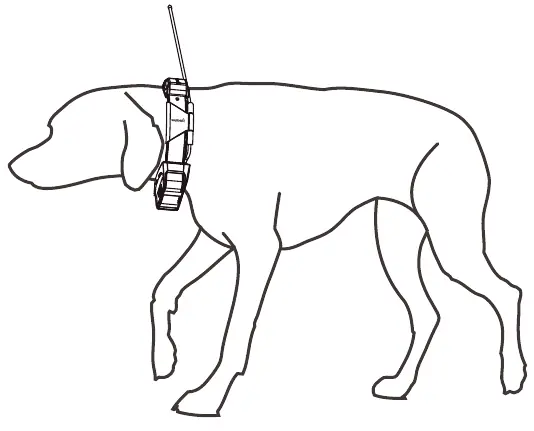
- Position the device at the front of the dog's neck, with the status LED facing the chin and contact points against the throat.
- Tighten the strap so it is snug but allows the dog to swallow food and water normally.
- Wiggle the device to ensure the contact points make contact with the dog's skin.
- If the strap is too long, cut off the excess, leaving at least 8 cm (3 in.) to spare.
Securing the Antenna
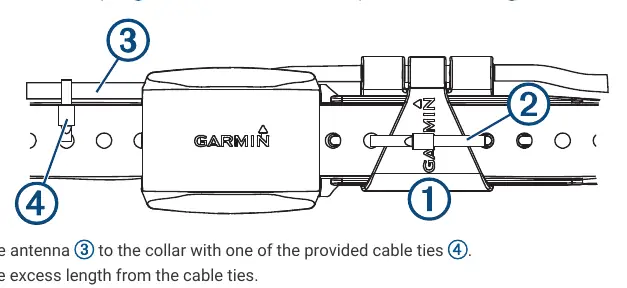
For maximum radio performance, the antenna should point straight up. Use the provided cable ties to secure the antenna and antenna keeper to the collar, ensuring no sharp edges touch the dog's skin.
Maintenance and Updates
You can update the device software by connecting it to a computer and using the Garmin WebUpdater tool. Always keep the device clean by wiping it with a cloth dampened with a mild detergent solution.
Manufacturer information
Garmin Ltd.
Practical help
Common problems
Device not charging
Ensure the contacts on the collar and the surrounding area are thoroughly dry and clean before connecting the charging clip.
Poor communication signal
Maintain an unobstructed line of sight between the handheld and the collar. Move to the highest elevation point in your area.
Skin irritation
Remove the collar for at least eight hours out of every 24-hour period.
Before use
- Fully charge the battery (approx. 5 hours).
- Ensure contact points are tightened correctly using the included wrench.
- Acquire satellite signals outdoors in an open area.
- Pair the collar with your handheld device.
- Ensure the antenna is pointing straight up.
Specs in practice
- Operating temperature
- -20° to 60°C (-4° to 140°F).
- Charging temperature
- 0° to 40°C (32° to 104°F) for TT 15X; 5° to 40°C (41° to 104°F) for TT 15 mini.
Images and diagrams
- Collar components: VHF antenna, GPS antenna, Power button, Contact points, Status LED.
- Charging clip connection: Snap clip onto device, plug into power source.
- Fitting: Position device at front of neck, tighten strap snugly.
- Antenna securing: Use cable ties to keep antenna pointing up.
Model compatibility
- Compatible with Alpha handheld devices.
- Some features (like sleep mode) may not be available on all collar models.

Manual page author
Michael Turner
Technical manual editor
Reviews PDF manuals for structure, safety notes, and practical product details so readers can find the right information quickly.