Electronics / Monitors
Acrylic Stand Keyholder Design Guide (100x130mm)
A comprehensive guide for preparing design files for 100x130mm acrylic stand keyholders, including technical specifications, layout requirements, and submission checklists.
Table of contents
Design Specifications
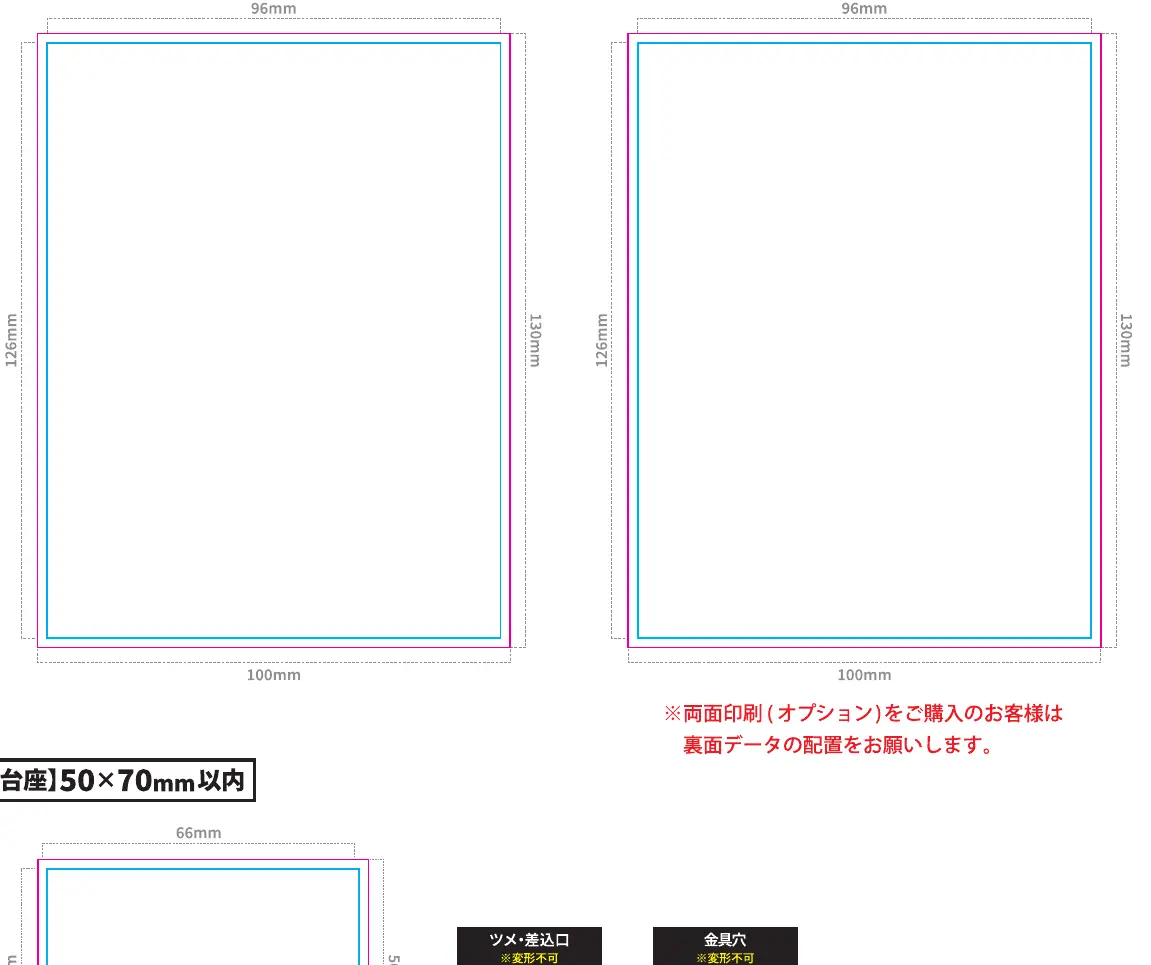
This guide provides the necessary technical requirements for creating custom acrylic stand keyholders with a main body size of 100x130mm. To ensure the highest quality output, all designs must be created within the specified dimensions. The main body area is defined as 100x130mm, while the base component is limited to 50x70mm. It is crucial to maintain a 2mm margin from the cut line to the edge of your printed artwork to prevent any potential misalignment during the cutting process.
Design Preparation Guidelines
When preparing your files, please adhere to the following professional standards to ensure a smooth production process. All text elements must be converted to outlines to prevent font substitution issues. All images used in the design should be embedded directly into the file. The color mode must be set to CMYK to ensure accurate color reproduction on the acrylic material. If you are including a white ink layer, it should be set to 100% black (K100) in your design software.
Submission Checklist
Before submitting your design, verify that you have completed all necessary steps. Ensure that both the main body and the base designs are included, along with the required cut lines and white ink layers. If you are ordering double-sided printing, please ensure that the reverse side data is correctly aligned with the front side. Avoid placing any design elements within 2mm of the metal fitting hole, as this area is prone to cracking during the manufacturing process. If you choose a standard base shape, you do not need to create a separate base design file. However, if the base is significantly smaller than the frame, it may result in an unstable stand. Always double-check that your cut lines are clearly defined and that complex shapes are simplified to ensure structural integrity.
Production Considerations
Proper file preparation is essential for the final product's durability and aesthetic appeal. By following these guidelines, you minimize the risk of production errors and ensure that your custom acrylic stand meets your expectations. Please ensure that all specific requirements, such as the type of metal fitting and packaging preferences, are clearly indicated in your submission form. If you have any questions regarding the design process or file compatibility, please refer to the provided technical specifications or contact our support team for further assistance.
Practical help
Common problems
Unstable stand
Ensure the base size is not significantly smaller than the frame.
Printing issues near holes
Avoid placing design elements within 2mm of the metal fitting hole.
Font display errors
Convert all text to outlines before submission.
Before use
- Create design within the blue frame (original size).
- Set cut lines within the red frame.
- Convert all text to outlines.
- Embed all images.
- Set color mode to CMYK.
- Set white ink layer to K100.
- Place base tabs/slots correctly.
Specs in practice
- Main Body Size
- Maximum dimensions of 100x130mm for the acrylic figure.
- Cut Line Margin
- 2mm distance required from the edge of the print to the cut line.
- White Ink Layer
- Must be set to 100% black (K100) in the design file.
Images and diagrams
- The blue frame represents the original design size.
- The red frame indicates the required cut line area.
- The 12mm slot is the standard size for the base connection.
- The metal fitting hole is located at the top of the main body.
Model compatibility
- Standard base shapes do not require a separate design file.
- Double-sided printing requires specific reverse side data alignment.

Manual page author
David Miller
Documentation analyst
Organizes user manual content into clear summaries, with attention to model details, product context, and everyday usability.