Electronics / Monitors
Generic X5 1080P USB DVR Radio Cables User Guide
Comprehensive installation and configuration guide for the Generic X5 1080P USB DVR and car radio system, covering cable connections, pin mapping, and software setup.
Table of contents
Product Overview and Installation
The Generic X5 1080P USB DVR and car radio system is designed for seamless integration into your vehicle. The system supports various configurations, including setups with or without a CANBUS box. Proper installation is critical for the functionality of all features, including the rear camera, steering wheel controls, and external peripherals.
Cable Connections
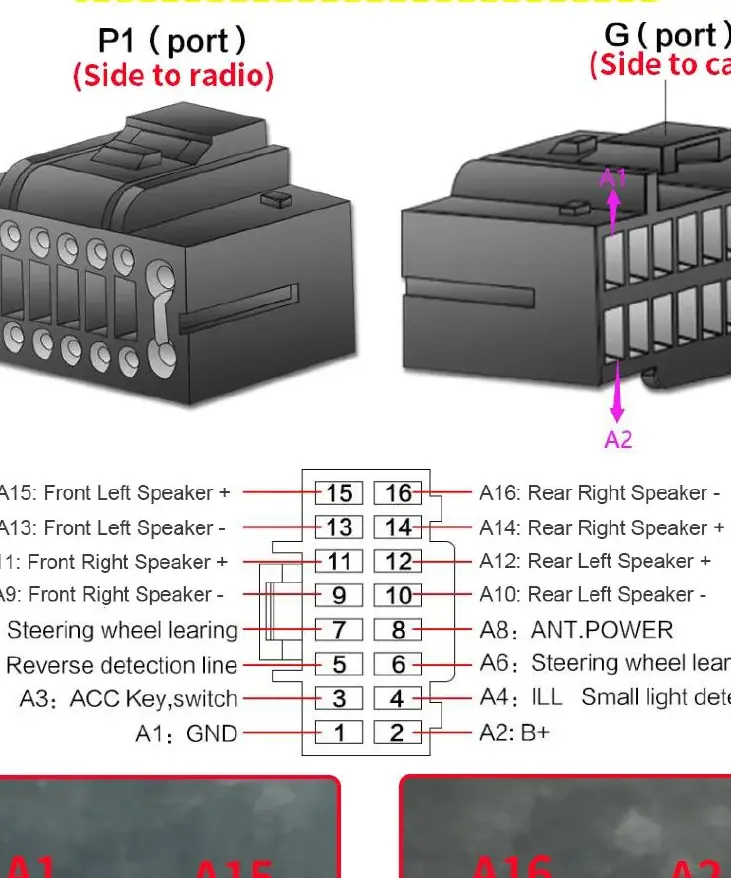
The system utilizes a comprehensive wiring harness. When connecting the radio, ensure all cables are securely seated. The main power cable includes specific pin definitions for speakers, power, and control signals. For systems with a CANBUS box, ensure the box is correctly connected between the power harness and the radio unit to maintain communication with the vehicle's onboard systems.
Connecting Peripherals
The radio unit features multiple ports for expansion. You can connect an AHD rear camera, an external microphone, a subwoofer, and a cooling fan. The RCA cable harness provides dedicated connectors for these devices. For example, the microphone connects to the MIC port, and the subwoofer connects to the SUB WOOFER port. Ensure that the AHD rear camera is connected to the appropriate reverse signal line to trigger the camera display automatically when the vehicle is in reverse gear.
DVR Setup and Software
To use the X5 1080P USB DVR, connect the device to the 6-pin USB cable provided. Once connected, navigate to the File Manager application on the radio's interface to locate and install the Fvdvr APK file. After installation, the DVR application will be available for use, allowing you to record and manage your driving footage directly through the radio's display.
System Maintenance and Configuration
If you encounter issues with the system, you may need to perform a factory reset. To do this, navigate to the Settings menu, select System, and then choose the Reset Factory option. You will be prompted to enter the factory password, which is 7890. This process will restore the system to its original settings. Always ensure that your connections are secure and that the wiring matches the provided pin map to avoid electrical issues or system malfunctions.
Practical help
Common problems
DVR not recognized
Ensure the DVR is plugged into the 6-pin USB cable and the Fvdvr APK is installed via File Manager.
Rear camera not triggering
Verify that the reverse signal line (A5) is correctly connected to the reversing light positive wire.
System malfunction
Perform a factory reset via Settings > System > Reset factory using password 7890.
Before use
- Verify if your vehicle requires a CANBUS box.
- Ensure all RCA connectors are firmly seated.
- Check that the power cable pin map matches your vehicle's harness.
- Install the necessary APK for the USB DVR.
- Confirm the reverse camera signal wire is connected.
Images and diagrams
- The pin map shows the G-port configuration for speaker and power connections.
- Wiring diagrams illustrate the difference between CANBUS and non-CANBUS installations.
- The cooling fan connection is located on the RCA harness.
- The microphone and subwoofer use specific labeled RCA connectors.
Model compatibility
- The system supports both original OEM rear cameras and aftermarket AHD cameras.
- 4G functionality requires a SIM card and the 4G antenna.
- The 360 camera is an optional accessory that must be purchased separately.

Manual page author
Michael Turner
Technical manual editor
Reviews PDF manuals for structure, safety notes, and practical product details so readers can find the right information quickly.