Power / Batteries & Chargers
User Manual for Goal Zero Flip 36 Power Bank
Quick start guide and user manual for the Goal Zero Flip 36 Power Bank. Learn how to charge your devices, check battery levels, and maintain your power bank.
Table of contents
Manual images
Click an image to enlargeQuick Guide
The Goal Zero Flip 36 is a portable power bank designed to charge small electronic devices like phones, tablets, and POV cameras. It features a built-in flip-out USB charging tip for recharging the power bank itself and a standard USB output port for charging your devices.
Getting to know your gear
The device is simple to operate with the following features:
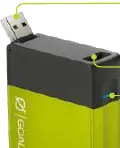
- 2.1A USB Charging Tip: Flip this out to plug into a USB power source for recharging the power bank. When the tip is closed, press it to display the current battery level. Double press to turn off the USB output.
- 2.1A USB Output: Plug your charging cable here to power your gear.
- Battery Indicator Lights: Four lights indicate the charge level: 1 light = 25%, 2 lights = 50%, 3 lights = 75%, 4 lights = 100%.
How it works
To charge your devices, simply connect them to the USB output port. The Flip 36 is designed to provide approximately three charges for most phones and one charge for small tablets.
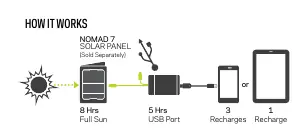
To recharge the Flip 36 itself, flip out the USB charging tip and plug it into a powered USB port (computer, wall adapter, or solar panel). Recharging via a USB source takes approximately 5 hours, while using a Nomad 7 Solar Panel takes 8-10 hours in full sun.
Technical Specifications
- Battery Capacity: 36Wh (3.6V, 10050mAh)
- Cell Chemistry: Li-ion NMC
- USB Output: 5V, up to 2.1A (10.5W max)
- USB Input: 5V, up to 2.1A (10.5W max)
- Operating Temperature: 32-104°F (0-40°C)
- Weight: 6.8 oz (193g)
- Dimensions: 3.7 x 2.4 x 0.83 in (9.4 x 6.1 x 2.1 cm)
Maintenance
To ensure the longevity of the battery, keep the device plugged in when possible, or charge it every 3-6 months if it is being stored. The device features built-in charging and low-battery protection.
Manufacturer information
Goal Zero
Practical help
Common problems
Device not charging connected gear
Ensure the USB output is active. If it is not charging, double press the charging tip to toggle the output.
Unknown battery level
With the charging tip closed, press the tip to illuminate the battery indicator lights.
Before use
- Charge the power bank fully before first use.
- Check the battery level by pressing the charging tip while closed.
- Ensure your device is compatible with 5V/2.1A USB charging.
- Register your product at goalzero.com/product-registration/.
Specs in practice
- Capacity (10050mAh)
- Provides roughly 3 full charges for a standard smartphone or 1 charge for a small tablet.
- Operating Temp (0-40°C)
- Do not use or charge the device outside of this temperature range to prevent damage.
Images and diagrams
- The charging tip flips out for recharging the power bank itself.
- The USB output port is used to charge your external devices.
Model compatibility
- Not chainable.
- Compatible with Nomad 7 Solar Panel for off-grid charging.

Manual page author
Michael Turner
Technical manual editor
Reviews PDF manuals for structure, safety notes, and practical product details so readers can find the right information quickly.