Power / Batteries & Chargers
User Manual for Goal Zero Sherpa 100AC Power Bank
Comprehensive user guide for the Goal Zero Sherpa 100AC Power Bank. Learn how to charge the device, use USB-C PD ports, operate the AC inverter, and troubleshoot common issues.
Table of contents
Quick Start Guide
Ensure your Goal Zero Sherpa 100AC is fully charged before first use. Keep the unit plugged in when not in use. For solar charging, ensure the solar panel voltage does not exceed 22V.
Get to Know Your Gear
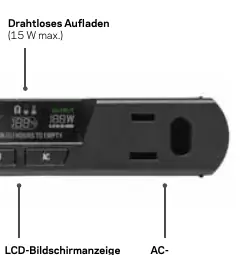
The Sherpa 100AC features a front panel with USB-A ports, a wireless charging pad, an LCD display, and an AC inverter. The back panel includes a fan, an 8mm DC input for charging, and a USB-C selector switch.
Charging the Sherpa
- USB: Use the included USB-C cable with one of the USB-C Power Delivery (PD) ports. A 65W USB-C charger is recommended for a 2-hour recharge.
- Solar: Connect a Nomad or Boulder solar panel to the 8mm input. Ensure the voltage does not exceed 22V.
- AC or 12V: Use the 8mm port with the accessory 12V Car Charging Cable or the Sherpa Power Supply (sold separately).
Using the Sherpa
The buttons on the device allow you to toggle the display, wireless charging, USB-A ports, and the AC port. The USB-C selector switch on the back is critical: set it to Input to charge the Sherpa, or Output to charge other devices.
Laptop Charging Tips
When charging laptops via USB-C PD, the ports are bidirectional. If the Sherpa tries to charge from the laptop's battery instead of charging the laptop, slide the selector switch on the back to Output.
Passthrough Charging
The Sherpa can be charged while simultaneously charging other devices. Note that if you output more power than you input, the Sherpa battery will drain and the device will turn off. Ensure the Sherpa is powered on before connecting devices.
Safety Instructions
- Do not exceed 22V when solar recharging.
- Use in a ventilated area; do not obstruct fan openings.
- Do not operate in wet conditions.
- The AC inverter generates potentially lethal AC power; use with caution.
- Do not insert foreign objects into outputs or ventilation holes.
Technical Specifications
- Battery: Li-ion NMC, 25600mAh @ 3.7V.
- Wireless Output: 15W max.
- USB-A Output: 5V, up to 2.4A (12W max).
- USB-C PD: Input 60W max, Output 100W max.
- AC Inverter: 100W modified sine wave (150W surge).
- Operating Temperature: 32-104F (0-40C).
Manufacturer information
Goal Zero
Practical help
Common problems
USB-C port not outputting 100W
Ensure both the cable and the device are capable of 100W. Use licensed and certified cables.
Wireless charging not reaching 15W
Ensure the phone is centered on the pad. Battery temperature or charge level may limit input.
Port light is red
An error occurred. Reset the port by pressing the corresponding on/off button.
USB-C port not charging device
Check the selector switch on the back. Set to 'Output' if it is in 'Auto' and not charging.
Before use
- Charge the unit fully before first use.
- Ensure solar panel voltage does not exceed 22V.
- Keep the unit plugged in when not in use.
- Inspect for dirt, dust, or moisture regularly.
Specs in practice
- 8mm DC Input
- Used for solar, AC, or 12V charging (60W max).
Images and diagrams
- Front panel shows USB-A ports, wireless charging pad, LCD screen, and AC inverter.
- Back panel shows fan, 8mm DC input, and USB-C selector switch.
Model compatibility
- Solar panels or series-chained panels exceeding 22V cannot be used.
- USB-C PD ports are bidirectional; use the selector switch to set to Output for charging laptops.

Manual page author
David Miller
Documentation analyst
Organizes user manual content into clear summaries, with attention to model details, product context, and everyday usability.