Home Appliances / Fans
Goldair 23cm Box Fan GCBF125 Operating Instructions
Quick guide for the Goldair 23cm Box Fan GCBF125. Learn how to operate, clean, and maintain your fan safely with this essential manual summary.
Quick answers from the manual
Quick answer
- To operate the Goldair 23cm Box Fan, place it on a sturdy surface, ensure the switch is set to 0 (OFF), and plug it in. Use the switch to select speed I (Low) or II (High). p. 5
Key actions
- Cleaning the fan p. 6
First start
- Ensure all packaging is removed and the fan is placed on a dry, level surface before plugging it in. p. 5
Show 4 more answers Show less
Problems and fixes
Overheating
Unplug the appliance and vacuum clean the air vents and grills.
p. 3Maintenance and reset
- Regularly clean the exterior with a damp cloth and vacuum the grills to prevent dust buildup. p. 6
Technical specifications
| Parameter | Value | Meaning | Pages |
|---|---|---|---|
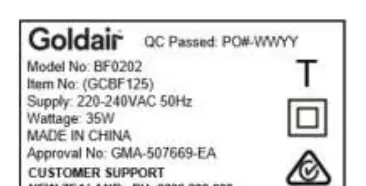
| Wattage | 35W | Power consumption | p. 4 |
| Supply Voltage | 220-240VAC 50Hz | Operating voltage | p. 4 |
Where to find it in the PDF
- Operating Instructions p. 1, 5
- Safety Guide p. 3, 4
- Cleaning p. 6
- Warranty p. 7
Table of contents
Manual images
Click an image to enlargeQuick guide from the manual
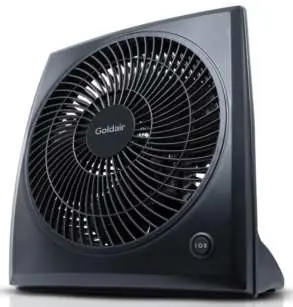
The Goldair 23cm Box Fan is a portable household appliance designed for simple operation. It requires no installation and should be placed on a dry, level, and sturdy surface. Always ensure all packaging is removed before use.
Safety Precautions
- Clearance: Keep all objects at least 1 metre away from the front, sides, and rear of the fan.
- Usage: Intended for household use only. Do not use outdoors, in bathrooms, near showers, or near swimming pools.
- Handling: Never cover the appliance. Ensure hands are dry before touching the plug or unit.
- Cord Safety: Do not twist, kink, or wrap the cord around the fan. Ensure the cord is fully extended during use. If the supply cord is damaged, it must be replaced by a qualified person.
- Moving: Switch off the fan and use the provided handles when moving the unit.
Operating your Fan
Before plugging the fan into the mains supply, ensure the speed control is set to the OFF position.

- 0: OFF
- I: Low Speed
- II: High Speed
To operate, turn the switch to the left for Low Speed or to the right for High Speed.
Cleaning and Maintenance
Regular cleaning is required to ensure trouble-free operation.
- Always unplug the fan from the mains supply before cleaning.
- Use a damp cloth (not wet) to wipe the exterior of the fan to remove dust and dirt.
- Use a vacuum cleaner to remove dust and fluff from around the grills.
- Do not attempt to dismantle the fan; there are no user-serviceable parts inside.
Warranty
This product is warranted against faults and manufacturing defects for one year from the date of purchase for normal domestic use. Retain your receipt as proof of purchase to verify your warranty.
Manufacturer information
Goldair
Practical help
Common problems
Overheating
Ensure air vents and grills are free of dust and fluff by vacuuming them regularly.
Fan not working or malfunctioning
Contact the place of purchase. Do not attempt to dismantle the fan or perform repairs yourself.
Before use
- Unpack the fan and check for transport damage.
- Ensure all packaging materials have been removed.
- Place the fan on a dry, level, and sturdy surface.
- Ensure the speed control switch is in the OFF (0) position.
- Ensure the power cord is fully extended and not coiled.
Show more Show less
Images and diagrams
- The control switch is located on the front of the unit.
- Positions: 0 (Off), I (Low Speed), II (High Speed).
Model compatibility
- Intended for household use only.
- Not for commercial or industrial use.
- Do not use in wardrobes or enclosed spaces.

Manual page author
David Miller
Documentation analyst