Home Appliances / Fans
User Manual for Goldair Platinum 107cm Tower Fan with WiFi
Quick guide for the Goldair Platinum 107cm Tower Fan with WiFi (GPTF470). Includes assembly instructions, operating modes, WiFi setup, and safety precautions.
Table of contents
Manual images
Click an image to enlargeQuick guide from the manual
This Goldair Platinum tower fan is designed for indoor household use. Before first use, ensure the unit is fully assembled and placed on a dry, level, and sturdy surface. Keep all objects at least 1 meter away from the front, sides, and rear of the appliance. The fan can be operated via the manual control panel on top of the unit or the included remote control. WiFi functionality requires a 2.4GHz home network.
Components
The fan consists of the following main parts:
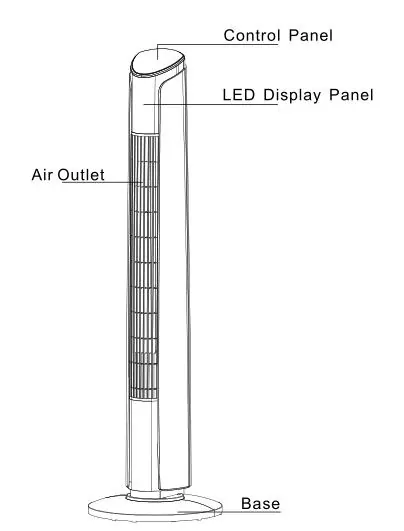
- Control Panel (top of the unit)
- LED Display Panel
- Air Outlet
- Base
Assembly
Always unplug the appliance before assembly. Do not attempt to use the fan until it has been fully assembled.
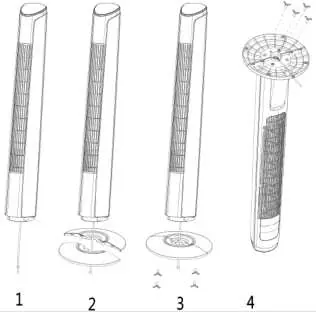
- The base comes in two parts that fit around the oscillation base.
- Attach the front half of the base, aligning the holes with the screw holes in the oscillation base, and lead the power cord through the center hole.
- Snap the back half of the base to the front half and secure it with the four supplied screws.
- Thread the power supply cord through the two cut-outs at the bottom of the base.
Operating your Fan
The fan can be controlled manually or via remote. All functions on the remote work identically to the manual controls.
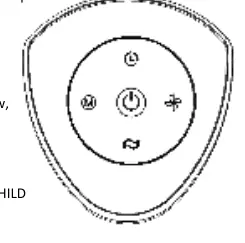
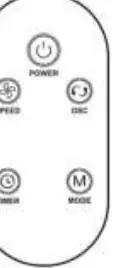
- On/Off: Press the Power button to turn the fan on or off.
- Speed: Press 'SPEED' to cycle through low, medium, and high settings.
- Mode: Press 'MODE' to select between Normal, Natural, Sleep, and Child modes.
- Timer: Allows setting operation length from 1 to 12 hours.
- Oscillation: Press 'OSC' to start or stop the oscillation function.
- Angle Adjustment: To tilt the fan backward, pull the top of the fan backward. Push it back to the upright position to reset.
WiFi and App Setup
This device is supported only on 2.4GHz Wi-Fi channels. It does not operate on 3G or 4G connections.
- Download the Goldair mobile app from the App Store or Google Play.
- Open the app and tap 'REGISTER'.
- Follow the prompts to agree to the Privacy Policy, enter your email, and obtain a verification code.
- Enter the verification code received via email, create a password, and confirm.
- Follow the in-app instructions or visit goldair.co.nz/goldair-app to pair the device.
Cleaning and Maintenance
Regular cleaning is required for trouble-free operation.
- Always switch off and unplug the fan before cleaning.
- Use a damp cloth (not wet) to wipe the exterior.
- Use a vacuum cleaner to remove dust and fluff from around the grills.
- Ensure the fan is completely dry before plugging it back in.
- Do not attempt to dismantle the fan; there are no user-serviceable parts.
Safety Warnings
- Keep batteries out of reach of children. The remote uses a CR2025 coin battery. If swallowed, seek medical attention immediately.
- Never cover the appliance.
- Do not use in bathrooms, near showers, or swimming pools.
- Do not use the appliance to dry clothes.
- Ensure the power cord is fully extended and not coiled during use.
Official resources from the manual
Manufacturer information
Goldair
Practical help
Common problems
Fan does not turn on
Ensure the power cord is plugged in and the fan switch is in the on position.
Overheating
Ensure air vents and grills are free of dust and fluff. Vacuum clean them regularly.
WiFi pairing fails
Ensure your phone is connected to a 2.4GHz Wi-Fi network. The device does not support 5GHz or cellular data.
Remote control not working
Check if the CR2025 battery is installed correctly in the back of the remote.
Before use
- Unpack the unit and check for transport damage.
- Ensure all parts are present.
- Assemble the base completely before plugging into the mains.
- Place on a dry, level, and sturdy surface.
- Ensure hands are dry before handling the plug.
- Keep 1 meter clearance around the unit.
Images and diagrams
- Base assembly: Two-part base secures around the oscillation base with four screws.
- Control panel: Located on top of the unit, includes Power, Speed, Mode, Timer, and Oscillation buttons.
Model compatibility
- WiFi: 2.4GHz networks only.
- Not for outdoor use.
- Not for commercial or industrial use.

Manual page author
Emily Carter
User documentation editor
Prepares concise manual descriptions and highlights the most useful setup, operation, and maintenance information for readers.