Home Appliances / Space Heaters
User Manual for Goldair GCT320 2100W Ceramic Tower Heater
Quick guide for the Goldair GCT320 2100W Ceramic Tower Heater. Learn how to operate the control panel, use the remote, set the timer, and maintain your heater safely.
Quick answers from the manual
Quick answer
- The Goldair GCT320 is a 2100W ceramic tower heater. It features multiple heat modes (High, Low, Eco), oscillation, a timer (1-12 hours), and a remote control. It includes safety features like a tilt switch and thermal link. p. 1, 7, 9
Key actions
- Turn on/off p. 7
- Set heat mode p. 7
- Set timer p. 7
First start
- Ensure all packaging is removed. Place on a flat, stable surface. Plug into a wall socket. Ensure switches are off before plugging in. p. 6
Show 4 more answers Show less
Problems and fixes
Heater stops working
Check if the tilt switch was activated or if the thermal link tripped due to overheating.
p. 9Maintenance and reset
- Clean air vents and grills regularly with a vacuum to prevent overheating. p. 3, 9
Technical specifications
| Parameter | Value | Meaning | Pages |
|---|---|---|---|
| Wattage | 2100W | Power consumption | p. 9 |
| Supply | 240VAC 50Hz | Electrical supply | p. 9 |
Where to find it in the PDF
- Operating p. 6, 7, 8
- Cleaning and Specs p. 9
Table of contents
Manual images
Click an image to enlargeQuick guide from the manual
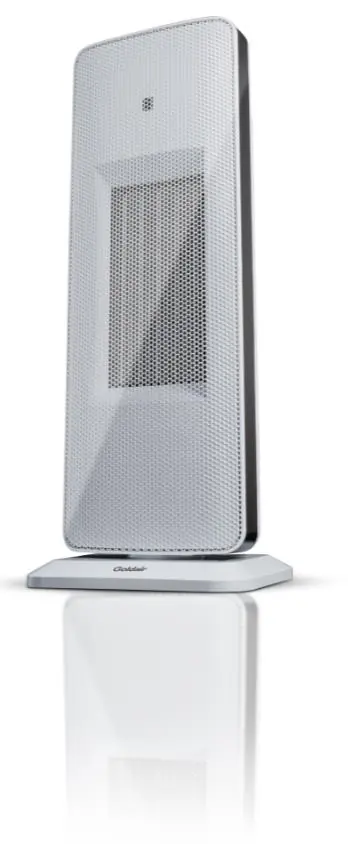
The Goldair GCT320 is a 2100W ceramic tower heater designed for indoor household use. It features multiple heat modes, oscillation, a timer, and a remote control. Always ensure the heater is placed on a flat, stable, heat-resistant surface and keep a 1-metre clearance from all objects, including curtains and furniture.
Safety precautions
- Do not cover: Covering the heater presents a fire risk and will permanently disable the unit.
- Clearance: Keep all objects at least 1 metre from the front, sides, and rear of the appliance.
- Placement: Use only on a flat, stable, heat-resistant surface. Do not use on thick, long carpet or bedding.
- Environment: Indoor use only. Do not use in bathrooms, near swimming pools, or in areas where flammable liquids are stored.
- Supervision: Do not leave the heater unattended when in use. Keep away from children and persons with reduced capabilities.
- Power: Plug directly into a wall socket. Do not use with external timers or programmers.
Operating the heater
Ensure all packaging is removed before use. Once in a safe position and switches are off, plug into the mains and switch on.
Control panel and remote
The remote control mirrors the functions of the control panel. For best results, aim the remote directly at the sensor on the front panel (3-metre range).
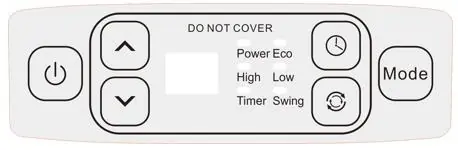
- On/Off Button: Turns the unit on/off. Note: The fan will continue to run for 60 seconds after turning off to cool the elements.
- Mode Button: Cycles between High, Low, and Eco modes.
- Eco Mode: Automatically adjusts power between 750W and 1500W to maintain an ambient temperature of around 20°C.
- Thermostat (Up/Down arrows): Adjusts the desired comfort level in High or Low modes.
- Oscillation Button: Turns the oscillation function on and off.
- Timer Button: Sets the auto-off or auto-on timer (1-12 hours).
Safety devices
- Tilt Switch: Automatically turns the appliance off if it is not in the correct operating position.
- Resettable Thermal Link: Automatically disconnects power if the unit overheats. It will reset after cooling down. If this occurs, investigate the cause of overheating.
Care and cleaning
Regular cleaning is required for trouble-free operation.
- Unplug the heater and allow it to cool completely before cleaning.
- Use a vacuum cleaner to remove dust and fluff from the air vents and grills, as this is a common cause of overheating.
- Wipe the exterior with a damp cloth (not wet) rinsed in hot soapy water.
- Do not use abrasive cleaning products, petrol, thinners, or polishing agents.
- Do not immerse the unit in liquids.
Technical specifications
- Model No: GCT320
- Supply: 240VAC 50Hz
- Wattage: 2100W
Manufacturer information
Goldair
Practical help
Common problems
Heater stops working unexpectedly
Check if the tilt switch was activated (ensure it is upright) or if the thermal link tripped due to overheating. If overheated, let it cool down.
Heater is overheating
Ensure air vents and grills are free of dust and fluff. Clean them regularly with a vacuum.
Remote control not working
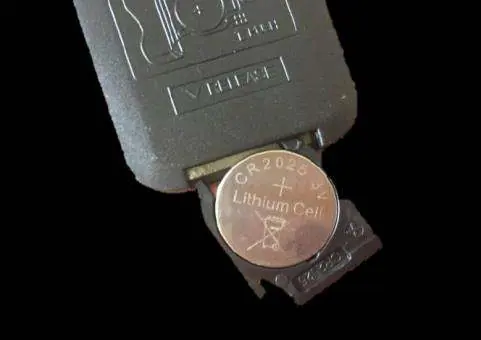
Ensure the battery (CR2025) is installed correctly and has charge. Aim directly at the sensor on the front panel.
Before use
- Remove all packaging from the unit.
- Place on a flat, stable, heat-resistant surface.
- Ensure the power cord is not coiled.
- Check for any transport damage.
- Ensure the heater is at least 1 metre away from flammable materials.
Show more Show less
Images and diagrams
- The control panel includes buttons for Power, Mode, Timer, Oscillation, and Temperature adjustment.
- The remote control duplicates the control panel functions.
Model compatibility
- Indoor use only.
- Not for commercial or industrial use.
- Do not use with external timers or programmers.

Manual page author
Michael Turner
Technical manual editor