Home Appliances / Dehumidifiers
User Manual for Goldair 20L Dehumidifier GPDH220
Quick guide for the Goldair 20L Dehumidifier (GPDH220). Learn how to set up Wi-Fi, operate modes, empty the water tank, and troubleshoot common issues.
Quick answers from the manual
Quick answer
- The Goldair GPDH220 is a 20L dehumidifier with Wi-Fi. It features multiple operating modes, a timer, child lock, and continuous drainage options. p. 1, 7
Key actions
- Emptying Water Tank p. 9
- Wi-Fi Pairing p. 12
First start
- Initial Setup p. 6, 7
Problems and fixes
Dehumidifier will not turn on
Check power connection.
p. 13Maintenance and reset
- Cleaning Air Filter p. 10
Technical specifications
| Parameter | Value | Meaning | Pages |
|---|---|---|---|
| Water Tank Capacity | 5.5L | Capacity of the water collection tank. | p. 5 |
Where to find it in the PDF
- Control Panel p. 7
- Water Tank and Drainage p. 9
Table of contents
Manual images
Click an image to enlargeQuick Guide and Safety
Before using your Goldair 20L Dehumidifier, ensure you have removed all packaging. Place the unit on a flat, stable, heat-resistant surface. Important: Leave the appliance to stand for one hour after transport or if it has been on its side to allow the refrigerant to settle. Ensure the exhaust louvre on top of the unit is open before operation.
Safety Warnings:
- Do not cover the appliance; this presents a fire risk.
- Keep all objects at least 200mm from all sides of the appliance.
- Do not use in small rooms occupied by persons unable to leave on their own without supervision.
- Do not use in temperatures below 5°C.
- Do not use with external timers or remote-control systems that switch the unit on automatically.
Operating the Dehumidifier
The control panel allows you to manage humidity, modes, and fan speed.

- Power Button: Turns the unit on or off. The LED displays the current relative humidity.
- Humidity Setting: Set target humidity between 30% and 80% in 5% increments using the < or > buttons.
- Modes:
- Normal: Manual control of fan speed and target humidity.
- Continuous: Low fan speed, runs continuously.
- High Power: High fan speed, target humidity fixed at 30%.
- Dry Clothes: High fan speed, runs continuously.
- Timer: Set the unit to turn on or off after 1-24 hours.
- Child Lock: Hold the button for 5 seconds to lock/unlock the panel.
- Sleep Mode: Turns off the LED display panel while the unit continues to operate.
Wi-Fi Setup
This device supports 2.4GHz Wi-Fi networks only. It does not operate on 3G or 4G connections.
- Download the Goldair mobile app from the App Store or Google Play.
- Register an account in the app using your email address.
- Put the dehumidifier in Stand-by mode (plugged in but off).
- Hold the MODE button for 5 seconds until the Wi-Fi icon flashes.
- In the app, tap the '+' icon and select 'Auto Scan' to pair your device.
Maintenance and Cleaning
Regular maintenance ensures trouble-free operation. Always unplug the unit before cleaning.
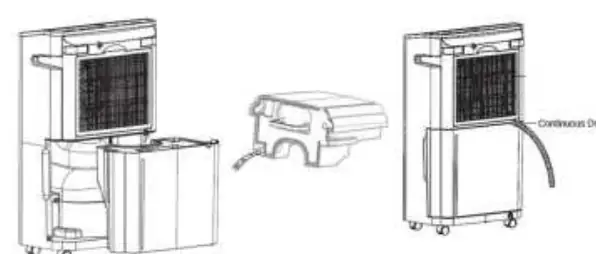
- Water Tank: When full, the indicator light illuminates and the unit stops. Grip the tank, pull outwards, and empty it. Ensure it is reinstalled correctly.
- Continuous Drainage: You can connect a drainage hose to the spout for permanent drainage. Ensure the hose end is lower than the drain opening.
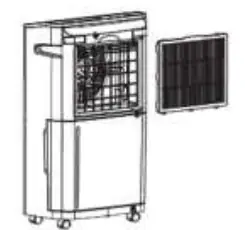
- Air Filter: Remove the filter and clean it with a vacuum cleaner. If exceptionally dirty, wash with warm water and mild detergent. Ensure it is completely dry before re-inserting.
Manufacturer information
Goldair
Practical help
Common problems
Dehumidifier will not turn on
Check that the power is connected and the unit is switched on.
Dehumidifier is not extracting water
Check if the water tank is full or incorrectly positioned. Ensure the air filter is not clogged. Note that the unit may not operate in low humidity or low temperatures.
Dehumidifier reduces humidity by small amounts
The room may be too large, there may be too many sources of humidity, or the room has too much ventilation (close windows and doors).
Before use
- Remove all packaging.
- Place on a flat, stable, heat-resistant surface.
- Open the exhaust louvre on top of the unit.
- Ensure the water container is positioned correctly.
- Wait one hour after transport before connecting to power.
Specs in practice
- Water Tank Capacity
- 5.5L
- Unit Capacity
- 20L/day max (at 30°C/80% RH)
Images and diagrams
- Control Panel: Features buttons for Power, Humidity, Modes, Fan Speed, Timer, Child Lock, Ventilation, and Sleep.
- Water Tank: Pull outwards to remove and empty.
- Continuous Drainage: Connect hose to drain spout; ensure hose end is lower than drain opening.
Model compatibility
- Requires 2.4GHz Wi-Fi network.
- Not compatible with 3G/4G internet connections.
- Do not use in temperatures below 5°C.

Manual page author
Michael Turner
Technical manual editor
Reviews PDF manuals for structure, safety notes, and practical product details so readers can find the right information quickly.