Home Appliances / Vacuum Cleaners
Goldair 110cm Tower Fan User Guide
Comprehensive operating instructions for the Goldair 110cm Tower Fan (Model GCTF110), covering assembly, safety, remote control usage, and maintenance.
Table of contents
Manual images
Jump to the sectionProduct Overview
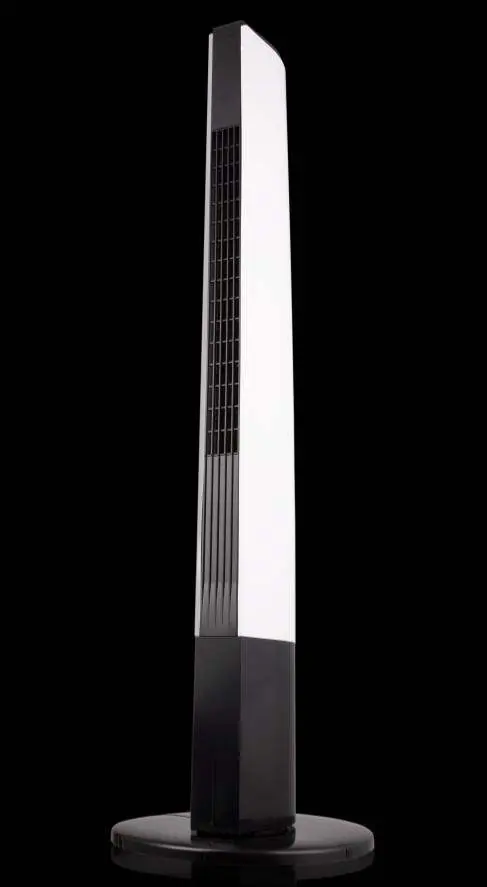
The Goldair 110cm Tower Fan (Model GCTF110) is a portable household appliance designed for cooling. It features multiple speed settings, wind modes, and oscillation capabilities to provide efficient air circulation. The unit is controlled via a top-mounted control panel or the included remote control.
Safety Information
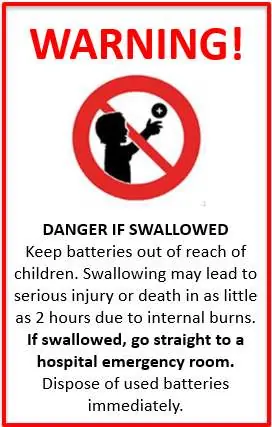
Important: Keep all objects at least 1 meter away from the front, sides, and rear of the fan. Never cover the appliance. Ensure the fan is placed on a dry, level, and sturdy surface. Do not use the fan in areas where flammable liquids are stored, near water, or outdoors. Always unplug the appliance when not in use or before cleaning. The remote control uses a CR2025 coin battery; keep it out of reach of children as swallowing can cause severe internal burns.
Assembly
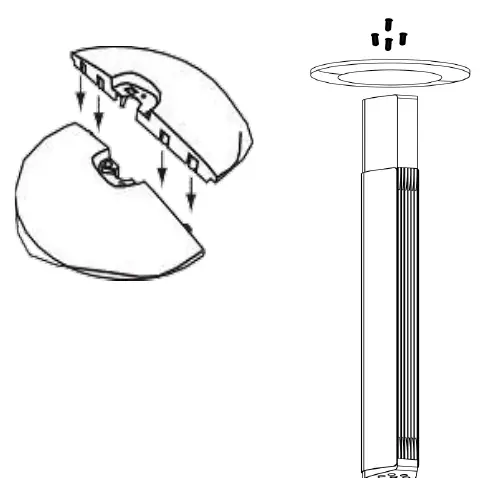
The fan requires assembly before first use. Ensure the unit is unplugged. Run the power cord through the central gap of the base halves. Connect the two base halves by aligning the plastic pegs with the slots. Secure the base to the main body using the provided screws. Finally, route the power cord through the base guides so it exits from the rear.
Operation
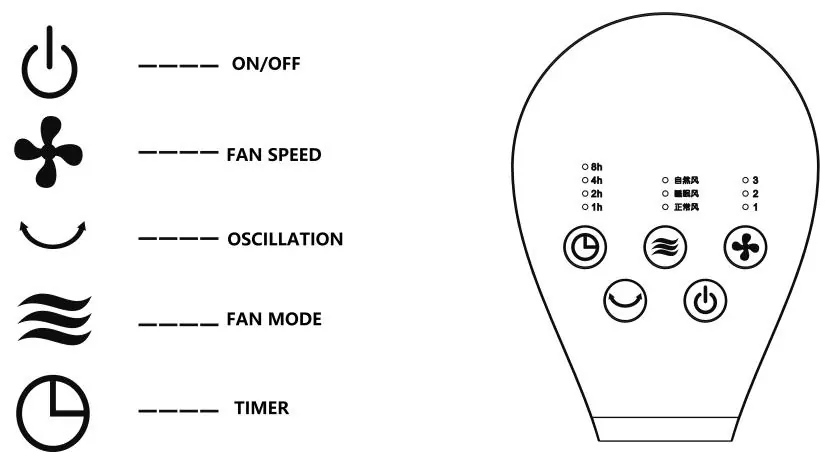
The fan can be operated using the control panel or remote. The power button turns the unit on and off. The speed button adjusts airflow from 1 (low) to 3 (high). The mode button cycles through Normal, Sleeping, and Natural wind modes. The timer allows for setting automatic on/off times from 1 to 15 hours in 1-hour increments. The oscillation button enables left-to-right movement.
Cleaning and Maintenance
Regular cleaning is essential for trouble-free operation. Always unplug the fan before cleaning. Use a damp cloth (not wet) to wipe the exterior. Use a vacuum cleaner to remove dust and fluff from the air vents and grills. Do not attempt to dismantle the fan, as there are no user-serviceable parts inside. For technical support in New Zealand, contact 0800 232 633; in Australia, contact 1300 465 324.
Manufacturer information
Goldair
Practical help
Common problems
Fan does not work or is not functioning properly
Contact the place of purchase. Do not attempt repairs yourself as this may void the warranty and pose a safety risk.
Overheating
Often caused by dust or fluff buildup. Unplug the unit and vacuum the air vents and grills regularly.
Remote control not working
Ensure a clear line-of-sight to the receiver lens and check if the CR2025 battery needs replacement.
Before use
- Ensure all packaging materials are removed from the unit.
- Verify the fan is fully assembled according to the instructions.
- Check that the power cord is undamaged and fully extended.
- Place the fan on a dry, level, and sturdy surface.
- Ensure the voltage matches the rating plate on the appliance.
Specs in practice
- Battery Type
- CR2025 coin battery for remote control
Images and diagrams
- Base assembly: Shows how to join the two base halves and secure them to the main body with screws.
- Control panel/Remote: Illustrates the icons for Power, Speed, Oscillation, Mode, and Timer.
Model compatibility
- Intended for household use only; not for commercial or industrial environments.
- Can be used in staff kitchens, offices, farm houses, and hotels.
- If using an extension cord, it must be correctly specified and undamaged.

Manual page author
Emily Carter
User documentation editor
Prepares concise manual descriptions and highlights the most useful setup, operation, and maintenance information for readers.