Tools / Welding Equipment
User Manual for GYS GYSMI 80P, 130P, 160P, 200P Welding Machine
Quick guide for the GYS GYSMI 80P, 130P, 160P, and 200P MMA welding machines. Includes safety instructions, installation steps, operation, maintenance, and troubleshooting.
Table of contents
Manual images
Click an image to enlargeQuick guide from the manual
This manual provides essential information for the GYSMI 80P, 130P, 160P, and 200P inverter welding machines. These units are designed for MMA (Manual Metal Arc) welding and can also perform TIG welding with scratch start. Always ensure the machine is disconnected from the power supply before performing any installation or maintenance.
Safety Rules
Arc welding can be dangerous. Follow these precautions:
- Protective Gear: Wear insulated, dry, fireproof clothing covering the whole body. Use protective gloves and a welding helmet with sufficient protection.
- Environment: Ensure the area is well-ventilated and free from flammable materials. Keep flammable items at least 11 meters away.
- Electrical Safety: The machine must be connected to an earthed 230V supply. Never touch live parts inside or outside the machine.
- Medical Implants: People with pacemakers should consult a doctor before using this equipment.
Installation
Follow these steps for proper setup:
- Place the machine on a floor with a maximum incline of 10°.
- Ensure the area has sufficient ventilation and easy access to controls.
- The machine is rated IP21/IP21S, meaning it is protected against solid bodies >12.5mm and vertical water drops.
- Fully uncoil all power and welding cables to prevent overheating.
- Connect to a 230V (50-60 Hz) earthed socket.
Operation
The machines feature three inverter-specific functions:
- Hot Start: Provides overcurrent at the start of welding to facilitate arc striking.
- Arc Force: Adjusts arc voltage to prevent sticking when the electrode enters the weld pool.
- Anti-Sticking: Prevents the electrode from sticking to the workpiece.
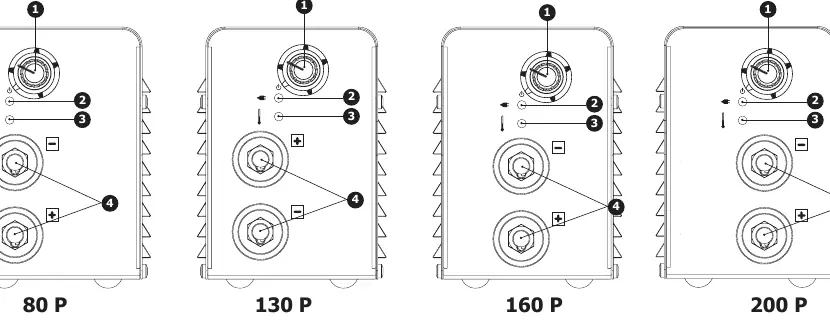
To start, turn the potentiometer to the desired current value. The sleep mode corresponds to the position marked on the potentiometer.
Maintenance
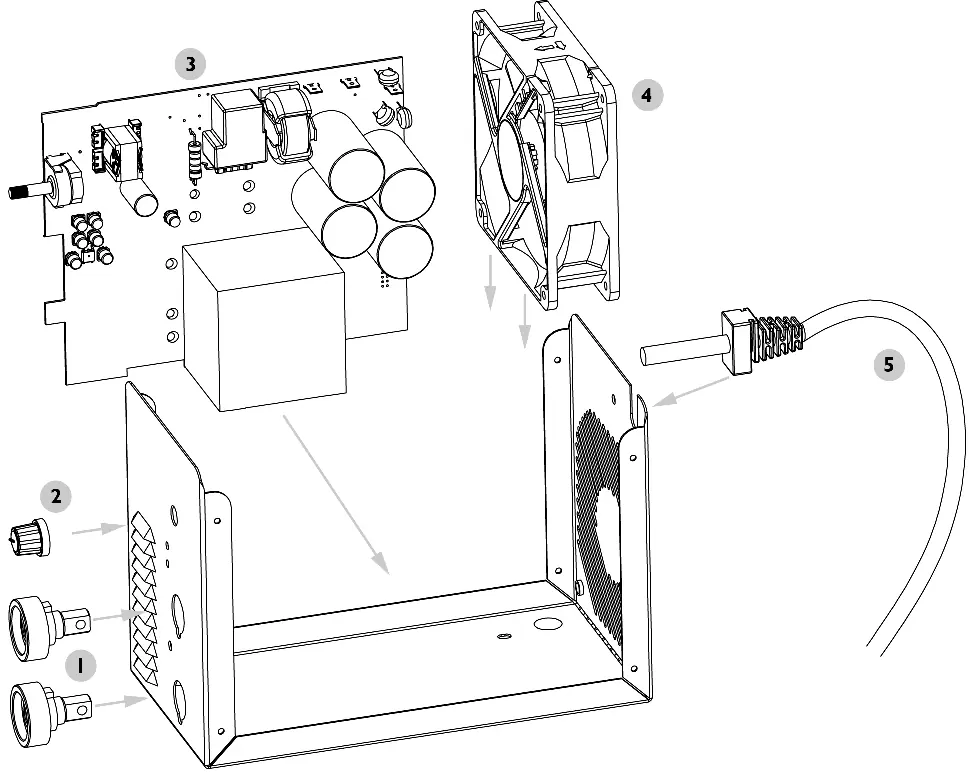
Annual maintenance is recommended. Always unplug the machine and wait two minutes before opening the casing. Regularly remove the cover and use compressed air to remove dust. Check electrical connections with an insulated tool.
Troubleshooting
If you encounter issues, check the following:
- Thermal Protection: If both indicators are on, the thermal protection has triggered. Wait for the cooling cycle to finish.
- No Welding: If the green indicator is on but the machine does not weld, check the earth clamp and electrode holder connections.
- Tingling Sensation: If you feel tingling when touching the machine body, check the plug and the earth of your installation.
- Poor Welding: Check the polarity (+/-) against the recommendations on the electrode box.
Manufacturer information
GYS
Practical help
Common problems
Thermal protection triggered (2 indicators on)
Wait for the cooling cycle to finish.
Machine does not weld (green indicator on)
Check earth clamp and electrode holder connections.
Tingling sensation when touching the body
Check the plug and the earth of your installation.
Machine welds poorly
Check polarity (+/-) against electrode box recommendations.
Before use
- Ensure the power supply is 230V with earth.
- Check that the work area is well-ventilated.
- Ensure cables are fully uncoiled.
- Verify the electrode type is compatible (rutile, stainless, cast iron, basic).
Images and diagrams
- 1: Current setting potentiometer.
- 2: Green power indicator.
- 3: Yellow thermal protection indicator.
- 4: Connectors for electrode holder and earth clamp.
Model compatibility
- Compatible with rutile, stainless, cast iron, and basic electrodes (except 80P for basic).
- Can be used with generators if auxiliary power meets requirements (AC, <400V peak, 50-60Hz).

Manual page author
Michael Turner
Technical manual editor
Reviews PDF manuals for structure, safety notes, and practical product details so readers can find the right information quickly.