Lighting / Fixtures
Halcyon DRDDACC 16-25W DALI Dimming LED Driver
Quick guide for the Halcyon DRDDACC 16-25W DALI Dimming LED Driver. Includes instructions for configuring output current via dip-switches, wiring for DALI or Switch-control, and operating dimming functions.
Table of contents
Manual images
Click an image to enlargeQuick Guide
The Halcyon DRDDACC 16-25W is a DALI 2 certified LED driver designed for constant current applications. It features configurable output current via dip-switches and supports both DALI and Switch-Control dimming methods. Ensure compatibility with other devices before installation. Note that DALI and Switch-control applications cannot be used simultaneously.
Technical Specifications
- Input Voltage: 220-240V, 50/60Hz
- Output Power: Maximum 25W
- Protection Class: II
- Operating Ambient Temperature: -20 to +50 degrees Celsius
- Case Temperature at Tc Point: 80 degrees Celsius
Dip Switch Settings
The output current can be configured using the dip switches (1, 2, 3) on the device. The factory default setting is 260mA.
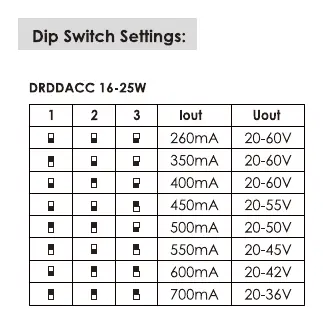
- 260mA: 1-OFF, 2-OFF, 3-OFF
- 350mA: 1-ON, 2-OFF, 3-OFF
- 400mA: 1-OFF, 2-ON, 3-OFF
- 450mA: 1-ON, 2-ON, 3-OFF
- 500mA: 1-OFF, 2-OFF, 3-ON
- 550mA: 1-ON, 2-OFF, 3-ON
- 600mA: 1-OFF, 2-ON, 3-ON
- 700mA: 1-ON, 2-ON, 3-ON
Wiring
The driver supports two wiring configurations:
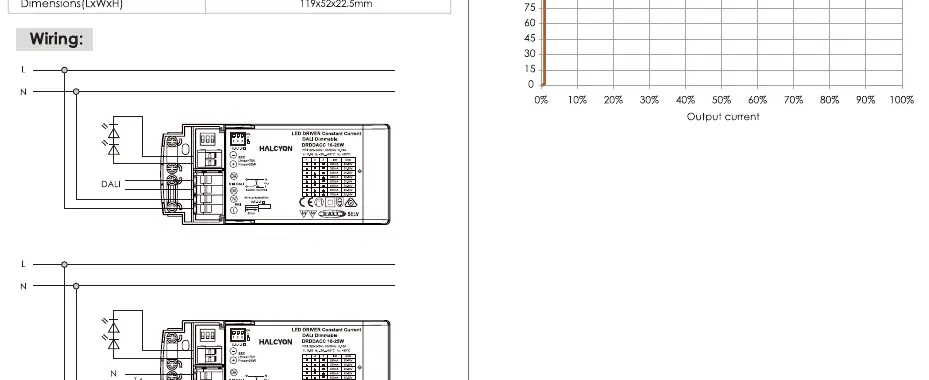
- DALI: Connect the DALI signal lines to the designated DALI terminals on the driver.
- Switch-Control: Connect the mains (L/N) and the switch input to the designated terminals.
Operating Modes
DALI Mode
In this mode, the light level is controlled via the DALI address.
Switch-Control Mode
Alternatively, the device can be controlled using switch-inputs for mains voltage. The dimming level is saved at power-down and restored at power-up.
- Short press (<1s): Switches the LED driver ON and OFF.
- Long press: Dims the LED modules. If LED modules are dimming in opposite directions, perform a long press to synchronize them.
Manufacturer information
Halcyon Lighting Ltd
Practical help
Common problems
LED modules are dimming in opposite directions.
Perform a long press on the switch to synchronize the LED modules.
DALI and Switch-control not working together.
DALI application and switch-control application cannot apply to the system at the same time.
Before use
- Verify input voltage is 220-240V.
- Test compatibility with other devices before installation.
- Set the correct output current using the dip-switches based on your LED module requirements.
- Ensure the driver is installed in a location with adequate ventilation (Operating Ambient Temperature -20 to +50C).
Specs in practice
- Output Current
- Configurable from 260mA to 700mA via dip-switches to match LED module requirements.
- Protection Class II
- Double insulated device, does not require an earth connection.
- Switch-Control
- Allows dimming and on/off control using standard mains voltage switches.
Images and diagrams
- Dip Switch Settings: Shows the switch positions (1, 2, 3) required to achieve specific output currents.
- Wiring Diagrams: Illustrates connections for DALI control and Switch-Control configurations.
Model compatibility
- DALI 2 certified.
- Test compatibility with other devices in advance.

Manual page author
Michael Turner
Technical manual editor
Reviews PDF manuals for structure, safety notes, and practical product details so readers can find the right information quickly.