Lighting / Fixtures
Tridonic LCA 100W 1100-2100mA one4all SR PRE LED Driver User Manual
Comprehensive user manual for the Tridonic LCA 100W 1100-2100mA one4all SR PRE LED driver. This guide covers installation, wiring diagrams, dimming configurations (DALI, DSI, switchDIM), I-select 2 setup, and technical specifications.
Table of contents
Manual images
Click an image to enlargeQuick Guide
The Tridonic LCA 100W 1100-2100mA one4all SR PRE is a dimmable LED driver designed for professional lighting applications. Key features include adjustable output current, support for DALI, DSI, switchDIM, and ready2mains protocols. Ensure the device is installed in a dry, oil-free, and grease-free environment. Always verify the input voltage (220-240V AC) and ensure the LED module is compatible before connection.
Installation and Wiring
Wiring Guidelines:
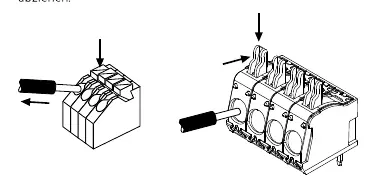
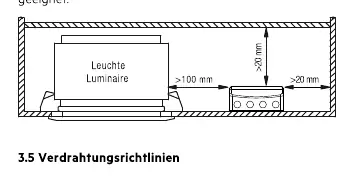
- Use stranded or solid wire with a cross-section of 0.5 to 2.5 mm².
- Strip insulation by 10-11 mm for mains connections and 8.5-9.5 mm for LED module connections.
- Keep secondary (LED) wiring as short as possible (max 2m) to ensure good electromagnetic compatibility (EMC).
- Do not connect secondary circuits while the driver is powered.
Grounding: While the driver is SELV, grounding the housing is recommended to improve EMC performance and reduce leakage currents.
Dimming and Control
The driver supports multiple dimming interfaces:
- DALI/DSI: Connect via DA/N and DA/L terminals.
- switchDIM: Allows direct control via a standard push-button. A short press toggles the light, while a long press dims it.
- ready2mains: Allows configuration and dimming via the mains voltage.
Configuration
I-select 2: The output current can be set using an I-select 2 plug. Insert the appropriate plug into the I-select 2 terminals. Do not use I-select 1 plugs as they are incompatible and may cause damage.
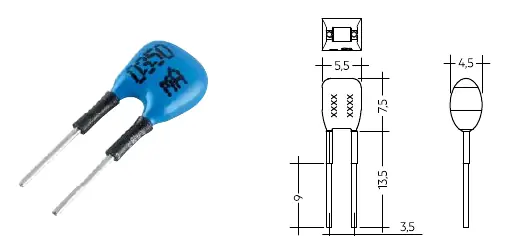
Software: Advanced parameters (CLO, corridorFUNCTION, power-up fading) can be configured using the masterCONFIGURATOR software via a DALI interface or ready2mains programmer.
Technical Specifications
- Input Voltage: 220-240V AC.
- Output Current: Adjustable between 1100-2100 mA.
- Max Output Power: 100W.
- Protection: IP20.
- Operating Temperature: Refer to the specific 'ta' values on the product label.
Safety and Maintenance
The driver features thermal protection, short-circuit protection, and overload protection. If a fault occurs, the driver will shut down and require a restart (power cycle) to resume operation. Do not open the device; doing so voids the warranty.
Manufacturer information
Tridonic
Practical help
Common problems
LED module does not turn on
Check wiring connections, ensure the LED module is compatible, and perform a power cycle (restart) of the driver.
Dimming is not functioning
Verify the DALI/DSI signal wiring or the switchDIM push-button connection. Ensure the driver is configured correctly via software if necessary.
Overheating
Ensure the mounting environment meets the specified temperature requirements and that there is adequate ventilation around the driver.
Before use
- Verify input voltage is 220-240V AC.
- Ensure wire cross-section is between 0.5 and 2.5 mm².
- Check that the LED module is compatible with the driver's output range.
- Confirm the mounting location is dry and free of oil/grease.
- Ensure the correct I-select 2 plug is used if current adjustment is required.
Specs in practice
- Output Current
- Adjustable between 1100-2100 mA to match the specific LED module requirements.
Images and diagrams
- The wiring diagram illustrates the connection points for mains input (L, N, PE), DALI/DSI control, and the LED module output.
- The I-select 2 diagram shows the plug insertion point for setting the output current.
Model compatibility
- Compatible with I-select 2 plugs only; do not use I-select 1.
- Supports DALI, DSI, switchDIM, and ready2mains protocols.
- Not suitable for secondary switching.

Manual page author
Michael Turner
Technical manual editor
Reviews PDF manuals for structure, safety notes, and practical product details so readers can find the right information quickly.