Lighting / Controllers Dimmers
User Manual for SuperLightingLED L1(WZ) 0/1-10V ZigBee + RF + Push Dimmer
Quick guide for the SuperLightingLED L1(WZ) dimmer. Learn how to install, wire, pair with Tuya APP, match RF remotes, and configure 0/1-10V settings.
Table of contents
Quick guide from the manual
The SuperLightingLED L1(WZ) is a 1-channel 0/1-10V dimmer that supports ZigBee, RF, and AC push dimming. It is designed to be installed in a standard wall junction box. Key features include Tuya APP cloud control, voice control compatibility (Amazon Echo, TmallGenie), and the ability to function as a ZigBee-RF converter. The device provides 256 levels of smooth dimming.
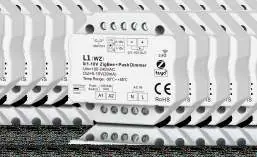
Technical Parameters
- Input voltage: AC 100-240V
- Output signal: 0/1-10V (20mA)
- RF Control distance: 30m (barrier-free)
- Dimming range: 0-100%
- Operating temperature: Ta: -30°C to +55°C
- Case temperature (Max): Tc: +65°C
- IP rating: IP20
Installation and Wiring
The device is designed for wall junction box mounting. Ensure the power is off before installation.
- Wiring: Connect AC input (L and N) to the AC IN terminals. Connect the Push Switch to the Push Switch terminals. Connect the 0/1-10V output to the dimmable LED driver.
- Limitations: Do not exceed 5 LED drivers connected to the dimmer. The maximum wire length from the dimmer to the LED driver should not exceed 15 meters.
Operation
The device supports Push-Dim functionality:
- Short press: Turn the light on or off.
- Long press (1-6s): Perform step-less dimming. With every other long press, the dimming direction reverses.
Tuya APP Setup
To connect the device to the Tuya APP:
- Press and hold the Match/Set key for 2 seconds to reset the ZigBee network.
- Press and hold the Match/Set key for 5 seconds, or push the Match/Set key twice quickly to enter configuration mode. The blue LED indicator will flash rapidly.
- Once connected, the blue LED will stop flashing, and the device will appear as SKYDANCE-ZB-DIM in the app.
Matching and Remote Control
The L1(WZ) can be matched with RF remotes using two methods:
- Match key: Short press the match key on the L1(WZ), then immediately press the on/off key (single zone) or zone key (multiple zone) on the remote.
- Power Restart: Switch off the power, then switch it back on. Immediately short press the on/off key or zone key 3 times on the remote. The light will blink 3 times to confirm success.
To delete matches, use the same methods but press the remote key 5 times or hold the match key for 10 seconds.
Dimming Settings
Use the DIP switch on the device to select the appropriate dimming mode (0-10V or 1-10V) based on the requirements of your dimmable LED driver.
Practical help
Common problems
Light does not respond to RF remote
Ensure the remote is correctly matched using the Match key or Power Restart method. Check if the remote is within the 30m range.
Tuya APP cannot find the device
Ensure the ZigBee gateway is active. Put the device into config mode (blue LED flashing) by holding the Match/Set key for 5s or double-pushing it.
Dimming range is not smooth or incorrect
Verify that the DIP switch setting (0-10V or 1-10V) matches the specifications of your connected LED driver.
Before use
- Verify input voltage is 100-240V AC.
- Ensure the LED driver is 0/1-10V dimmable.
- Check that the number of connected LED drivers does not exceed 5.
- Ensure wire length from dimmer to driver is under 15 meters.
- Have a Tuya ZigBee gateway ready for remote and voice control features.
Specs in practice
- Input voltage
- 100-240V AC mains power supply.
- Output signal
- 0/1-10V (20mA) signal for controlling dimmable LED drivers.
- RF Control distance
- 30m range in open, obstacle-free environments.
- Dimming levels
- 256 levels for smooth, flicker-free brightness adjustment.
Images and diagrams
- Wiring diagram shows AC input (L/N), Push Switch input, and 0/1-10V output to the LED driver.
- DIP switch is located on the device to select between 0-10V and 1-10V modes.
Model compatibility
- Requires Tuya ZigBee gateway for remote and voice control.
- Compatible with RF 2.4G single or multiple zone remotes.
- Supports Amazon Echo and TmallGenie via Tuya APP.

Manual page author
Emily Carter
User documentation editor
Prepares concise manual descriptions and highlights the most useful setup, operation, and maintenance information for readers.