Home Appliances / Cooktops Hobs
HENDI Induction Cooker 2000W 239391 User Manual
Quick guide for the HENDI 2000W Induction Cooker (model 239391). Learn how to operate, set power and temperature, clean, and troubleshoot your device.
Quick answers from the manual
Quick answer
- The HENDI 2000W Induction Cooker (239391) is designed for household and buffet use. It features adjustable power (100W-2000W), temperature (35°C-240°C), and a timer (0-180 min). p. 7
Key actions
- Power on p. 7
- Set power p. 7
- Set temperature p. 7
First start
- Remove packaging, clean, place on stable surface, connect to power. p. 7
Show 4 more answers Show less
Problems and fixes
E1
Appliance too hot. Clear obstacles, unplug, remove pan, let cool.
p. 8
E2
Pan overheated. Unplug, remove pan, let cool, ensure water in pan.
p. 8
E3
Abnormal supply voltage. Check power supply.
p. 8Error codes
| Code | Meaning | Action | Pages |
|---|---|---|---|
| E1 | Appliance too hot | Clear obstacles, unplug, remove pan, let cool | p. 8 |
| E2 | Pan overheated | Unplug, remove pan, let cool, ensure water in pan | p. 8 |
| E3 | Abnormal supply voltage | Check power supply | p. 8 |
Technical specifications
| Parameter | Value | Meaning | Pages |
|---|---|---|---|
| Power | 2000W | Rated input power | p. 4 |
| Temperature range | 35°C - 240°C | Adjustable temperature | p. 4 |
| Timer range | 0 - 180 min | Adjustable timer | p. 4 |
Where to find it in the PDF
- Control Panel p. 3
- Technical Specifications p. 4
- Operating Instructions p. 7
- Troubleshooting p. 8
Table of contents
Manual images
Click an image to enlargeQuick guide from the manual
This induction cooker is designed for household and buffet use. It features adjustable power and temperature settings, as well as a timer function. Always ensure the appliance is placed on a stable, heat-resistant surface and that suitable cookware is used.
Control Panel
The control panel (Fig. 1 on page 3) includes the following:
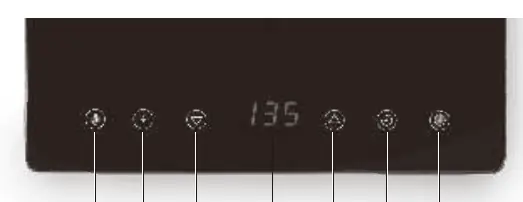
- ON/Standby button: Powers the unit on or into standby mode.
- Timer function: Sets the cooking duration.
- Increase/Decrease buttons: Adjusts time, temperature, or power.
- Digital display: Shows current settings and remaining time.
- Power/Temperature function buttons: Selects the desired mode.
Operating Instructions
To start cooking:
- Place suitable cookware in the center of the heating surface.
- Connect the power plug to a suitable outlet. The On/Standby button will light up.
- Press the On/Standby button to turn the unit on.
- Select either the Power or Temperature button to begin cooking.
- Use the increase/decrease buttons to adjust the level.
- Optionally, press the Timer button and use the increase/decrease buttons to set the cooking time (0-180 minutes).
Suitable Cookware
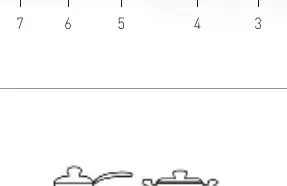
For optimal performance, use cookware with a flat bottom (Fig. 2 on page 3). Avoid curved, uneven, or rounded bottoms (Fig. 3 on page 3). Suitable materials include iron, cast iron, magnetic stainless steel, or enamelled iron. The bottom diameter should be between 12 cm and 22 cm, with a thickness over 1.5 mm.

Cleaning and Maintenance
Always disconnect the appliance from the power supply and let it cool down before cleaning. Clean the exterior with a damp cloth or sponge and mild soap. Do not use water jets, steam cleaners, or abrasive agents. Regularly clean the grease filter to prevent accumulation.
Troubleshooting
If the appliance does not function properly, check the following:
- Appliance does not switch ON: Ensure the power plug is connected and the On/Standby button is pressed.
- Cooling fan runs in Standby: This is normal; it cools internal components. Wait for it to stop.
- E1 Error: Appliance too hot. Clear obstacles, unplug, remove pan, and let cool.
- E2 Error: Pan overheated. Unplug, remove pan, let cool, and ensure water is in the pan.
- E3 Error: Abnormal supply voltage. Check power supply.
Manufacturer information
HENDI Tools for Chefs
Practical help
Common problems
Appliance does not switch ON
Check power plug connection and press On/Standby button.
Cooling fan runs in Standby
This is normal; it cools internal components. Wait until it stops.
E1 Error
Appliance too hot. Remove obstacles, unplug, remove pan, let cool.
E2 Error
Pan overheated/empty. Unplug, remove pan, let cool, ensure water in pan.
E3 Error
Abnormal supply voltage. Check power supply.
Before use
- Remove all packaging
- Check for damage
- Clean accessories
- Ensure appliance is dry
- Place on stable, heat-resistant surface
Show more Show less
Specs in practice
- Temperature Range
- 35°C to 240°C
Images and diagrams
- Fig 1: Control panel layout showing buttons 1-7.
- Fig 2: Examples of suitable flat-bottomed cookware.
- Fig 3: Examples of unsuitable curved/uneven cookware.
Model compatibility
- Use flat-bottomed cookware
- Diameter between 12cm and 22cm
- Bottom thickness > 1.5mm
- Suitable materials: iron, cast iron, magnetic stainless steel, enamelled iron

Manual page author
Emily Carter
User documentation editor