Tools / Drills
Operating Instructions for Hilti DD 110-D Diamond Core Drilling Machine
Quick guide for the Hilti DD 110-D Diamond Core Drilling Machine. Includes setup, operation, maintenance, and troubleshooting.
Table of contents
Manual images
Click an image to enlargeQuick guide from the manual
This manual provides essential information for the safe and efficient operation of the Hilti DD 110-D Diamond Core Drilling Machine. Always read the full safety instructions before use. Ensure the machine is used only by trained, authorized personnel.
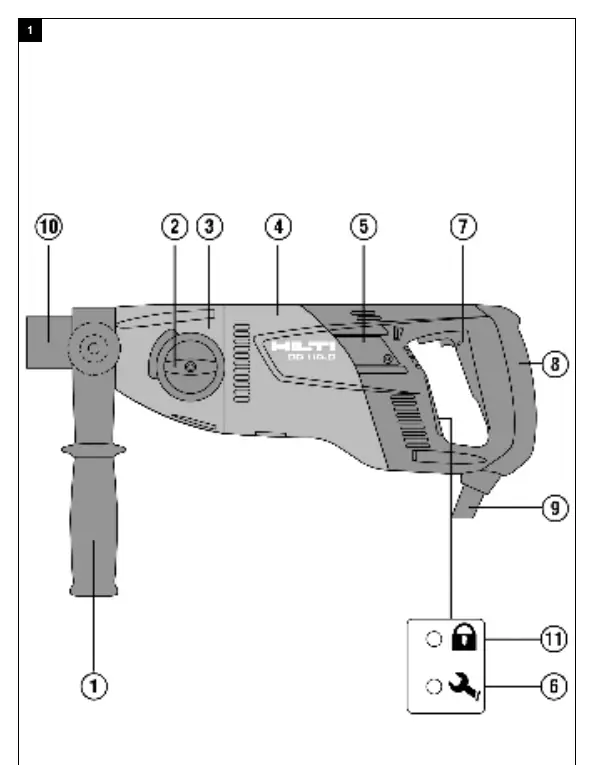
Product description
The DD 110-D is an electrically powered diamond core drilling machine designed for hand-held dry drilling in masonry. It features a side handle, gear selector, motor, service indicator, on/off switch, and a chuck for core bits.
Intended use
The machine is designed for hand-held dry drilling with diamond core bits and diamond socket cutters in masonry. It is not suitable for drilling in concrete or reinforced concrete. Drilling into materials that produce electrically conductive dust (e.g., magnesium) is not permitted.
Setup and installation
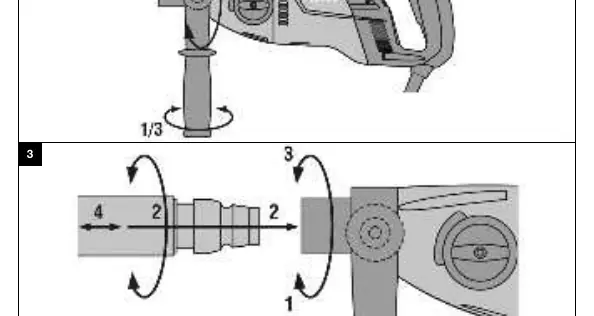
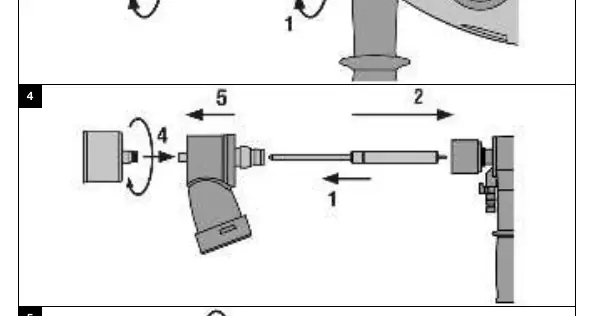
Adjusting the side handle
- Slacken the side handle by turning it counter-clockwise.
- Position the side handle as needed.
- Secure the side handle by turning it clockwise.
- Ensure it is tightened securely.
Fitting a diamond core bit
- Open the chuck by turning it in the direction of the symbol.
- Push the core bit into the chuck from the front, turning until the teeth engage.
- Close the chuck by turning it in the direction of the symbol.
- Check that the core bit is seated securely.
Operation
TPS Theft Protection System (optional)
If equipped, the product can only be unlocked and made ready for operation using the corresponding TPS key. Hold the key against the lock symbol until the yellow indicator light goes out.
Operating the PRCD
- Plug the mains plug into an earthed power outlet.
- Press the 'I' or 'RESET' button on the PRCD. The indicator should light up.
- Press the '0' or 'TEST' button to test. The indicator should go out.
- Press 'I' or 'RESET' again to enable operation.
Dry-drilling
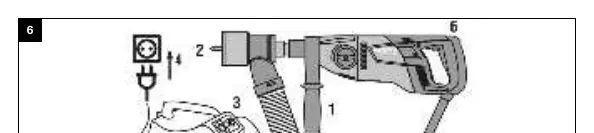
Always route the suction hose to the rear and away from the machine to avoid contact with the core bit. Use an anti-static vacuum extractor to prevent electrostatic effects.
Care and maintenance
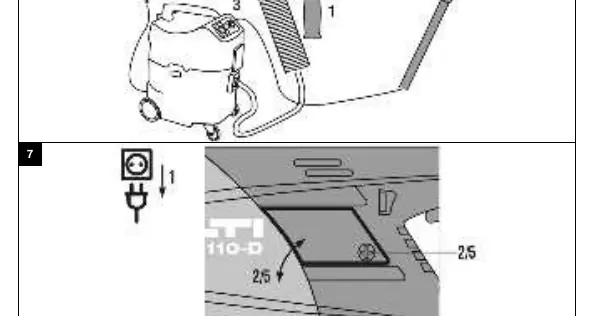
Always unplug the power cord before performing maintenance. Clean air vents with a dry brush and the casing with a slightly damp cloth. Do not use silicone-based cleaning agents.
Replacing carbon brushes
- Open the carbon brush covers on the left and right sides of the motor.
- Note the positioning of the brushes and conductors. Remove worn brushes.
- Fit new brushes in the exact same position. Ensure the insulation of the indicator lead is not damaged.
- Close the covers and tighten the screws.
- Run the machine at no load for at least 1 minute to break in the new brushes.
Troubleshooting
If the service indicator lights up, the carbon brush wear limit is almost reached. If the machine does not achieve full performance, check the power supply and extension cord length. If the core bit does not rotate, ensure the gear selector is engaged or release a jammed bit using an open-end wrench.
Manufacturer information
Hilti Corporation
Practical help
Common problems
Service indicator lights up
Carbon brush wear limit is almost reached. Have them replaced at the next opportunity.
Machine does not achieve full performance
Check for undervoltage in the power network or generator, and check the length of the extension cord.
Core bit does not rotate
Ensure the gear selector is fully engaged or release a jammed core bit using an open-end wrench.
Drilling speed decreases
Check if the maximum drilling depth is reached, the core is stuck, the wrong gear is selected, or the bit is polished.
Before use
- Check side handle position
- Ensure core bit is clean and secure
- Test PRCD before use
- Check extension cord suitability
- Verify power supply voltage
Specs in practice
- Speed (1st gear)
- 650 /min
- Speed (2nd gear)
- 1,380 /min
- Protection class
- Class II (Class I with PRCD)
Images and diagrams
- Overview of controls and components
- Side handle adjustment
- Fitting/removing core bit
- Socket cutter installation
- Speed selection
Model compatibility
- Not suitable for concrete or reinforced concrete
- Use only genuine Hilti core bits and accessories

Manual page author
Michael Turner
Technical manual editor
Reviews PDF manuals for structure, safety notes, and practical product details so readers can find the right information quickly.