Tools / Drills
Hilti SF 10W-A22 Cordless Drill/Driver User Manual
Quick guide for the Hilti SF 10W-A22 cordless drill/driver. Includes setup, operation, safety instructions, maintenance, and troubleshooting.
Table of contents
Manual images
Jump to the sectionQuick guide from the manual
This manual provides essential information for the safe and efficient operation of the Hilti SF 10W-A22 cordless drill/driver. Always read the safety instructions before use.
Product Overview
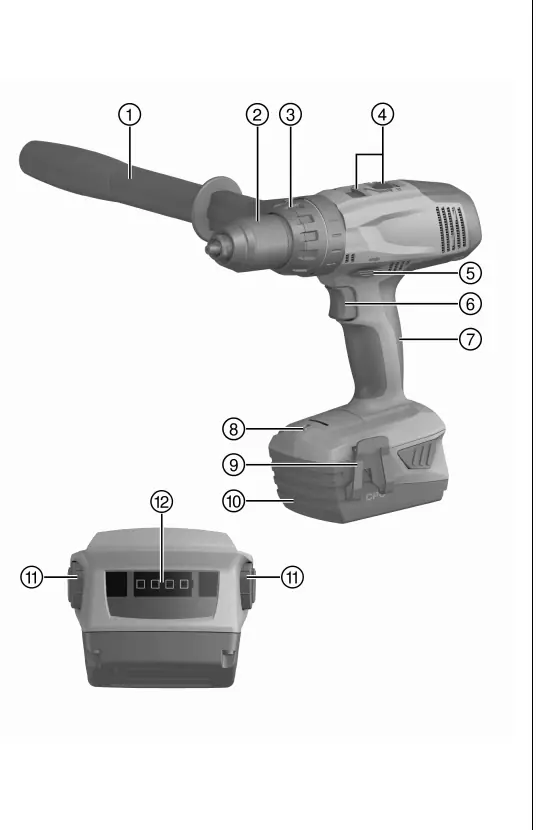
The drill/driver features a keyless chuck, torque and drilling mode selector, gear selector, forward/reverse switch, control switch, and a battery with a charge status display.
Intended Use
This tool is a hand-held cordless drill/driver designed for driving and removing screws and for drilling in steel, wood, and plastic. Use only Hilti B 22 series batteries.
ATC (Active Torque Control)
The tool is equipped with ATC, which detects sudden pivoting movements if the accessory tool stalls and switches the tool off immediately.
Operation
Inserting/Removing Battery: Push the battery into the tool until it clicks. Press the release buttons to remove it.
Drilling: Set the selector ring to the drill symbol and the forward/reverse switch to forward.
Screwdriving: Set the selector ring to the required torque and select the desired rotation direction.
Care and Maintenance
Keep the tool and battery clean. Clean air vents with a dry, soft brush. Do not use silicone-based cleaning agents. Always remove the battery before maintenance.
Troubleshooting
If the tool does not work, check if the battery is fully inserted or discharged. If all four LEDs flash, the tool is overloaded or overheated.
Manufacturer information
Hilti Corporation
Practical help
Common problems
Product does not work
Battery not fully inserted or discharged.
All four LEDs flash
Product overloaded or overheating.
On/off button locked
Forward/reverse switch in middle position.
Before use
- Charge battery fully
- Check battery contacts
- Ensure side handle is mounted
- Check accessory tool
Specs in practice
- 4-speed gear
- Adjustable speed ranges for different materials.
Images and diagrams
- 1: Product overview
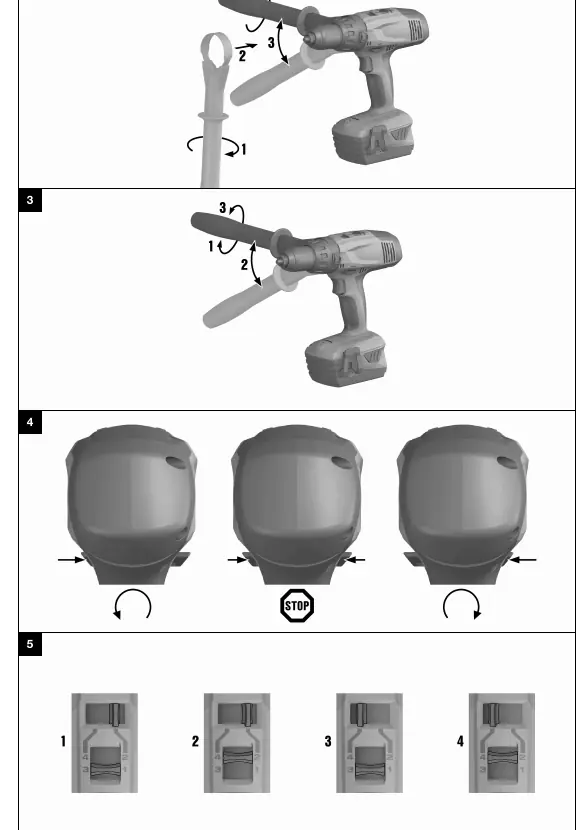
- 2: Side handle mounting
- 3: Side handle adjustment
- 4: Forward/reverse switch
- 5: Gear selector
Model compatibility
- Use only Hilti B 22 series batteries
- Use only Hilti-approved chargers

Manual page author
Emily Carter
User documentation editor
Prepares concise manual descriptions and highlights the most useful setup, operation, and maintenance information for readers.