Tools / Drills
User Manual for Hilti SF 10W-22 Cordless Drill Driver
Quick guide for the Hilti SF 10W-22 cordless drill driver. Includes setup, operation, battery status indicators, maintenance, and troubleshooting.
Table of contents
Manual images
Click an image to enlargeQuick guide from the manual
This manual provides essential information for the safe and efficient operation of the Hilti SF 10W-22 cordless drill driver. Always read the full safety instructions before use.
Product Overview
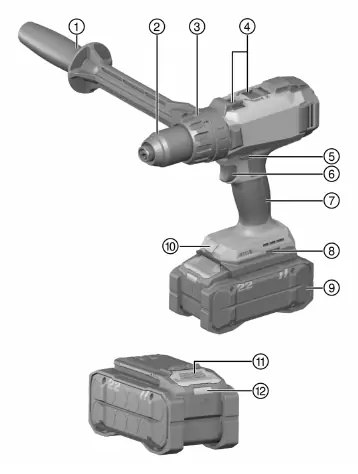
The Hilti SF 10W-22 is a professional-grade cordless drill driver. Key components include the auxiliary handle, keyless chuck, torque/drilling mode selector ring, gear selector switch, forward/reverse switch, and the control switch with electronic speed control.
Setup and Preparation
- Battery: Use only Hilti Nuron Li-ion batteries of the B 22 series. Charge the battery fully before first use.
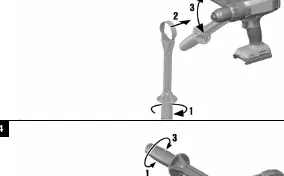
- Auxiliary Handle: Mount the auxiliary handle by loosening the clamping band, sliding it over the chuck, and tightening it in the desired position.
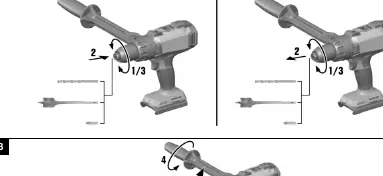
- Accessory Tool: Ensure the tool shank is clean. Open the keyless chuck, insert the tool, and tighten firmly until you hear mechanical clicks.
Operation
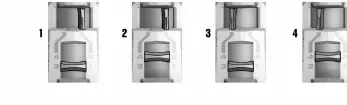
- Gear Selection: Use the gear selector switch to choose between 4 speeds. Only operate when the motor is stopped.
- Forward/Reverse: Use the switch above the handle to set the rotation direction. The middle position locks the trigger.
- Drilling/Screwdriving: Use the selector ring to choose between drilling mode or specific torque settings for screwdriving.
Battery Status Indicators
Hilti Nuron batteries feature LED indicators for charge status and health. Short-press the release button to check the charge level. If the battery is too hot or overloaded, the LEDs will flash yellow.
Maintenance and Care
- Always remove the battery before performing any maintenance.
- Clean the air vents with a dry, soft brush.
- Clean the housing with a slightly damp cloth; do not use silicone-based cleaning agents.
- Keep battery contacts clean and free of oil/grease.
Troubleshooting
If the tool does not work, ensure the battery is fully inserted. If the control switch is stuck, check the forward/reverse switch position. For persistent issues, contact Hilti Service.
Manufacturer information
Hilti Corporation
Practical help
Common problems
Control switch cannot be pressed or is stuck
Ensure the forward/reverse switch is not in the middle (locked) position.
Product does not work
Ensure the battery is fully inserted and clicks into place.
Battery drains faster than usual
Very low ambient temperature can affect battery performance. Allow the battery to warm up slowly to room temperature.
Battery does not engage with an audible click
Check if the retaining lug on the battery is dirty and clean it if necessary.
Before use
- Ensure the battery is fully charged.
- Check that the auxiliary handle is correctly mounted and tightened.
- Verify the accessory tool is clean and securely inserted in the chuck.
- Check that the forward/reverse switch is set to the desired direction.
- Ensure the torque/mode selector is set correctly for the task.
Specs in practice
- Rated voltage
- 21.6 V
- Torque range
- 1.5 Nm to 12 Nm (15 settings)
- Speed (1st gear)
- 0 - 330 rpm
- Speed (4th gear)
- 0 - 2230 rpm
Images and diagrams
- 1: Product overview showing all controls and parts.
- 2: Fitting and removing the accessory tool.
- 3: Mounting the auxiliary handle.
- 4: Adjusting the auxiliary handle position.
- 5: Selecting the gear.
Model compatibility
- Use only Hilti Nuron Li-ion batteries of the B 22 series.
- Use only Hilti chargers approved for these batteries.

Manual page author
David Miller
Documentation analyst
Organizes user manual content into clear summaries, with attention to model details, product context, and everyday usability.